Schindler 3100/3300/6300 J 43402603 / 01 215/269
Copyright © 2017 INVENTIO AG
Function of Light
Curtain
Function of Door
Contacts
Correct Adjustment
of Clutch against
Door Lock
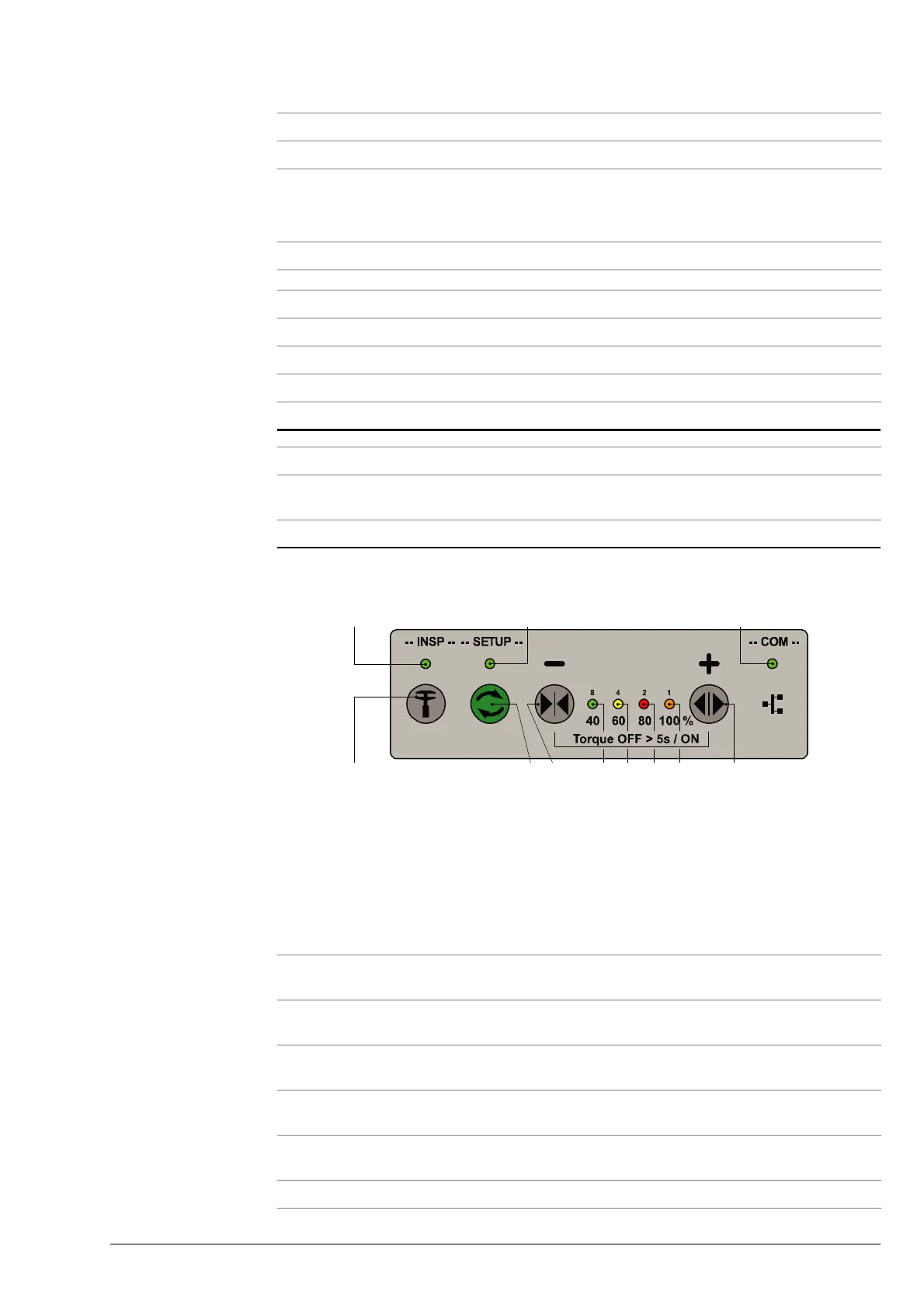
HMI Overview The HMI is the interface between the user and the DDE-V15.
HMI Keypad (Maxon SW v2.00) [40797; 23.09.2011]
Diagnosis via LED
No Step
1
Run door system in normal mode, not firefighter mode.
2 Bring in an obstacle while doors are closing (for example, operator’s hand).
– Check immediate door stop and reversal (reopening).
– Door has to stay open as long as obstacle is present.
3 If necessary, check light curtain electronics and connection to elevator control.
No Step
1
Check contact bridge fit centred into the housing holes.
2 Check the distance of the contact bridge to the housing is 4 mm.
3 Adjust until correct contacting.
No Step
1
Check correct adjustment of clutch/car door lock and landing door lock as
indicated.
1 LED green, “Ready”
2 LED yellow, “Locked / Opened”
3 LED red, “Obstacle”
4 LED orange, “Closed (KET-S2)”
5 LED green, “INSP”
6 LED green, “SETUP”
7 LED green, “COM”
8 Key “INSP” (inspection door)
9 Key “Setup / Auto-setup”
10 Key “DRET-S (- / Insp Door Close)”
11 Key “DRET-O (+ / Insp door Open)”
1 2 3 4 Description Fault
Rectification
All
flashing
Door error Check error log in
SMLCD
Blinking
slowly
- - - Door is in standby state -
- Blinking
slowly
- - Referencing not
executed
Close door until
locked
- - Blinking
slowly
- KSKB / KOKB / RPHT /
KTL / KTFP active
Remove obstacle
Flashing - - - Torque off -
Auto > 5sON / OFF
Id. No. 5950643
Ready
Obstacle
Locked/
Opened
Closed
(KET-S2)
8910123411
56 7



 To Next Page