Installation and operating instructions
33 Vers. 1.0 2024_03
5 Operation, management
After commissioning, the SECURO 24 PRO system automatically queries the communication
status of all luminaires once an hour, and after 10 failed queries, a communication error is
displayed in the event/alert list. It automatically runs function tests and battery tests at set
times. It controls groups to the signals of ac controls and switches to battery power in case of
power failure. It constantly measures and controls the charge of the batteries, checks
asymmetry, monitors the temperature of the panel. It protects the batteries from deep
discharge, disconnects the circuits at 21V, and if the power does not come back, it also
disconnects itself.
The operator can carry out daily and three-month inspections quickly and efficiently from the
screen. With the help of client software, test reports and event lists can be downloaded.
5.1 Touch screen menu system
5.1.1 Basic screen
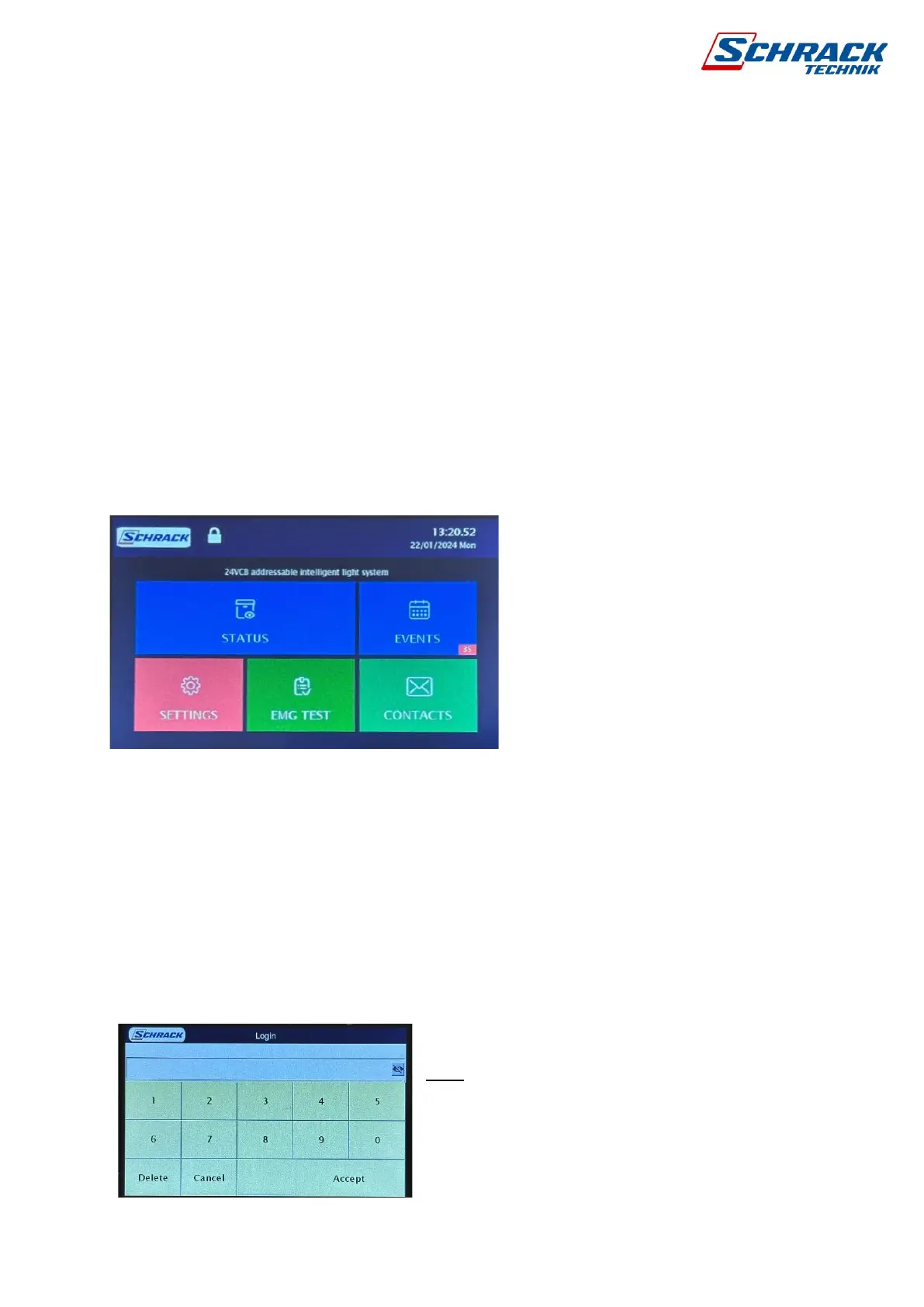
From the basic screen we can enter the various submenu items.
Status: System overview
Events: View events/alerts
Settings: System settings
EMG Test: Function and Battery Tests
Contact: Installer Information
Top line, the status of the logged-in operator is open or closed. A yellow triangle indicates
alarms with the time/date next to it.
To change the settings, you must first log in by
pressing the lock icon in the top row, access code:
5000, which can be changed in the programming
software.



 To Next Page