18
ENGLISH
www.sematic.com
Changes can be made without notice
Instruction without handset
811-000-000 SDS© DC-PWM Compatible • Edition 25 March 2016
5 INSTRUCTION WITHOUT HANDSET
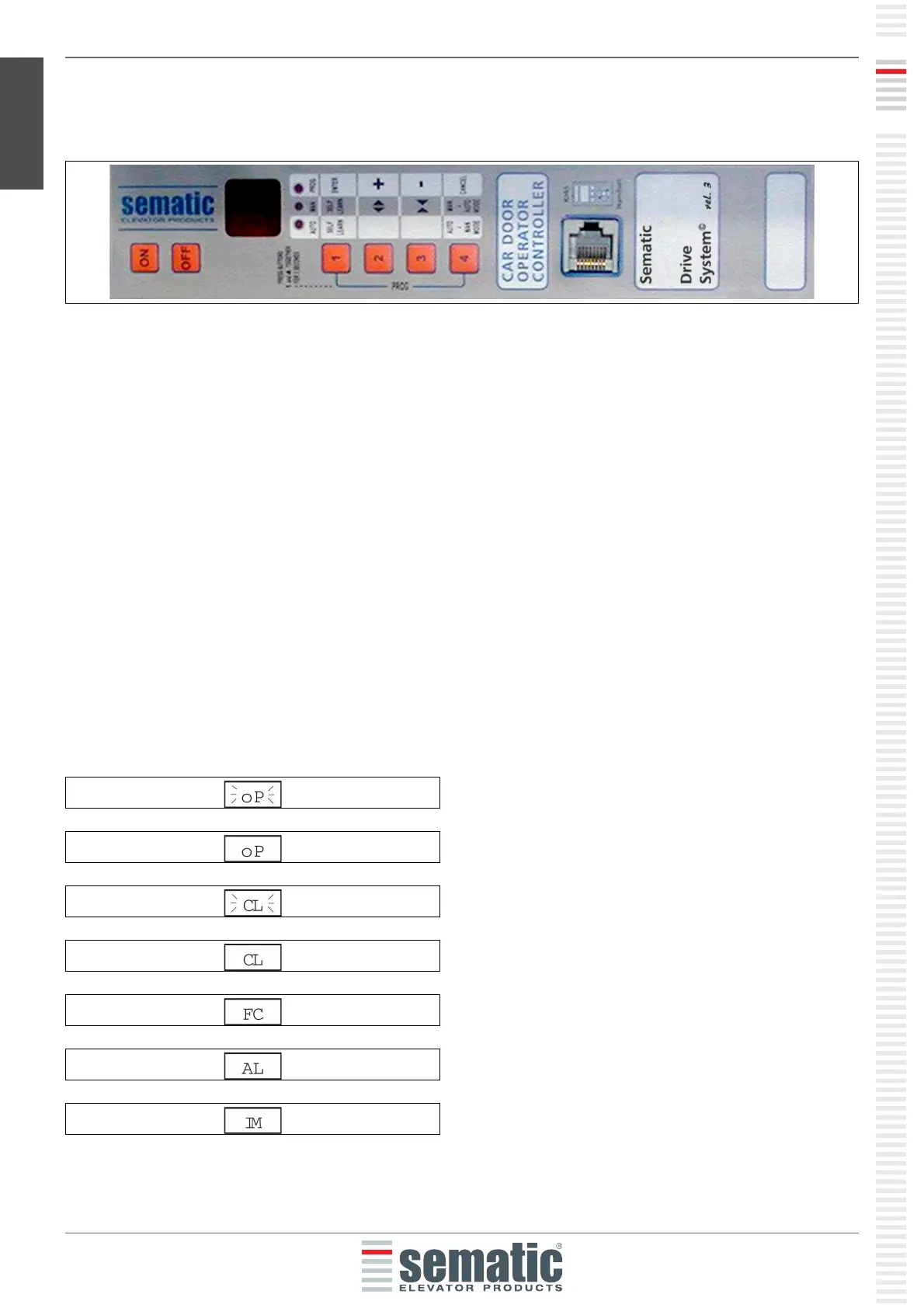
Display in Automatic and Manual Mode
5.1 AUTOMATIC MODE “AUTO”
• When the Door Controller is working in automatic mode the “AUTO” red led is on, whereas the other two red
leds are off.
• When the Door Controller is switched on, or after a self-resetting, it starts directly in the automatic mode.
• All the signals sent by the main lift controller and by the external devices (barriers, photocells, etc.) are active
in this mode.
• Keys 2 and 3 are not functional during automatic mode.
• When Key 4 is kept pressed for a while, the Door Controller (ca. 3 sec.), switches to the manual mode “MAN”.
5.2 MANUAL MODE “MAN”
• When the Door Controller is working in manual mode the “MAN” red led is on, whereas the other two red leds
are off.
• All signals coming from the main lift controller and from other external devices are ignored.
• The IM contact is deactivated, therefore the Door Controller does not recognize any signal coming from the
external devices to reverse door movement, such as photocells or barriers.
• Opening and Closing commands may be manually input by pushing Key 2 (open) or Key 3 (close).
• When key 4 is kept pressed for a while (Appx. 3 sec.), the Door Controller switches to the automatic mode
“AUTO”.
• If no keys are pressed for at least 10 minutes, the Door Controller will switch to the “automatic mode “AUTO”.
Both in automatic and manual mode the Door Controller will show the following display:
Door opening (Flashing Display)
Door open
Door closing (Flashing Display)
Door closed
Forced closing
It signals an alarm and flashes giving the code of the
recognised alarm. See § 10 (pg. 35).
Reversing system on


 To Next Page