LR1110
User Manual Rev.1.0
UM.LR1110.W.APP March 2020
50 of 130
Semtech
www.semtech.com
8. Modems
8.1 Modem Configuration
The LR1110 contains different modems capable of handling different constant envelope modulations. The user shall then
specify the modem to be used by using the command SetPacketType( ) .
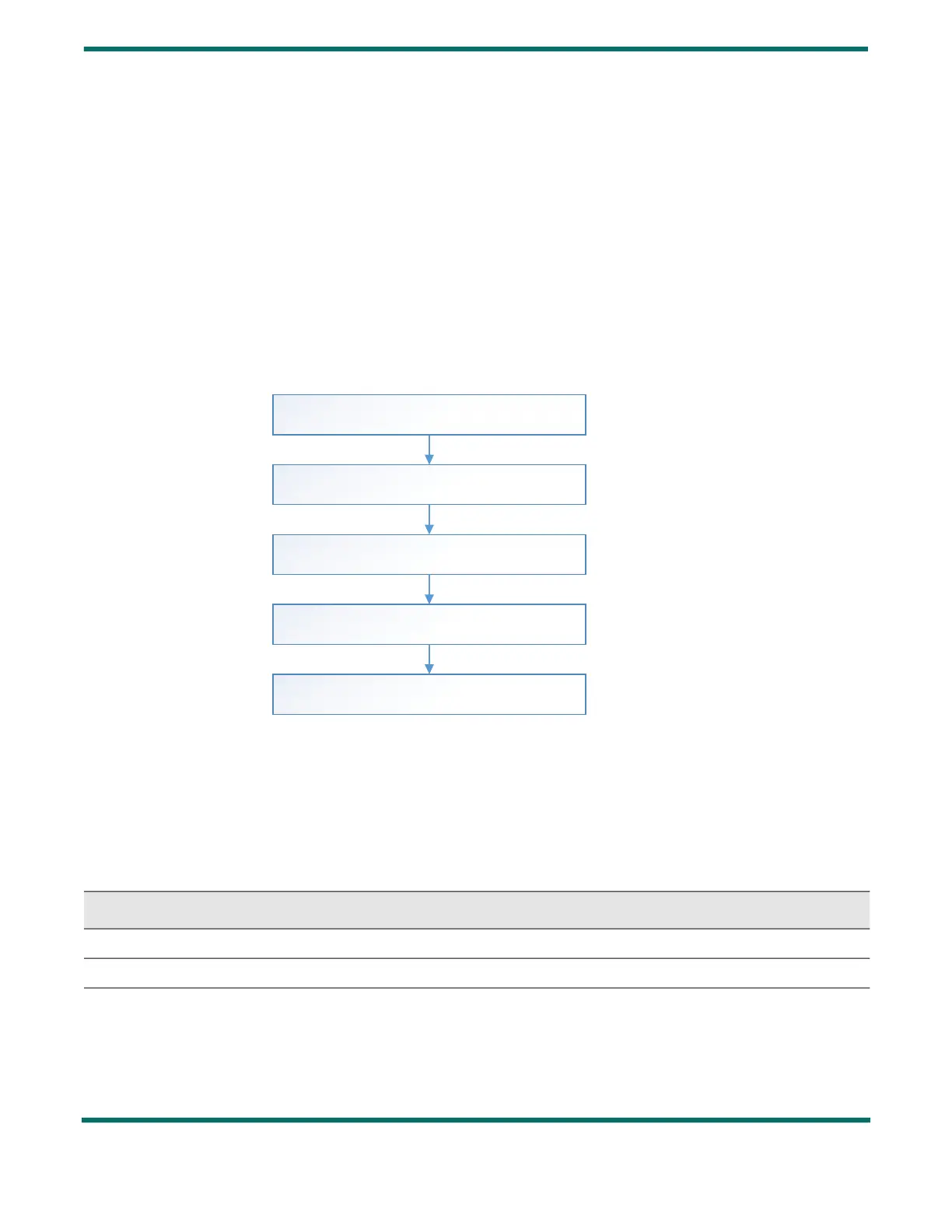
In a second step, SetModulationParam( ) configures the modem parameters (SF, BW, CR and LDRO), and SetPacketParam( )
defines the RF packet parameters (Payload length, Implicit/explicit mode, …). Then the settings of the PA used for the RF
packet transmission shall be configured with the command SetPaConfig( ) (which PA, supply mode…), followed at last by
the PA parameters (output power, ramp time) using the command SetTxParams( ) .
The suitable command order is the following:
Figure 8-1: LoRa® /(G)FSK Command Order
8.1.1 SetPacketType
The SetPacketType( ) command defines which modem is to be used.
• PacketType defines the modem to be used for the next RF transactions.
0x00:None
0x01: (G)FSK
Table 8-1: SetPacketType Command
Byte 0 1 2
Data from Host 0x02 0x0E PacketType
Data to Host Stat1 Stat2 IrqStatus (31:24)
SetModulationParams
SF, BW, CR, LDRO, bitrate, fdev
SetPacketType
GFSK/LoRa
SetPacketParams
PreambleLength, Implicit/Explicit,CRC, InvertIQ
SetPAConfig
PaSel, RegPaSupply, PaDutyCycle, PaHpSel
SetTxParams
Power, RampTime


 To Next Page