LR1110
User Manual Rev.1.0
UM.LR1110.W.APP March 2020
71 of 130
Semtech
www.semtech.com
9. Power Amplifiers
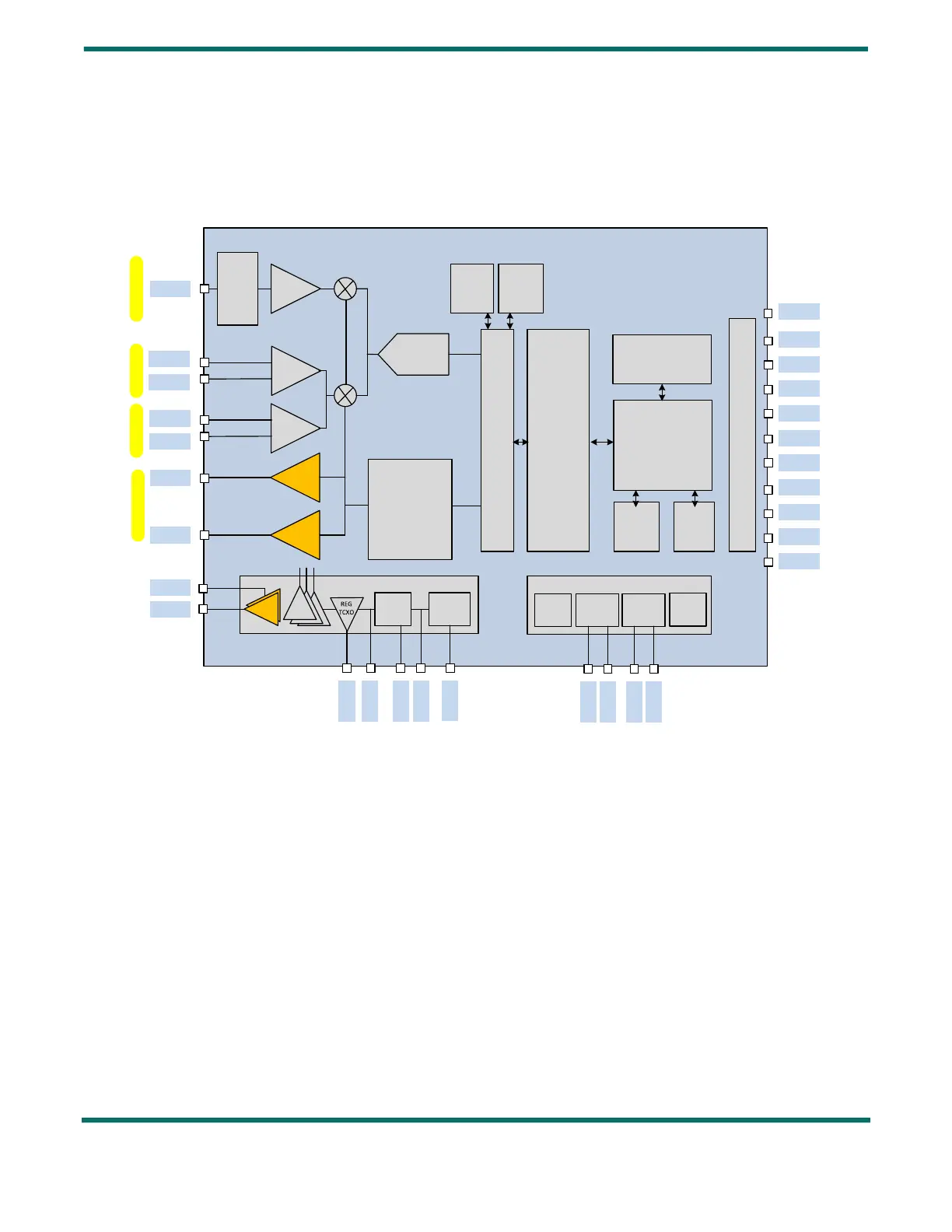
The LR1110 features 2 Power Amplifiers for sub-GHz operation: a High Power PA, optimized for +22dBm operation, and a
Low Power PA, optimized for +14dBm operation, capable of +15 dBm output power.
Figure 9-1: LR1110 Power Amplifiers
The PA is configured using two commands: SetPaConfig() and SetTxParams().
The SetPaConfig() is used to:
• Select the PA to be used (High power or low power)
• Select the supply of the PA (VBAT or VREG)
• Select the duty cycle of either PA
• Select the size of the PA (only applicable to the high power PA).
The SetTxParams() command is used to:
• Control the supply voltage of the PA (VR_PA) and output power
• Choose the ramp time at the start / stop of TX
LNA
LF0
LNA
LF1
PA
HP LF
PA
LP LF
RFO_HP_LF
RFO_LP_LF
RFI_P_LF0
RFI_N_LF0
RFI_P_LF1
RFI_N_LF1
LNA
HF
Balun
&
Match
RFIO_HF
ADC
PLL
VBAT_RF
VR_PA
VREG
DCC_SW
VBAT
VBAT_RF
DC-DC
LDO
BG/IREF
POR/
BRN
PDS
REGs
HFXOSC
32MHz
CKS
LFXOSC
32kHz
HFRC
32MHz
LFRC
32kHz
XTA
XTB
DIO11/
32k_P
DIO10/
32k_N
VTCXO
DIO0/ BUSY
DIO1
DIO2
DIO3
DIO4
DIO9
DIO8
DIO7
DIO6
DIO5
150 – 960 MHz, TX
150 – 960 MHz,
RX
2.412 – 2.484 GHz,
RX
REG_PA
Digital Baseband
+ DSP
CPU
RAMROM
NVM
IO SWM
Digital Front-End
LoRa
modem
(G)FSK
modem
NRESET
1.5 – 1.6 GHz,
RX


 To Next Page