30 | TeamConnect
Installing and connecting the TeamConnect components
Connecting microphones
You can connect up to eight microphones to the orange MIC / LINE IN terminal
of the SL TeamConnect CU1. For attaching the microphone cables you need the
supplied terminal connectors.
To connect a microphone to the SL TeamConnect CU1:
X Remove the insulation from the wires at the end of the microphone cable.
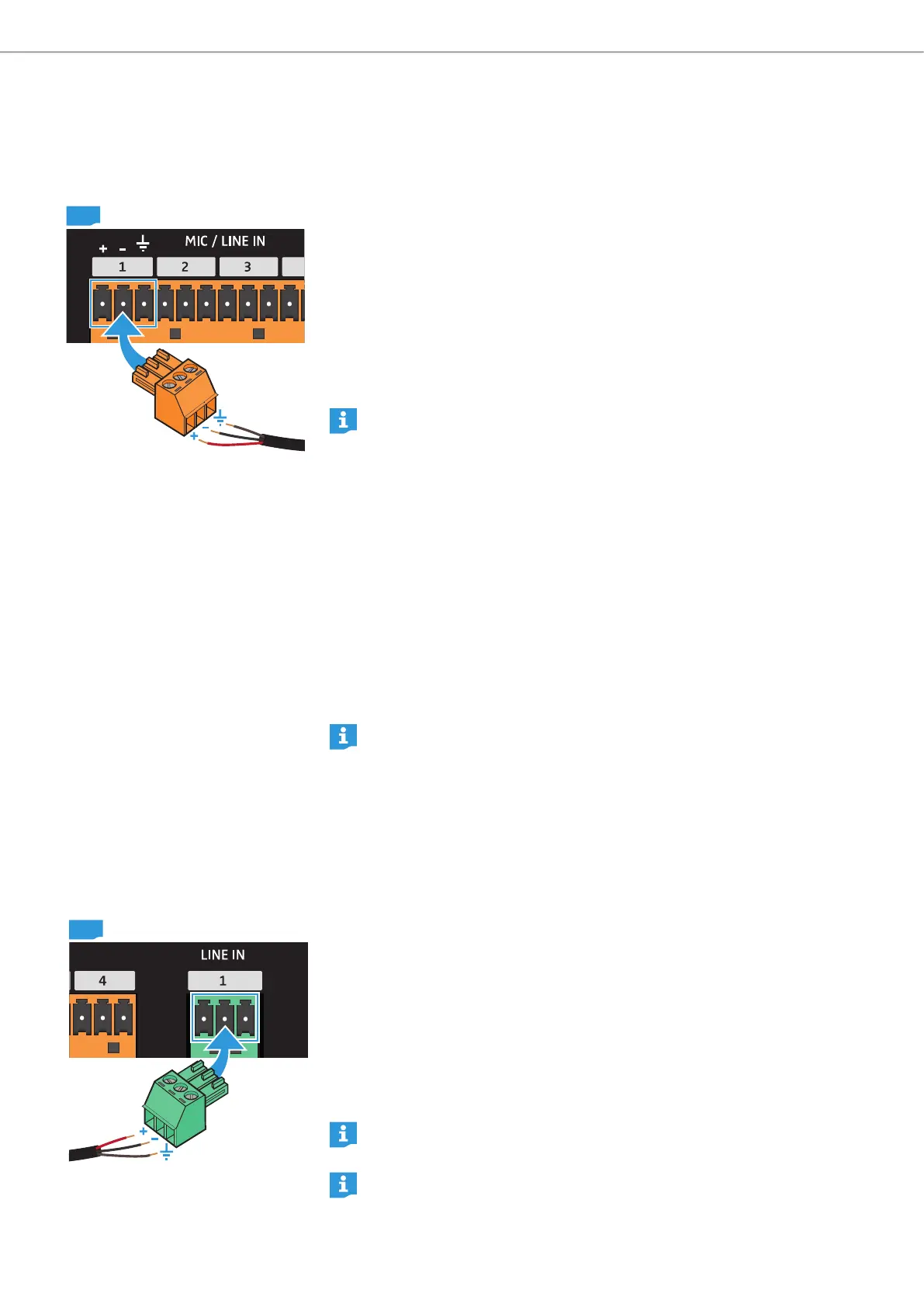
X Attach the three wires to the terminal connector observing the correct pin
allocation (see figure on the left).
X Plug the terminal connector into one of the eight channels of the MIC / LINE IN
terminal 9 of the SL TeamConnect CU1.
X Plug the XLR connector at the other end of the microphone cable into the
microphone.
You can also connect line sources to the MIC / LINE IN terminal. For line
sources the gain settings of the input must be adjusted in the Configuration
Manager software (see “Configuring microphone settings” on page 39).
Installing the microphones in the meeting room
The Sennheiser SpeechLine microphones used with the TeamConnect system
must be installed or placed in the meeting room for adequate use in telephone
or web conferences.
To install the microphones in the meeting room:
X Observe the installation instructions in the instruction manual of the
SpeechLine microphone series.
To configure the audio settings of a connected microphone:
X See “Configuring microphone settings” on page 39.
For further information on the Sennheiser SpeechLine microphones refer to
the instruction manual of the SpeechLine microphone series or the product
page at www.sennheiser.com.
Connecting auxiliary audio devices
The green LINE IN input terminal of the SL TeamConnect CU1 allows the connection
of auxiliary audio devices. These could be the audio signals of video conferencing
systems or DVD players in the meeting room. For attaching the audio cables you
need the supplied terminal connectors.
To connect an auxiliary audio device to the SL TeamConnect CU1:
X Remove the insulation from the wires at the end of the audio cable.
X Attach the three wires to the terminal connector observing the correct pin
allocation (see figure on the left).
X Plug the terminal connector into one of the two channels of the LINE IN
terminal 0 of the SL TeamConnect CU1.
X Plug the connector at the other end of the audio cable into the respective
terminal of the auxiliary audio device.
For unbalanced line sources the negative contact and the ground contact
must be bridged.
For further information on the auxiliary audio device refer to the instruction
manual of the audio device.
CU1
CU1



 To Next Page