39
Using external equipment
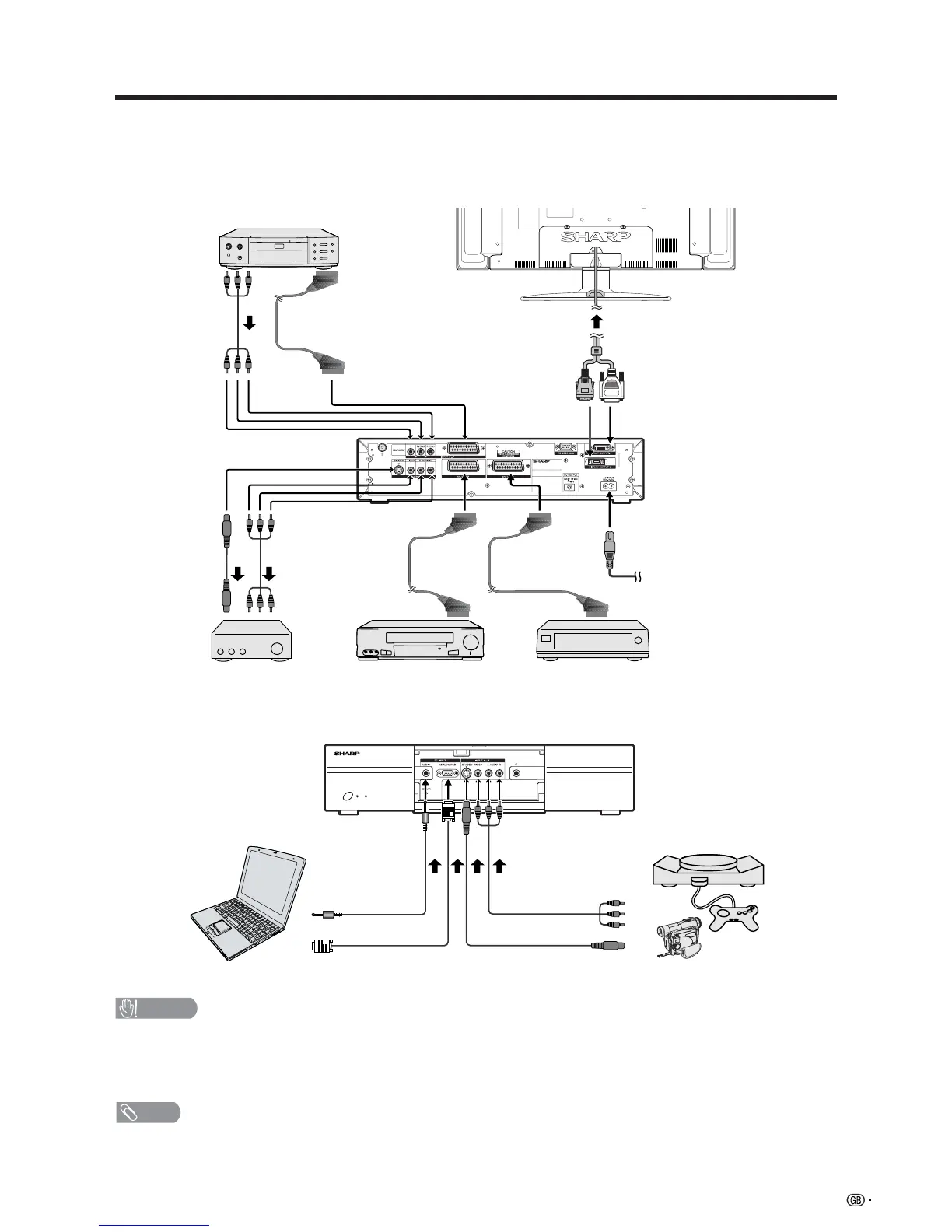
Display
(rear view)
DVD player
AVC System
(rear view)
AVC System
(front view)
AV Receiver
(Built-in Tuner Amp)
VCR Decoder
Game console/CamcorderPC
You can connect many types of external equipment to your System, like a decoder, VCR, DVD player, PC, game
console and camcorder. To view external source images, select the input source from b on the remote
control unit or INPUT on the Display.
CAUTION
• To protect all equipment, always turn off the AVC System before connecting to a decoder, VCR, DVD player, PC, game
console, camcorder or other external equipment.
• The S-video signal only outputs when “INPUT2” or “INPUT3” is selected for “Y/C”, or when from the INPUT 4 terminal (S-
VIDEO). Only the S-video signal can output from the INPUT 4 terminal (S-VIDEO).
NOTE
• Please refer to the relevant operation manual (DVD player, PC, etc.) carefully before making connections.














 To Next Page