44
Using external equipment
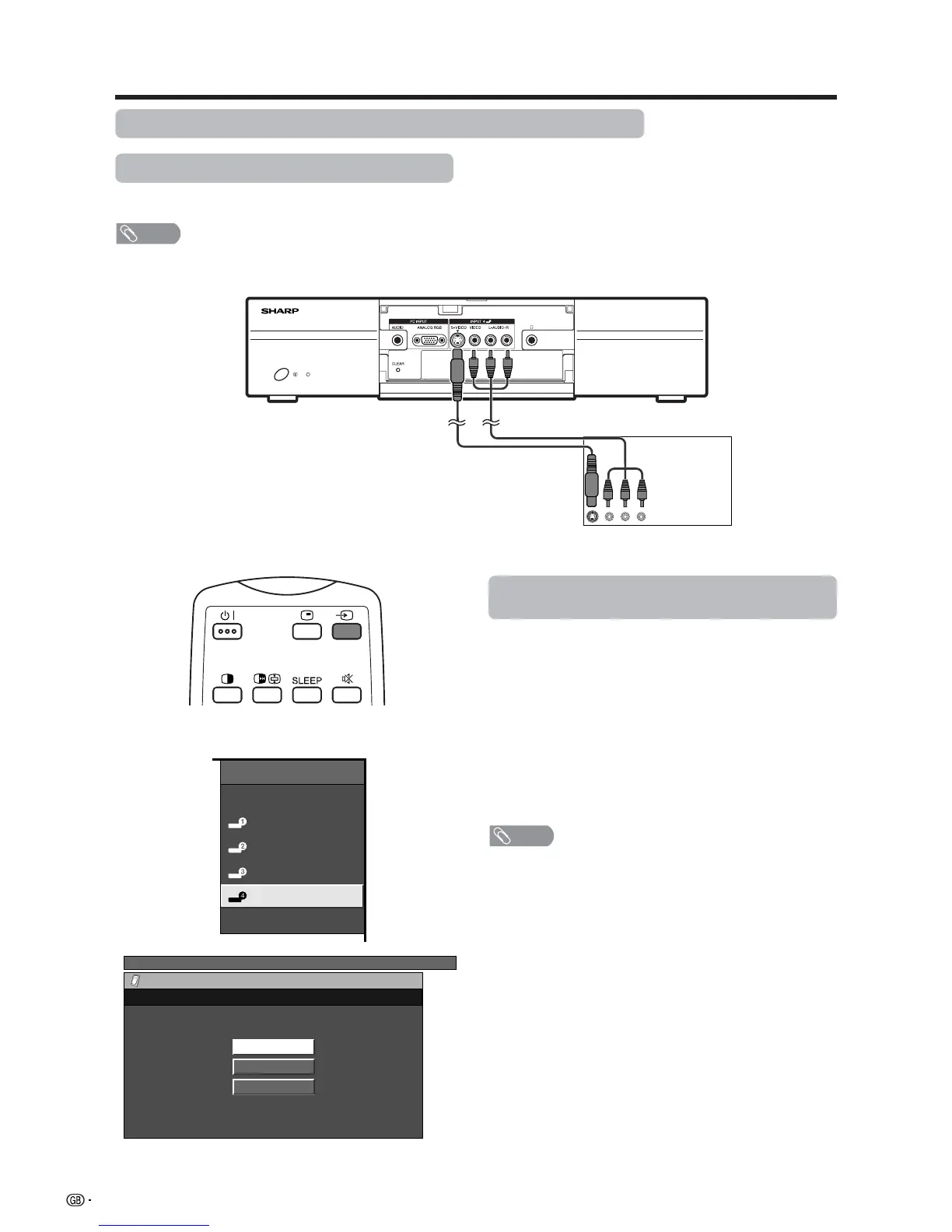
AVC System (front view)
Game console/Camcorder
Composite video cable
(commercially available)
S-video cable
(commercially available)
Enjoying a game console and viewing camcorder images
Connecting a game console or camcorder
A game console, camcorder and some other audiovisual equipment are conveniently connected using the
INPUT 4 terminals.
NOTE
• The S-video terminal has priority over the video terminals.
Displaying an image of the game console or
camcorder
To connect a game console or view a camcorder, select
“INPUT 4” from the “INPUT SOURCE” menu using b
on the remote control unit or INPUT on the Display.
Then select “INPUT4” on “Input Select” in the menu to
set the correct input signal type. (See page 50.)
The setting is stored and can be selected on the
“INPUT SOURCE” menu.
NOTE
• Each time b is pressed, the input source toggles.
INPUT SOURCE
TV
INPUT1
INPUT2
INPUT3
INPUT4
PC
TV MENU
Option
Input Select
AUTO
S-Video
Video
(For INPUT4 signal)














 To Next Page