60
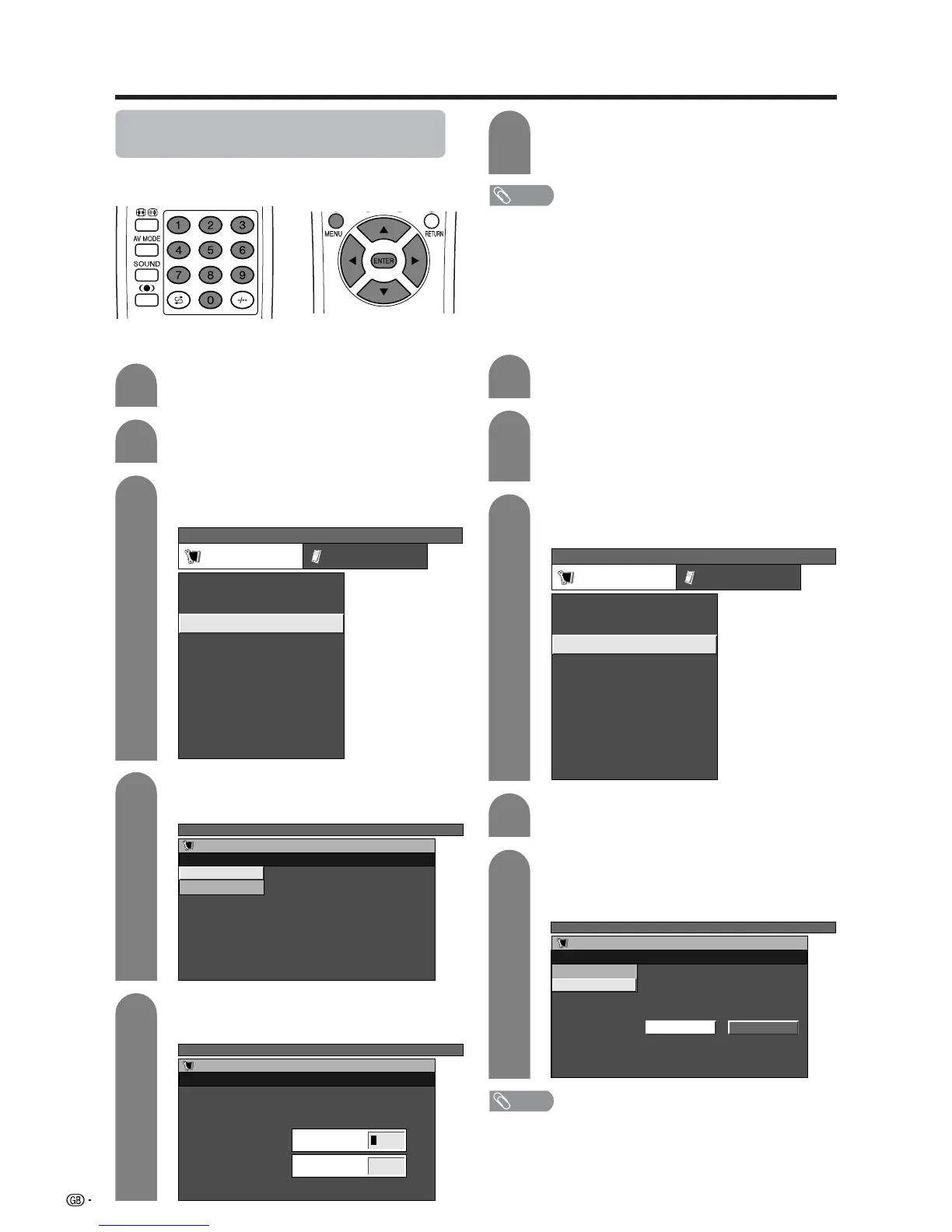
Password setting for child lock (for
TV/AV input mode)
Allows you to use a password to protect certain settings
from being accidentally changed.
Setting a password
Press MENU and the TV MENU screen
displays.
1
2
3
Press a/b to select “Child Lock”, and then
press ENTER.
4
5
Enter the 4-digit number as a password using
0 – 9.
Press a/b to select “Password”, and then
press ENTER.
Enter the same 4-digit number as in step 5
to confirm.
• “The new password is registered.” displays.
6
NOTE
• To view a locked channel (Lock setting in Programme
Setup “Manual” is set to “On”), you must enter a password.
(See page 27.) When you select a locked channel, a
password prompt message pops up. Press ENTER to
display the password input window.
Press c/d to select “Setup”.
• Setup menu displays.
Useful adjustment settings
Clearing the password
Allows you to clear your password.
Press a/b to select “Child Lock”, and then
press ENTER.
Press a/b to select “Password Clear”, and
then press ENTER.
Press c/d to select “Yes”, and then press
ENTER.
• Your password is cleared.
Press MENU and the TV MENU screen
displays.
Press c/d to select “Setup”.
• You are asked to enter the password. Follow
the same steps as explained in “Auto
installation” (See steps 2 and 3 on page 22.)
TV MENU
Setup Option
Child Lock
Auto Installation
Programme Setup
Position
WSS
4:3 Mode [Normal]
[Off]
[Mode1]Full Mode
[English]
[Normal]
Language
Rotate
TV MENU
Setup
Child Lock
New Password
–––
Reconfirm
––––
–
TV MENU
Setup
Child Lock
Password
Password Clear
TV MENU
Setup
Child Lock
Yes No
Password
Password Clear
1
2
3
4
5
NOTE
• As a precautionary measure, make a note of your
password and keep it in a familiar place. If you lose or
forget your password, initialise the System to return
all settings except for the TV channel settings to factory
preset values. (See page 74.)
• This function is available for AV input mode and TV tuner
mode.
TV MENU
Setup Option
Child Lock
Auto Installation
Programme Setup
Position
WSS
4:3 Mode [Normal]
[Off]
[Mode1]Full Mode
[English]
[Normal]
Language
Rotate














 To Next Page