56
Useful adjustment settings
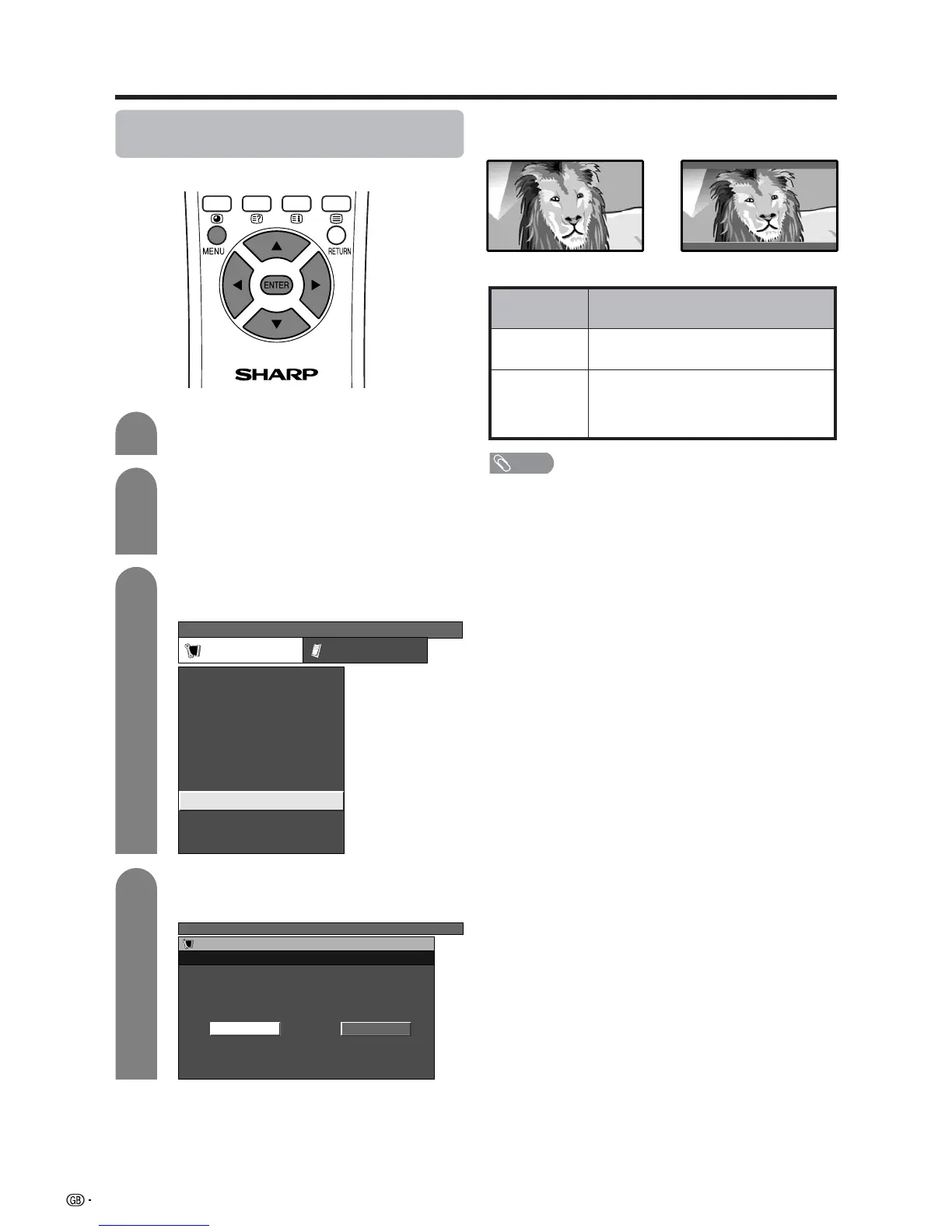
Selecting Full Mode display (for TV/
AV input mode)
Select the display type in Full Mode.
Press MENU and the TV MENU screen
displays.
1
2
Press a/b to select “Full Mode”, and then
press ENTER.
3
Press c/d to select “Setup”.
• If password is already set, you are asked to
enter it. Follow the same steps as explained in
“Auto installation”. (See steps 2 and 3 on page
22.)
TV MENU
Setup Option
Child Lock
Auto Installation
Programme Setup
Position
WSS
4:3 Mode [Normal]
[Off]
[Mode1]Full Mode
[English]
[Normal]
Language
Rotate
Press c/d to select “Mode1” or “Mode2”,
and then press ENTER.
4
TV MENU
Setup
Full Mode
Mode 2Mode 1
Full Mode screen
Full mode “Mode1”
Full mode “Mode2”
Description
Projects 16:9 squeeze image evenly over
entire screen.
Displays a 16:9 squeeze image without
distortion.
However, black bands appear at the top
and bottom.
Selected item
Mode1
Mode2
NOTE
• This function is available for AV input mode and TV tuner
mode.














 To Next Page