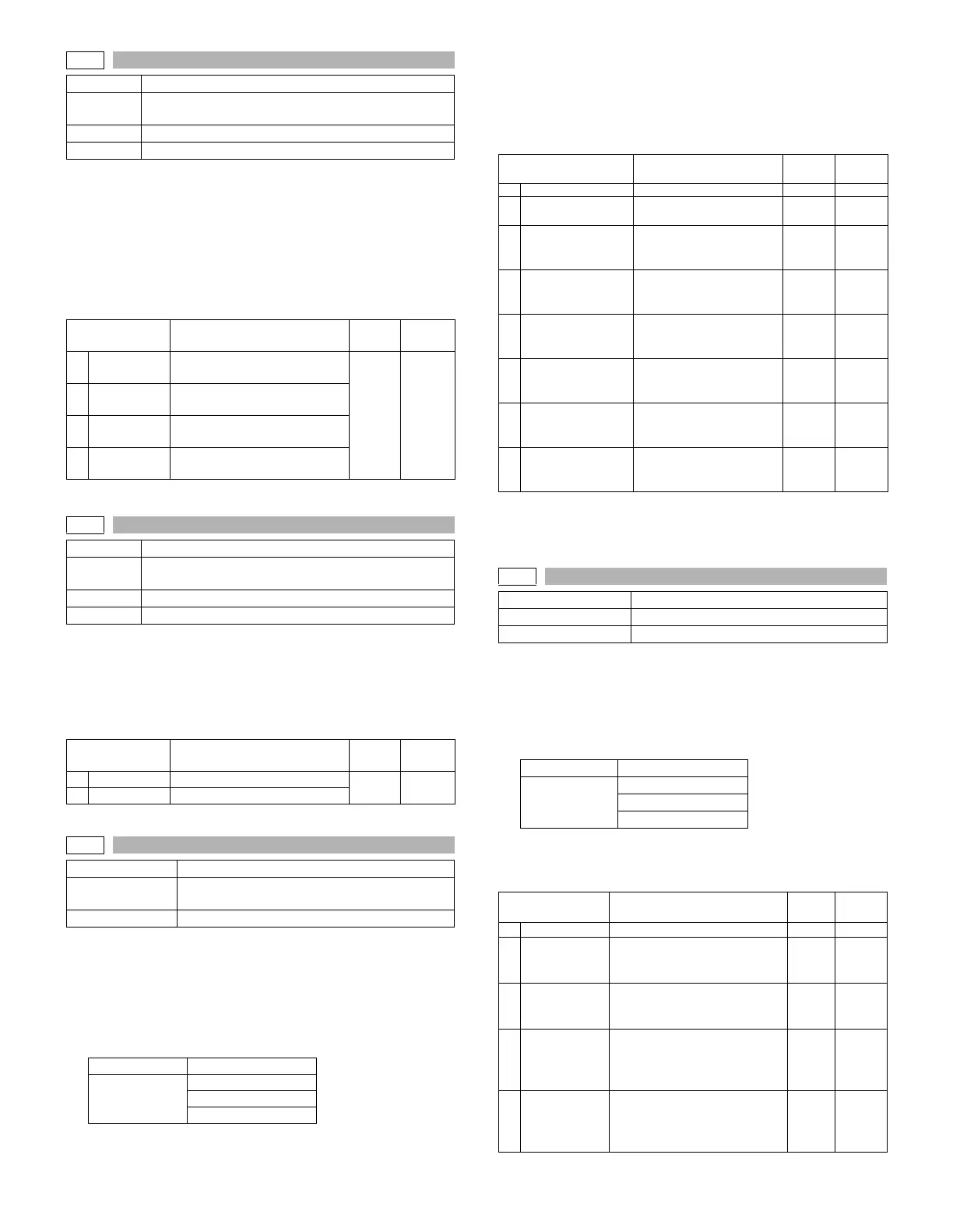
AR-5726/5731 SIMULATION 6 - 30
Operation/procedure
1. Touch the item to be set.
The item and the currently set value are highlighted.
2. Press the [START] key.
The display is shifted to the copy menu.
3. Select the paper feed tray and the print density, and enter the
adjustment value with the 10-key.
4. Press the [START] key.
Copying is started.
Operation/procedure
1. The adjustment item and the currently set value are highlighted.
2. Enter the adjustment value with the 10-key.
Changes magnification ratio by changing speed of main motor.
The change of the paper transfer speed is 0.1% when changing value
is 1.
Operation/procedure
The currently set value is highlighted beside the item.
1. Select an item to be adjusted.
2. Enter the set value of the magnification ratio adjustment with the
10 key.
3. Press the [START] key.
Copying is started and the set value is stored.
There is no operation of tray selection.
The optimum paper tray for the scanned size is selected.
Even when the SPF/RSPF is selected, if there is no original on the
SPF/RSPF, the OC is scanned.
Even when the OC is selected, if there is any original on the SPF/
RSPF, the SPF/RSPF is scanned. (Setting 2)
* The adjustment can be made in the range of –12.7% - +12.7% by
the increment of 0.1%.
Note: Executable only when the FAX is installed.
Operation/procedure
The currently set value is highlighted beside the item.
1. Select an item to be adjusted.
2. Enter the set value of the magnification ratio correction with the 10
key.
3. Press the [START] key.
There is no operation of tray selection.
The optimum paper tray for the scanned size is selected.
When two pages are scanned, duplex printing is made.
Note: Executable only when the FAX is installed.
48-2
Purpose Adjustment
Function
(Purpose)
Used to adjust the scanner mode magnification ratio
(main/sub scanning direction).
Section Image processing
Item Picture quality
Item Content
Setting
range
Default
1
F-R
Main scanning magnification
ratio adjustment
1-99 50
2
SCAN
Sub scanning magnification
ratio adjustment
3
SPF (SIDE1)
RSPF surface sub scan
magnification ratio
4
SPF (SIDE2)
RSPF back surface sub scan
magnification ratio
48-3
Purpose Adjustment
Function
(Purpose)
Used to adjust the print mode magnification ratio
correction.
Section Image processing
Item Picture quality
Item Content
Setting
range
Default
1
145mm/s
Main motor speed (145mm/s)
45-55 50
2
122mm/s
Main motor speed (122mm/s)
48-8
Purpose Adjustment
Function
(Purpose)
FAX magnification adjustment (read)
Section FAX
Normal display NOW PRINTING
Error display
DOOR OPEN
JAM
PAPER EMPTY
Item Content
Setting
range
Default
1 COPY START Copy start – –
2
SCAN SELECT
(OC/SPF/RSPF)
Scan selection
(OC/ SPF/RSPF)
1-255* 128
3OC(MAIN)
SCAN Main scanning
magnification ratio
adjustment (OC)
1-255* 128
4OC(SUB)
SCAN Sub scanning
magnification ratio
adjustment (OC)
1-255* 128
5 SPF(MAIN)
SCAN Main scanning
magnification ratio
adjustment (SPF)
1-255* 128
6SPF(SUB)
SCAN Sub scanning
magnification ratio
adjustment (SPF)
1-255* 128
7 RSPF(MAIN)
SCAN Main scanning
magnification ratio
adjustment (RSPF)
1-255* 128
8 RSPF(SUB)
SCAN Sub scanning
magnification ratio
adjustment (RSPF)
1-255* 128
48-9
Purpose Adjustment
Function (Purpose) FAX magnification adjustment (print)
Section FAX
Normal display NOW PRINTING
Error display
DOOR OPEN
JAM
PAPER EMPTY
Item Content
Setting
range
Default
1 COPY START Copy start 1-255 128
2 Horizontal
Print magnification ratio
adjustment (Horizontal, vertical
to paper passing)
1-255 128
3 Vertical
Print magnification ratio
adjustment (Vertical, parallel to
paper passing)
1-255 128
4
Horizontal
(DUPLEX)
Print magnification ratio
adjustment on the back surface
(Horizontal, vertical to paper
passing)
1-255 128
5
Ver tical
(DUPLEX)
Print magnification ratio
adjustment on the back surface
(Vertical, parallel to paper
passing)
1-255 128



 To Next Page