SECTION 7 TROUBLESHOOTING
68
263-13228
7
7.2.1 Power Failure Counter-Operation
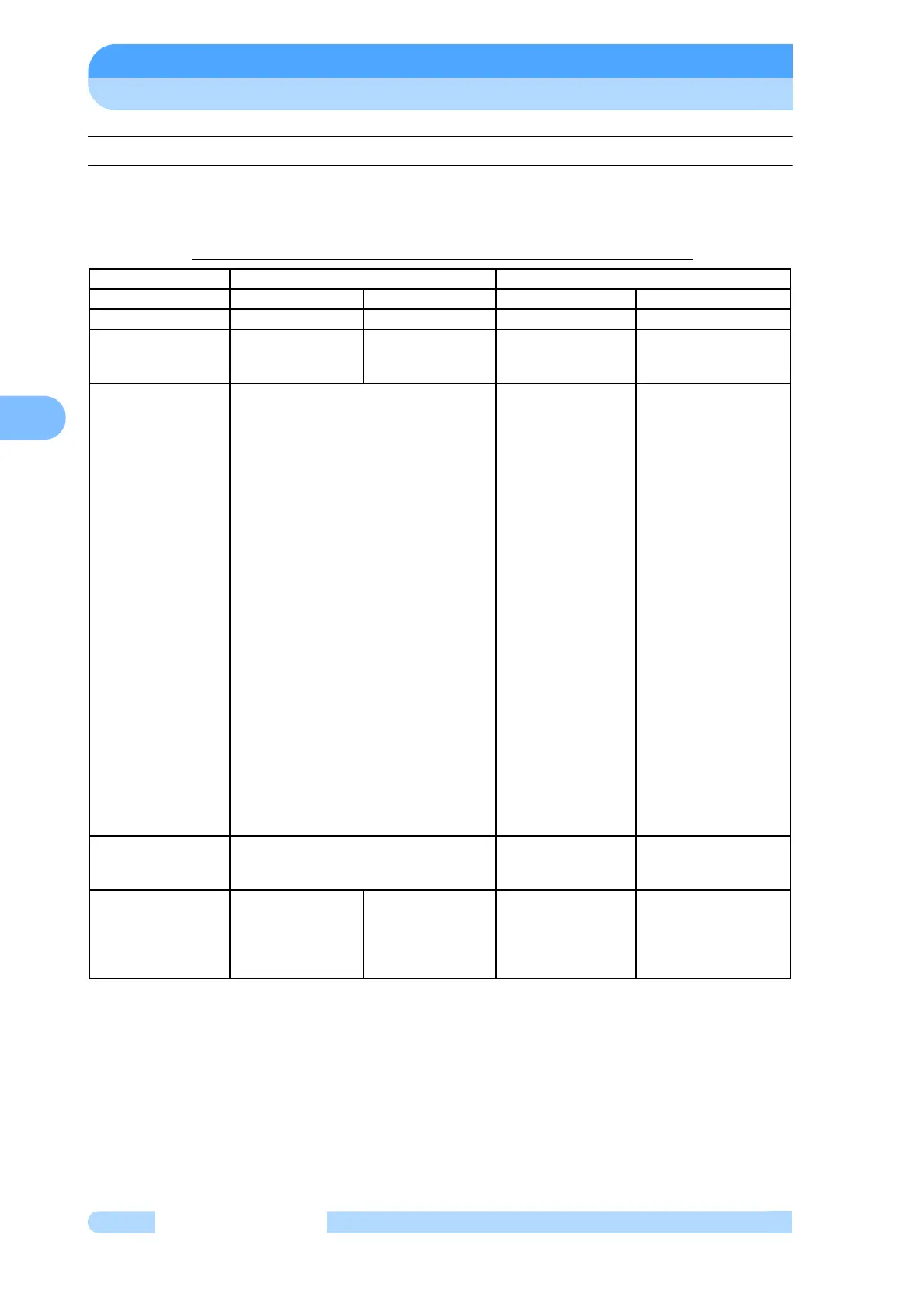
Table 7-3 shows the counter-operations against power supply failure which occurred while the
pump rotor is normally rotating.
Table 7-3 Counter-Operations Against Power Supply Failure
(Note 1) For restarting after the power re-supply (restoration), press the RESET switch twice
and, thereafter, perform the start-up operation. First pressing of the RESET releases the
buzzer and second pressing of the RESET releases "ALARM" signal.
(Note 2) The pin numbers are shown in Fig. 6-11 Arrangement of Remote-Control Connector
Pins.
(Note 3) The ALARM, WARNING and REMOTE signal activity will change depending on the
SETTINGS/REMOTE SIGNAL MODE menu settings on the LCD display. For more
information, refer to Section 6.6 "Software Operation".
Interruption time 1 second or less Over 1 second
Interrupt/re-supply During interruption After re-supply During interruption After re-supply
Magnetic levitation Levitation goes on Levitation goes on Levitation goes on Levitation goes on
Run Decelerates
Returns to before-
power-failure
running condition
Decelerates
Decelerates
(Note 1)
Indicator lamp
ROTATION
NORMAL SPEED
ALARM
Before-power-failure indication goes on.
Before-power-failure indication goes on.
Before-power-failure indication goes on.
Lamp ON goes on
Turns OFF
Turns ON
Lamp ON goes on.
Lamp OFF goes on.
Lamp ON goes on.
(Note 2)
Remote-control
output signals
ROTATION
Pin no. (29)-(30)
(4)-(30)
Before-power-failure condition goes on.
Contact close
Contact open
"CLOSE" goes on
"OPEN" goes on
NORMAL
Pin no. (2)-(26)
(25)-(26)
Before-power-failure condition goes on.
Contact close
Contact open
"CLOSE" goes on
"OPEN" goes on
ACCELERATION
Pin no. (1)-(24)
(23)-(24)
Before-power-failure condition goes on.
Contact close
Contact open
"CLOSE" goes on
"OPEN" goes on
BRAKE
Pin no. (27)-(28)
(3)-(28)
Before-power-failure condition goes on.
Contact close
Contact open
"CLOSE" goes on
"OPEN" goes on
REMOTE
Pin no. (31)-(32)
(5)-(32)
Before-power-failure condition goes on.
Contact open
Contact close
Return to Before-
power-failure
condition
ALARM
Pin no. (21)-(22)
(20)-(22)
"OPEN" goes on
"CLOSE" goes on
Contact close
Contact open
By resetting,
"CLOSE" → "OPEN"
"OPEN" → "CLOSE"
WARNING
Pin no. (12)-(13)
(11)-(13)
"OPEN" goes on
"CLOSE" goes on
Contact open
Contact close
By resetting,
Contact open
Contact close
Buzzer Does not sound Does not sound
(Note 1)
Before resetting:
Sounds
After resetting:
Released (reset)
(Note 1)
Before resetting:
Sounds
After resetting:
Released (reset)



 To Next Page