EN-18 Original User Guide | Pedelec Shimano Steps E6000 Version 1
5. Tighten the front screw by the same number of turns.
6. Ensure that the newly-tightened saddle does not tip; test it by pressing
down on the front and back alternately.
3.3.3 Clampattachment:Shiftingandtiltingthesaddle
1. Turn the clamping nut clockwise
to loosen it. You may need to
keep the nut on the other side in
place with a second key.
2. Move the saddle backwards or
forwards as required.
3. Tilt the bicycle saddle to the desired angle.
4. Turn the clamping nut clockwise to tighten it. You may need to keep
the nut on the other side in place with a second key. Observe the
correct torque setting.
5. Ensure that the newly-tightened saddle does not tip; test it by pressing
down on the front and back alternately.
Loosen clamping nut
3.3.2 Twin-screwsupports:Shiftingandtiltingthesaddle
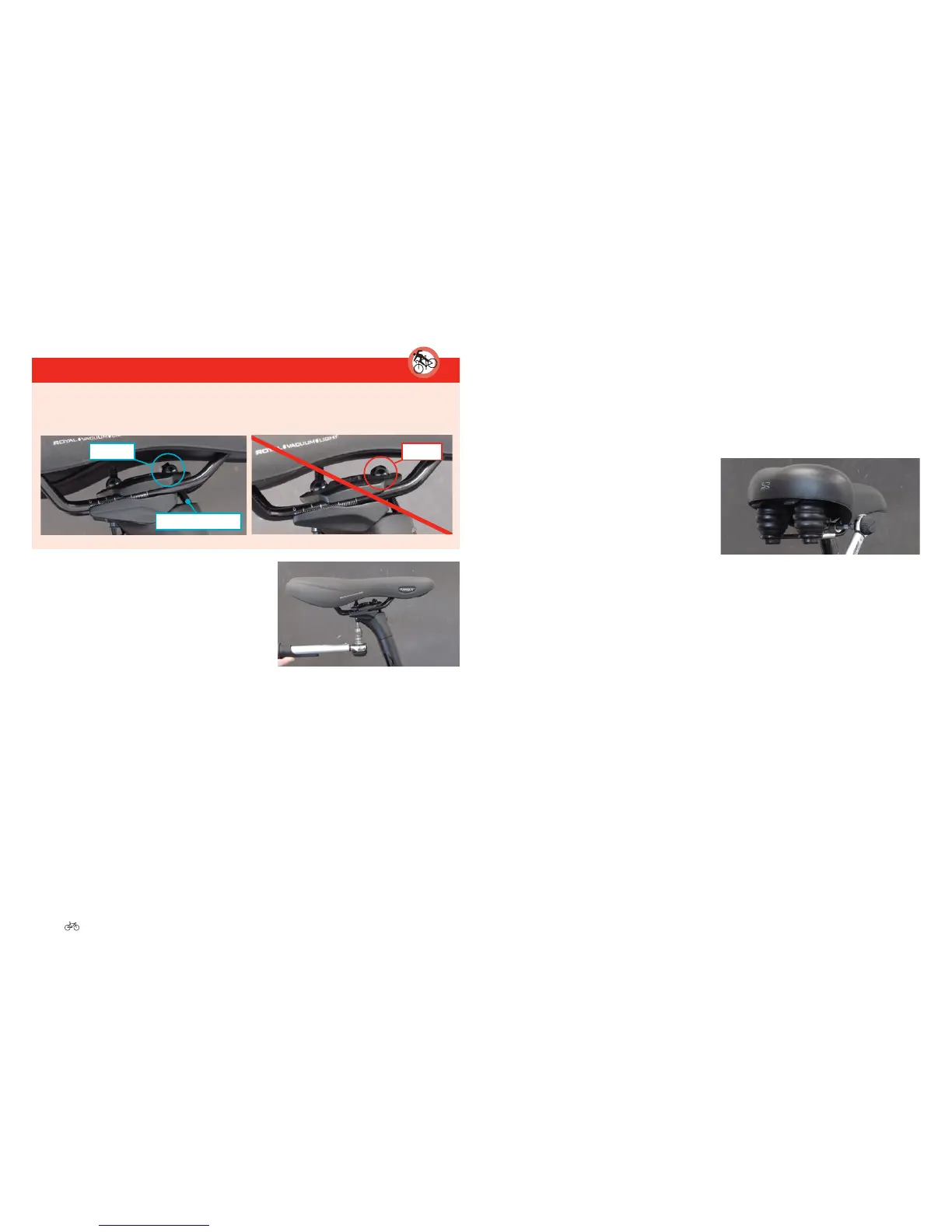
DANGER
Screwtheclampingscrewsfullyinastraightpositioninthenuts.
Failuretodosocanresultinthescrewstearingoutofthenuts.
correct
Clampingscrew
wrong
1. To move the saddle, loosen the front
and rear screws by turning them
anticlockwise. Turn the screws
completely two to three times at
most or the whole mechanism could
fall apart.
2. Move the saddle backwards or forwards as required.
3. Tighten the screws using a torque wrench to turn them clockwise.
4. To alter the angle of the saddle, loosen the front screw by turning it
anticlockwise. Turn the screw completely two to three times at most or
the whole mechanism could fall apart.





 To Next Page