EN-36 Original User Guide | Pedelec Shimano Steps E6000 Version 1
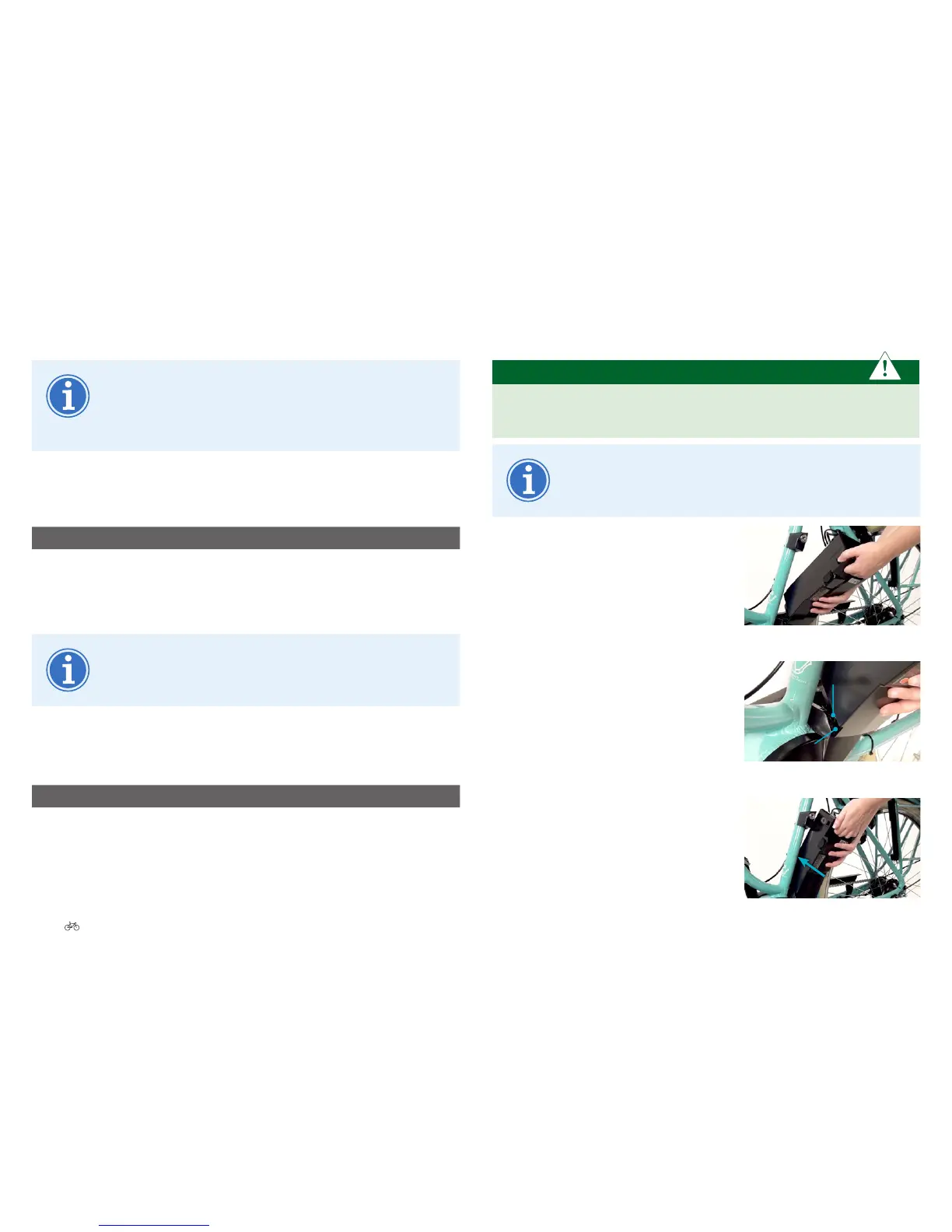
5.3.2 Insertingandlockingthebattery
IMPORTANT
Graspthebatteryrmly, so that it does not fall out of your hand. It
can be damaged if you drop it.
One-key system: The same key (if available) can be used for
the cycle and battery lock.
1. Hold the battery, with the discharger
connector pointing downwards, at an
angle of 80˚, slightly tilted to the left in
front of the docking station.
2. Place the battery catches into the dents
provided.
3. Push the battery forwards and
upwards into the docking station
until the locking mechanism engages.
Hold in front of the docking station
Battery nibs
Recesses
Battery nibs into recesses
Push battery into docking station
5.3.1.3Sleep mode
To prevent a total discharge, the battery management
system switches the battery to Sleep mode. Your battery
reverts to Sleep mode after 10 days (depending on charge
level).
To wake from Sleep mode
1. Press the battery button for one second. The following appears:
Display Description
The rst, second, third, fourth and fth LEDs come on in order and then
all go o.
2. The battery has now “woken up”.
If no LED ashes, or all ve LEDs ash several times, the
battery may be faulty 7.1 Battery Page EN-44.
Initiating Sleep mode
1. Briey press the battery button twice. The following appears:
Display Description
The rst and fth LEDs ash twice.
2. The battery is now in Sleep mode.





 To Next Page