Copyright © Shimmer 2017
Realtime Technologies Ltd Shimmer User Manual
All rights reserved Rev3p
5
Figure 2-4 View Devices and Printers
Search for Shimmer Devices
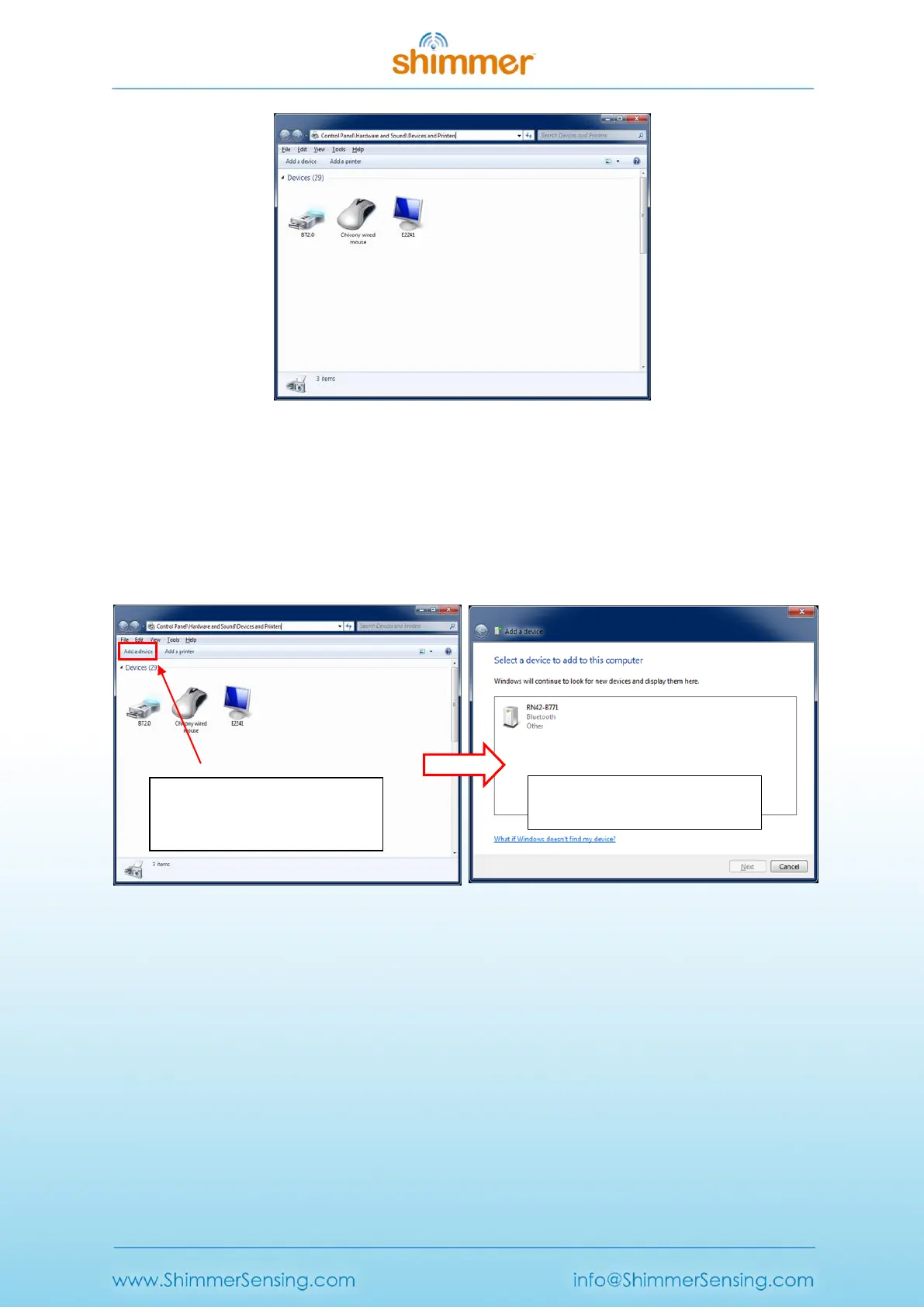
To add a Shimmer to the list of devices connected with the PC, select the Add a Device button on the
top left of the window (see screenshot on left of Figure 2-5). Windows will now search for Bluetooth
devices that are within range of your PCs BT radio and display them as in the screenshot on the right
of Figure 2-5.
Figure 2-5 Searching for available Bluetooth devices
Warning: If Windows fails to find the Shimmer device, ensure the following;
The PC attempting to find the Shimmer device is Bluetooth enabled.
The Shimmer unit is powered ON (refer to Section 2.2 to identify if Shimmer is powered ON).
The Shimmer unit is within Bluetooth range of the PC (<12m approximately).
Pair to a Shimmer device
To pair with a particular device, select the device from the list; the device name will be “RN42-XXXX”
or “Shimmer3-XXXX”, depending on what hardware version you have purchased, where “XXXX” are
Pressing the Add a Device button
Instructs Windows to search for
available devices
When Windows finds a device, it
displays it in the box



 To Next Page