Copyright © Shimmer 2017
Realtime Technologies Ltd Shimmer User Manual
All rights reserved Rev3p
48
As mentioned previously, if in-program debugging is not required, Code Composer Studio can be
configured to create an output flash image that can be loaded to a Shimmer3, using the Consensys
application and Shimmer Dock or Consensys Base. To ensure this option is selected, complete the
following steps:
1. With the project selected in Code Composer Studio, go to the "Project" menu and select
"Properties".
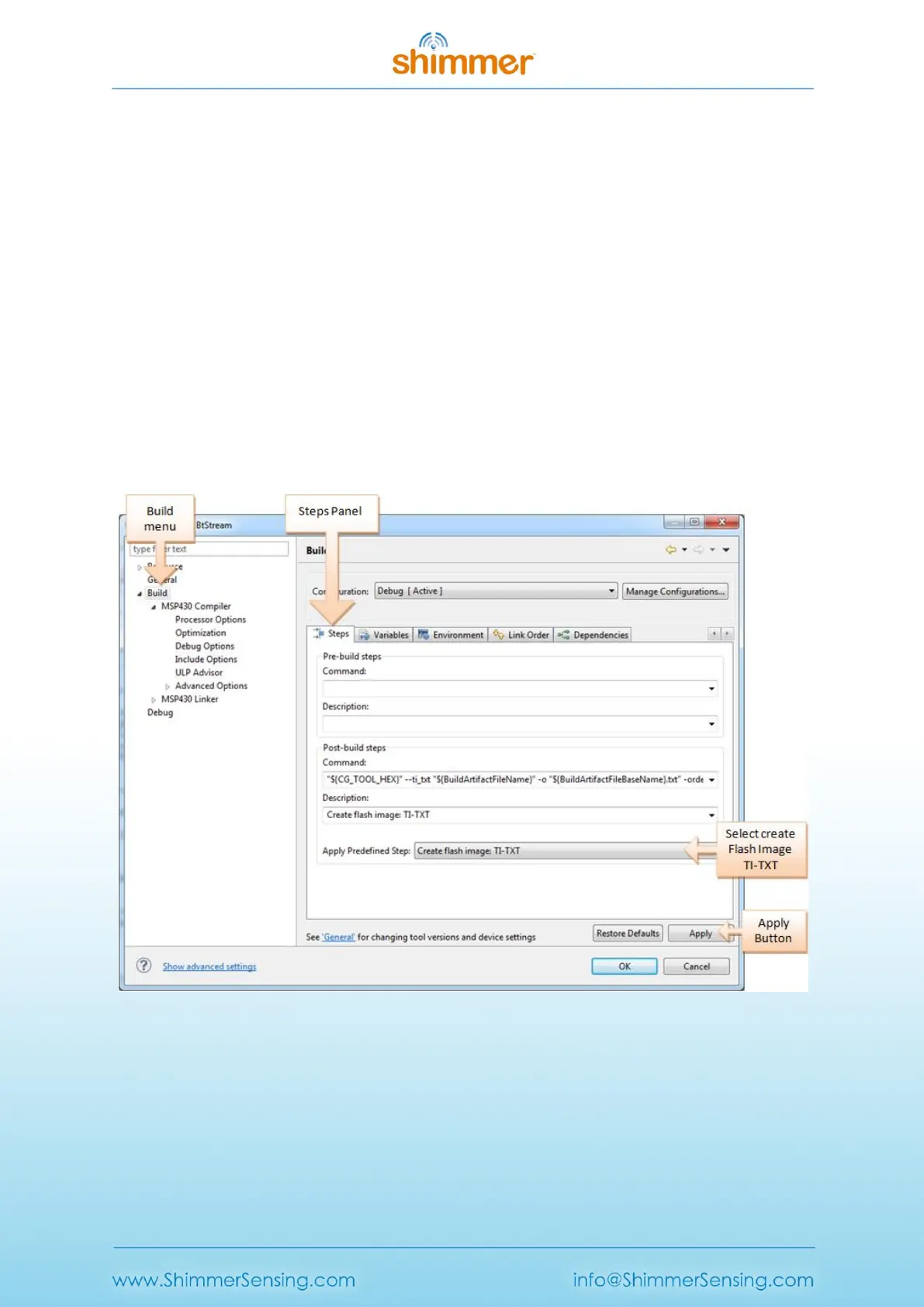
2. As shown in Figure 5-3, select the "Build" menu in the left panel and then select the "Steps"
panel on the right.
3. Ensure that "Create flash image TI-TXT" is listed in the "Description" box. If this is not the
case, select it from the "Apply Predefined Step" drop down menu as shown.
4. Finally press the "Apply" button to save the changes.
An output TXT file with the same name as the project will then be created within the "Debug"
directory of the project when the project is built. This is the file that can be loaded to the Shimmer3
through the Consensys application.
Figure 5-3 Creating an output TXT file using Code Composer for custom firmware programming with
the Consensys application.



 To Next Page