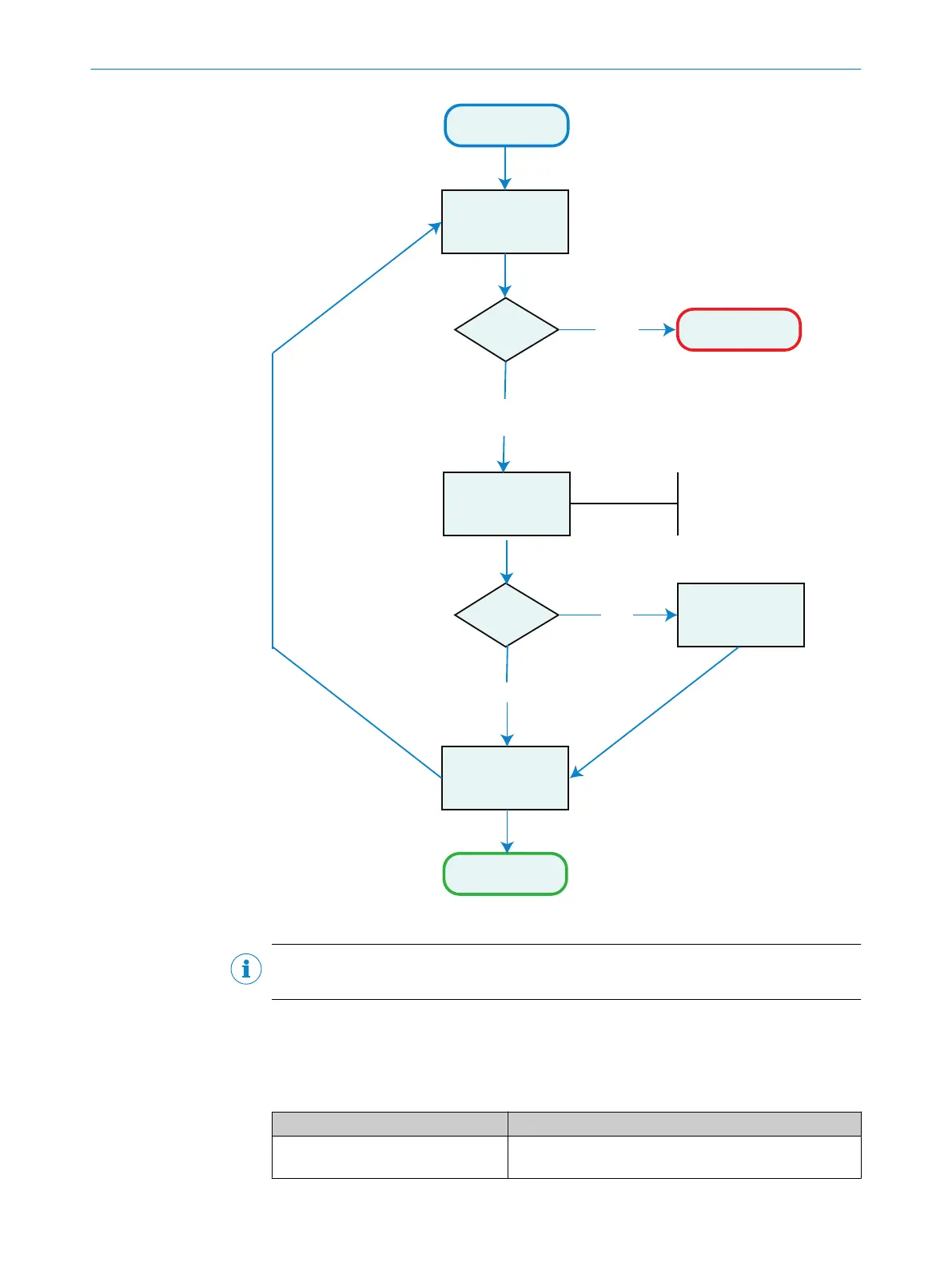
Measurement
Measurement failed
Send Run Locate
command to PLOC
Receive
PLOC Response
Apply correction
on work frame
Pick up and handle
part
Define a pick position in
the corrected work frame.
Is the
pick position
defined?
Run Locate
OK
Run Locate
Error
Yes
No
Measurement
complete
The position of the part in the
corrected work frame is always the same.
The pick position should be defined
in this corrected work frame.
Figure 31: Robot operation flowchart
NOTE
Correctly typed PLOC2D robot commands always yields a response message (Ok/Error).
Commands
PLOC2D accepts the commands in the following table, see table 2, page 60. All
parameters are explained in table 5.
Table 2: PLOC2D commands
Command Description
Alignment.Align,alignment
Acquire a new image and align sensor to work plane
alignment target.
7 OPERATION
60
O P E R A T I N G I N S T R U C T I O N S | PLOC2D 4.1 8020736/1K3Z/2023-06 | SICK
Subject to change without notice



 To Next Page