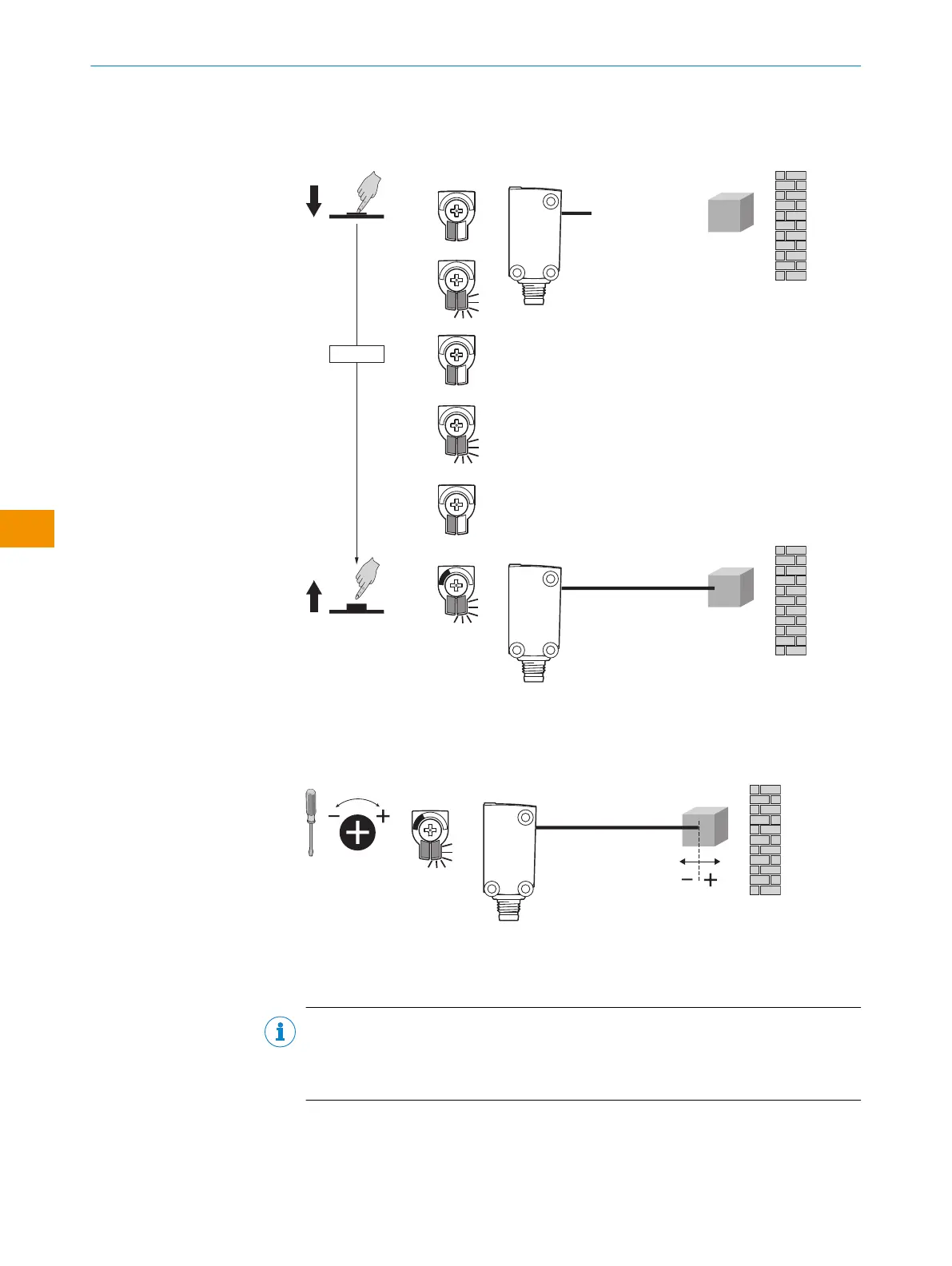
WTB4Sx-xxxxxx2x with Teach-Turn adjustment
1. The sensing range is adjusted by pressing the teach-in button (approx. 1-3sec‐
onds) until the yellow LED flashes.
2. Depending on the requirements, the potentiometer can be used for fine-tuning
(without pressing the teach-in button).
Clockwise rotation: Sensing range increased
Counterclockwise rotation: Sensing range reduced
The sensing range can also be adjusted using just the potentiometer.
We recommend placing the object within the sensing range. Once the sensing
range has been adjusted, the object is removed from the path of the beam,
which causes the background to be suppressed. The digital output changes (see
table 6).
NOTE
WTB4ST: After teach-in, approx. 1/3 of the linear light spot must be covered for
the sensor to switch. The sensitivity can be adjusted by turning so that the sensor
also switches with less coverage.
✓
The sensor is adjusted and ready for operation.
OPERATING INSTRUCTIONS
42
O P E R A T I N G I N S T R U C T I O N S | WTB4S 8028211/2023/10/20 | SICK
Subject to change without notice
en











 To Next Page