GENIUS 2.2, Electromechanical mul-point lock
02.202024/44 H39.ELEKS013EN-00
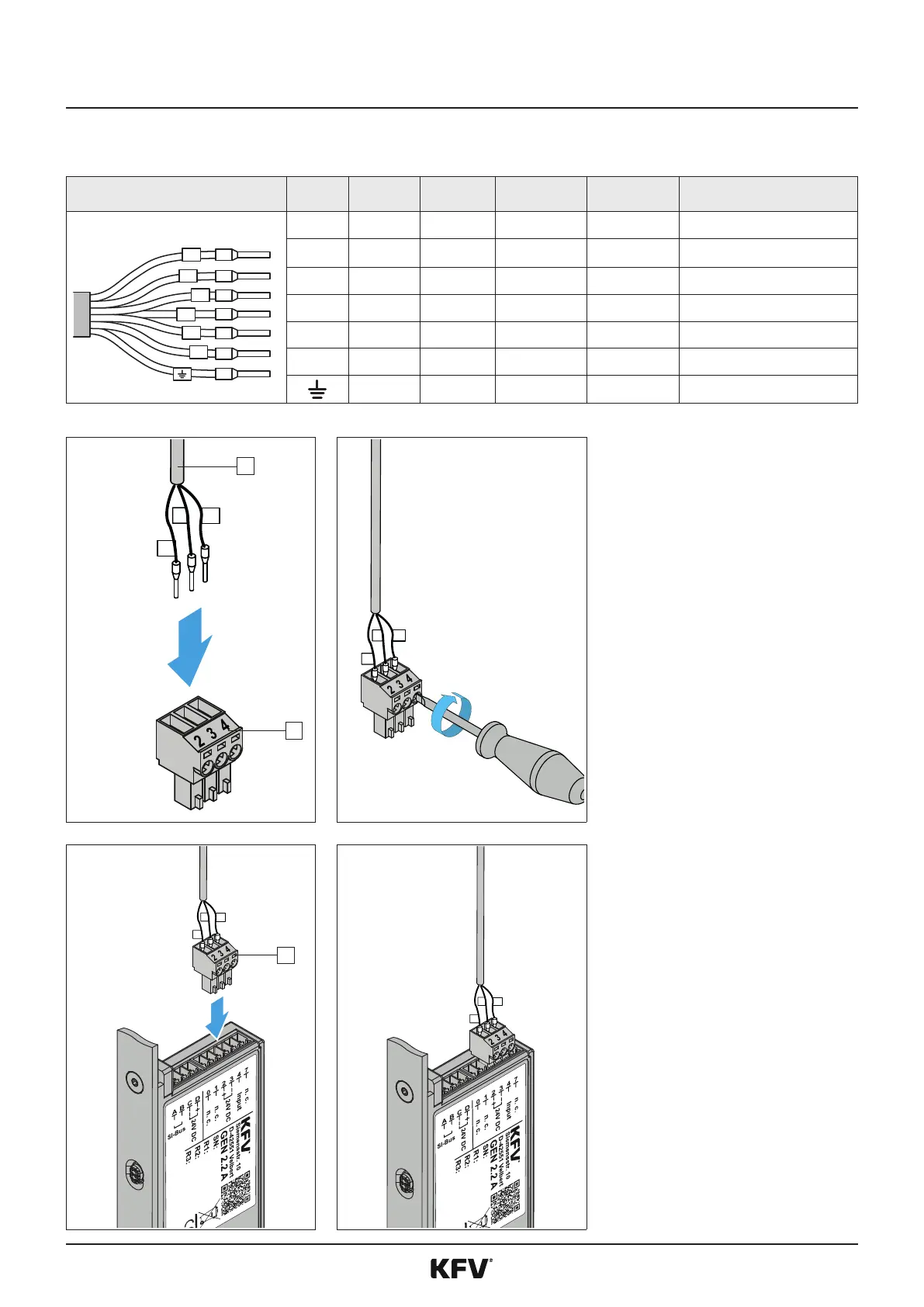
To obtain a connecon via the analogue connecon, establish a plug connecon with the KFV cable.
0
1
+
-
4
7
0 Black grey - 0: input Switchover day/night mode
1 Brown Yellow - 1: input Switchover day/night mode
+ Red White 2: + 24VDC 2: + 24VDC Operang voltage (+) 24 V DC
- Blue Brown 3: - GND 3: - GND Operang voltage (-)
4 Yellow Green 4: input 4: input External unlocking signal
7 Violet Pink - 7: output Feedback contact
White Blue - - Shield for power supply
1
2
+
-
4
f
Establish a plug connecon with
the KFV cable [1] and the green
PTR plug [2].
f
Tighten the screws of the PTR
plug by hand so that the wires
of the cable will not be able to
loosen themselves.
Check the rm seang.
+
-
4
1
+
-
4
f
Insert the green PTR plug
[1] into the connecon with
the designaon 2 to 4 of the
A-opener.
f
Route the cable and connect it
to a power supply and oponally
to an analogue access control
system (see chapter 4.3).



 To Next Page