39/44
GENIUS 2.2, Electromechanical mul-point lock
39/4402.2020H39.ELEKS013EN-00
8 s
or
f
proceed to the GENIUS 2.2
menu.
f
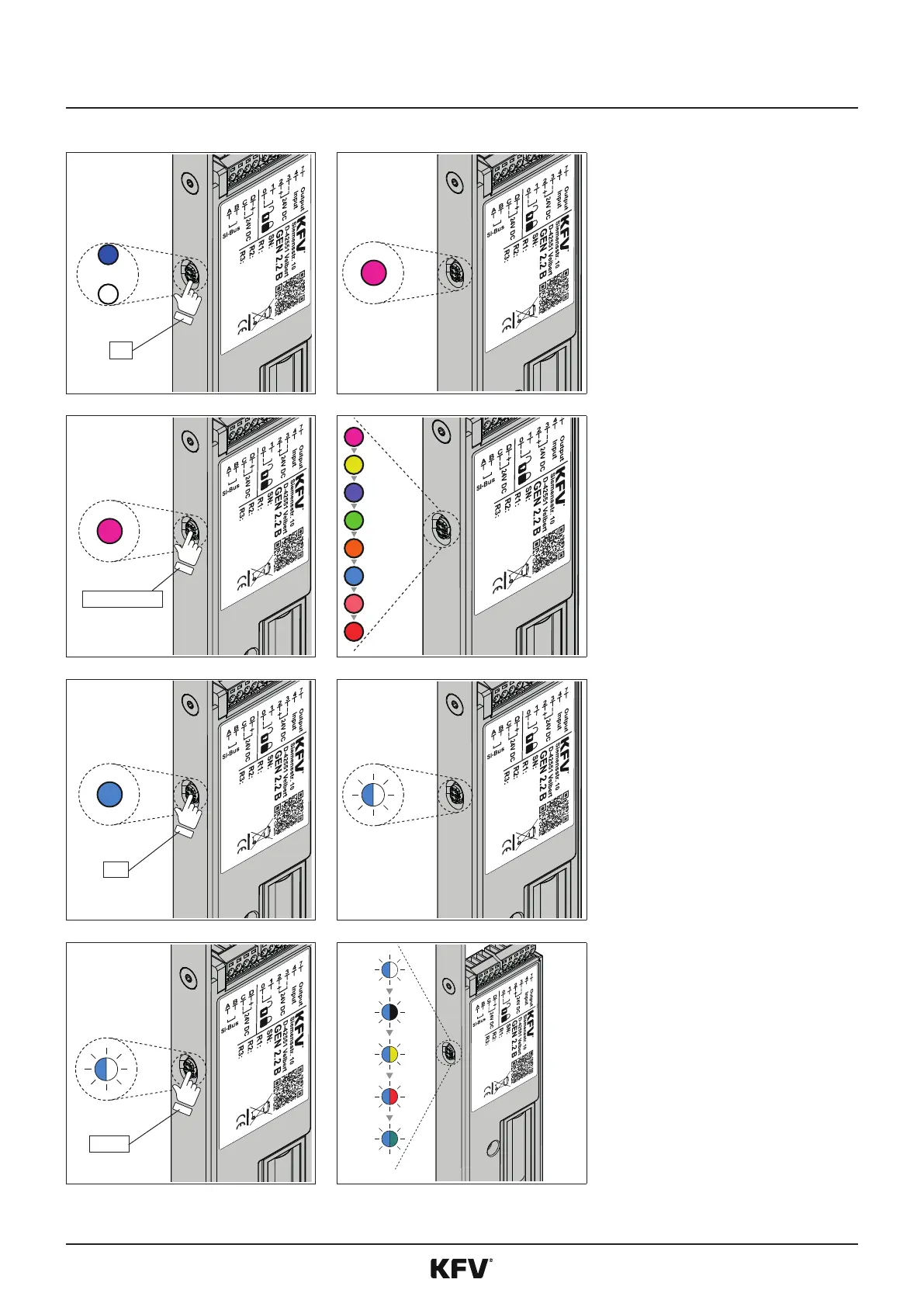
To proceed to the menu, press
the buon on the GENIUS 2.2
for 8 seconds unl the menu
LED magenta lights up. The LED
lights up blue or white during
these 8 seconds.
f
An acousc signal sounds as
acknowledgement.
3 x or 5 x 1 s
f
Press the buon several mes
quickly in succession (approx. 1
second each me) unl the LED
lights up light blue (for GENIUS
2.2 EA / CA -> 3 x and for GENI-
US 2.2 EB / CB -> 5 x). You will
change to the main menu.
f
Every press of a buon is
acknowledged by an acousc
signal.
3 s
f
If the LED lights up light blue,
hold down the menu buon for
approx 3 seconds. You will then
proceed to the sub-menu.
f
An acousc signal sounds as
acknowledgement.
f
The LED ashes alternavely
light blue/white.
3 x 1 s
f
Press the buon 3 mes quickly
in succession (approx. 1 second
each me) unl the LED ashes
light blue/red.
f
Every press of a buon is
acknowledged by an acousc
signal.



 To Next Page