Data transfer using CANopen Issue 01/05
CANopen Option Module Operating Instructions
42 6SE6400-5BC00-0BP0
Using two examples, the following two sections show the read and write access
operations using SDO on two PKW objects.
Example 1: Reading parameter r0964.02
Parameter number (964) must be converted into a hexadecimal number in order to
read the value of parameter r0964.02:
964dec = 3C4H.
After this, 2000H must be added:
03C4H + 2000H = 23C4H.
The numerical sequence after the point in the specification of the PKW object (in
this case: 2 in r0964.02) corresponds to the subindex number of the CANopen
object. This must be converted from a decimal number into a hexadecimal number:
02 dec =2H
Now, an SDO read task is defined for the object that was determined:
• Byte 0
− Bit 5 - 7 (CCS) = 2H ->initiate upload request
− Bit 0 - 4 = 0H ->always for initiate SDO-upload request
• Byte 1
− Bit 0 - 7 = C4H ->index of the object, part 2
• Byte 2
− Bit 0 - 7 = 23H ->index of the object, part 1
• Byte 3
− Bit 0 - 7 = 02H ->subindex of the object
• Byte 4-7
− Bit 0 - 7 = 00H ->always for initiate SDO-upload request
CANopen telegram of the master:
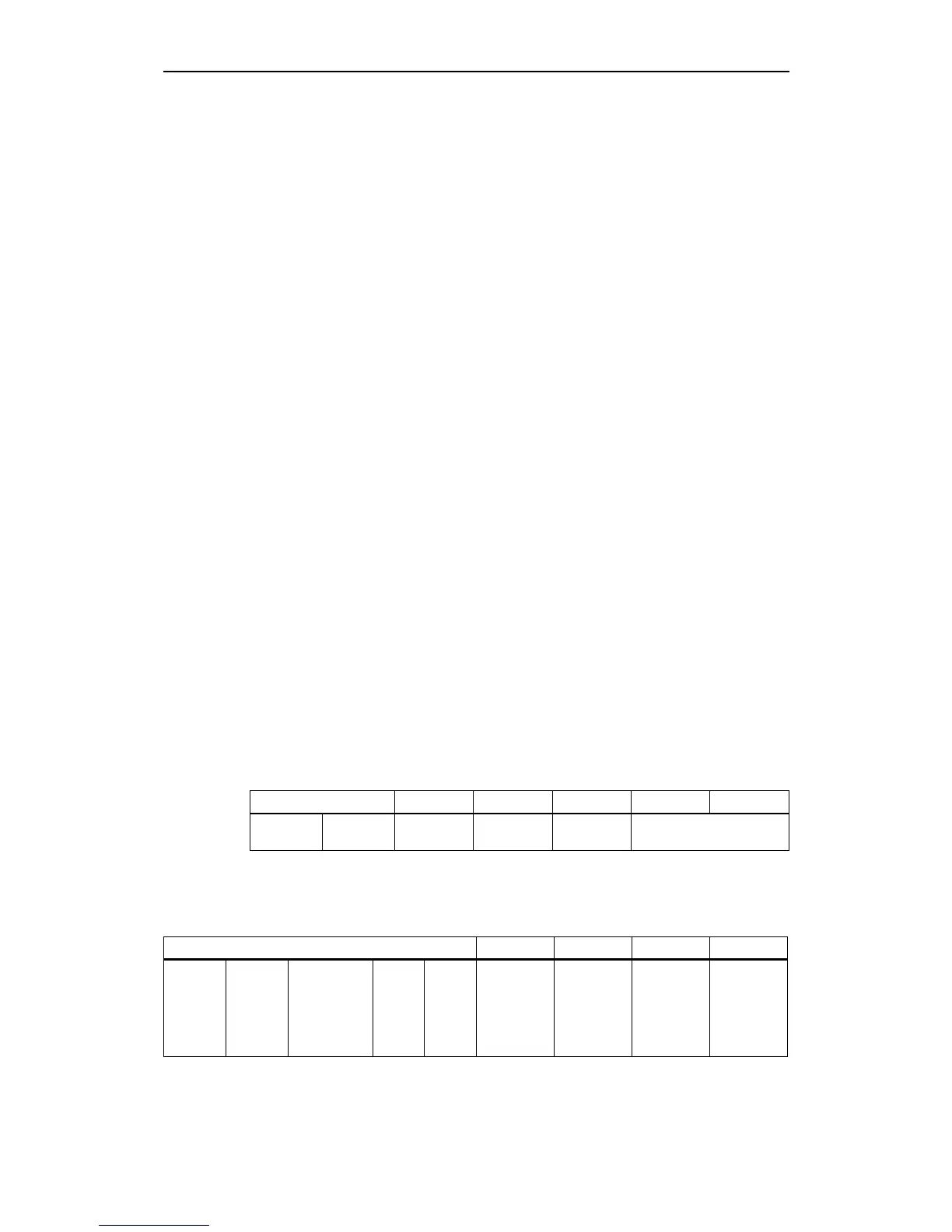
Table 3-7 SDO read request to parameter r0964.02 (object 0x23C4* sub2)
Byte 0: Bytes 1 Byte 2 Byte 3 Bytes 4,5 Bytes 6,7
Bits 7-5
CCS = 2
Bit 4-0 = 0 C4H 23H 02H reserved = 0
CANopen MICROMASTER response telegram
Table 3-8 MICROMASTER response to the SDO read request
Byte 0: Bytes 1,2 Byte 3 Bytes 4,5 Bytes 6,7
Bits 7-5
SCS = 2
(initiate
upload
respons
e)
Bit 4 = 0 Bits 3,2
n= 2 (word)
(number of
bytes that do
not contain
any data)
e = 1
expedi
ted
transfe
r)
s = 1
(data
size is
indicat
ed)
23C4H
(index)
02H
(subindex)
Word data
(2 bytes
data)
0H
(two bytes,
no data as
specified in
n)








 To Next Page