Issue 01/05 Data transfer using CANopen
CANopen Option Module Operating Instructions
6SE6400-5BC00-0BP0
55
3.3 Controlling MICROMASTER drive converters via
CANopen
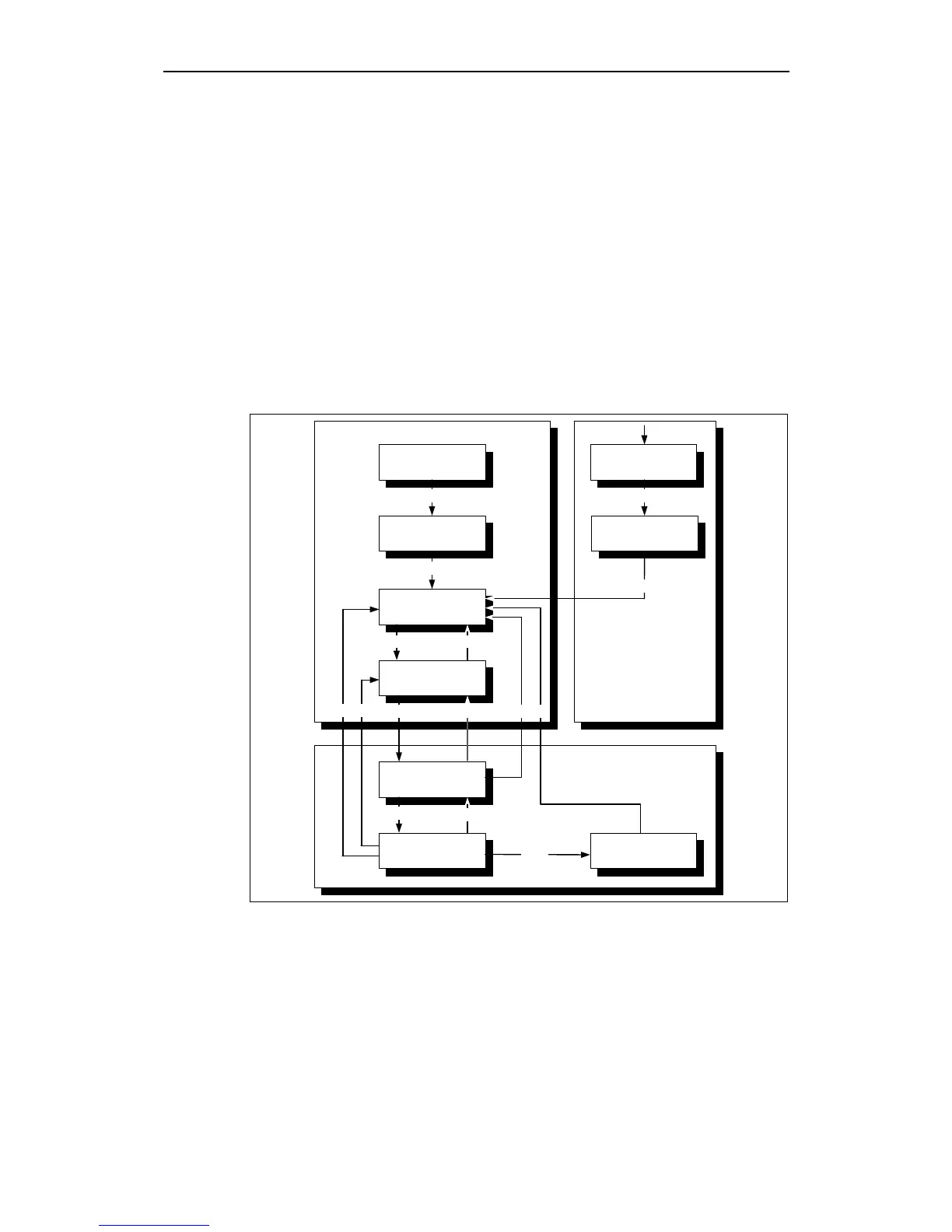
The state machine for drives - as is supported by MICROMASTER - is shown in
the diagram below. The state machine defines the various stati of the drives and
the possible transitions between them. In order to speed-up the drive run-up, the
drive does not require a second command to progress (advance) from Ready to
power-up to operation enable. If the control has set the two relevant bits, that are
required for these transitions, then the MICROMASTER only displays the powered-
up (switched-on) state in the status word and then automatically changes into the
Operation Enable state.
CANopen state machine
11
4
5
3 6
2 7
1
0
13
14
15
10 12
Start
Power
Disabled
Not Ready to
Switch On
Ready to
Switch On
Switch On
Disabled
Operation
Enable
Switch On
Fault
Fault
Reaction Active
Fault
Statusword
Bit 3 (Fault)
Quick Stop
Active
9
8
Power
Enabled
Fig. 3-15 State machine for drives








 To Next Page