Start-Up 02.2001 SLE / SLE-DP – SIMOLINK Encoder
GWE-477 763 4070.76 J Siemens AG
6-20 Operating Instructions SIMOVERT MASTERDRIVES
The transfer control bit U (bit 15 in output data word) implements the
transfer sequence for the receive channel and address by changing
logical states 0 to 1 to 0. The starting sequence must then be initiated
via SIMOLINK to enable pulse output. If bit U is switched to status 1 in
the output data word, the SLE-DP is deactivated. No pulses are output
and the status in the SIMOLINK write channel and the PROFIBUS input
data word equals ’SLE-DP not active’. The bits for receive channel and
address of the output data word are read in at the same time and OR’d
with the bits of the DIL switches. The results for receive channel and
address are checked; if an error is detected, this is indicated by the
LEDs on the front panel and by bits in the input data word. The settings
of the remaining DIL switches are still transferred again. After the SLE-
DP has been activated (U in status 0), the encoder waits for the starting
sequence via the new (or unchanged) SIMOLINK receive telegram.
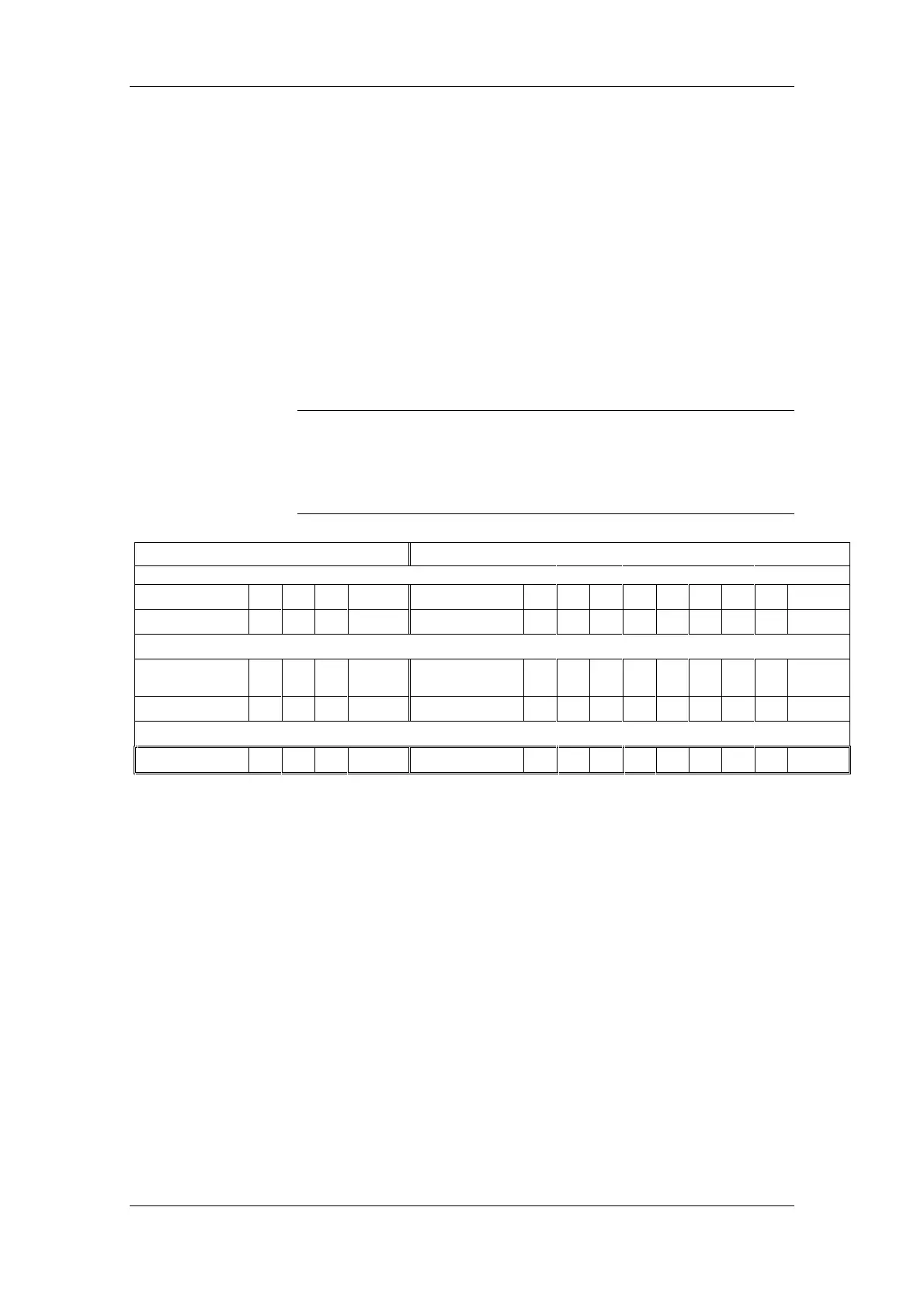
When the receive channel and address are changed via the
PROFIBUS, the bit-serial ORing of DIL switches and PROFIBUS output
data word must be noted (example below illustrates bit-serial ORing
based on a presetting and change strategy which are not
recommended).
Receive channel
Receive address
DIL switch S1
.3 .2 .1
DIL switch S2
.8 .7 .6 .5 .4 .3 .2 .1
Value:
101 5
dec
Value:
10110100180
dec
PROFIBUS ODW
Bit number
10 9 8
PROFIBUS ODW
Bit number
76543210
Value:
001 1
dec
Value:
00110010 50
dec
Result:
101 5
dec
Result:
10110110182
dec
Table 6-12 SLE-DP; Example of bit-serial ORing of receive channel and address
Recommendation:
♦ Set a fixed receive channel via DIL switches S1.1...S1.3.
♦ Do not change the receive channel via the PROFIBUS output data
word.
♦ Set DIL switch S2 for the receive address permanently to its default.
♦ Input the complete receive address, including bits from the default
address set via DIL switch, via the PROFIBUS output data word.
♦ Set DIL switch S1.5 to ’SLE active’ (position 1) (SLE can always be
started on the default address after ’power ON’).
♦ Activate the SLE-DP only via the PROFIBUS in conjunction with the
current receive address
NOTICE










 To Next Page