CN-Series Hardware Installation and Maintenance Guide Task 1—Performing the Pre-Installation Tasks
Obtaining Hardware That is Not Supplied on page 20
Rail Kit Components
The rail kit contains these items:
• Two sliding rail tool-less (fasteners optional) assemblies, left and right.
• Two hook and loop cable straps.
• Documentation.
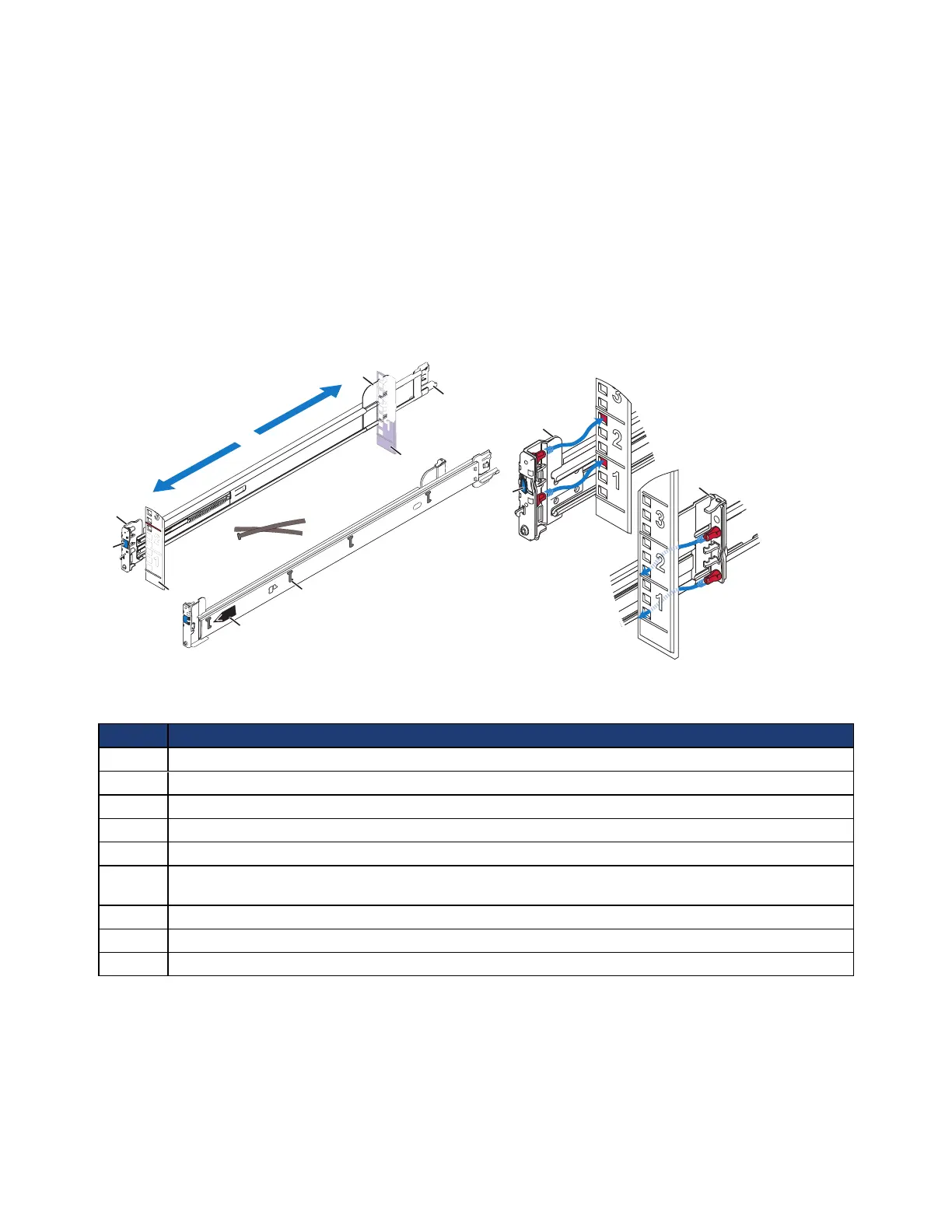
The following image shows the rail kit components.
The following table describes the rail kit components in the above image.
Callout Component
1 Front rail bracket—secures the rail to a rack column, using holes at position 1 and 4 in the 2U space.
2 Rear rail bracket—secures the rail to a rack column, using holes at position 3 and 6 in the 2U space.
3 Rack depth adjustment.
4 Blue, spring-loaded latch—secures the rails in place.
5 Rack columns (posts).
6 Cable management arm mount point or, if you do not use the cable management arm, cable fastening
point.
7 Cable straps.
8 J-shaped retaining slots (4) for the pins on the side of the server (shown on left rail).
9 Label identifying the left or right rail (shown on left rail).
Related Topics
Task 2—Installing Each CN-Series System in a Rack on page 23
19



 To Next Page