CN-Series Hardware Installation and Maintenance Guide Accelerator Card Monitoring
System
State
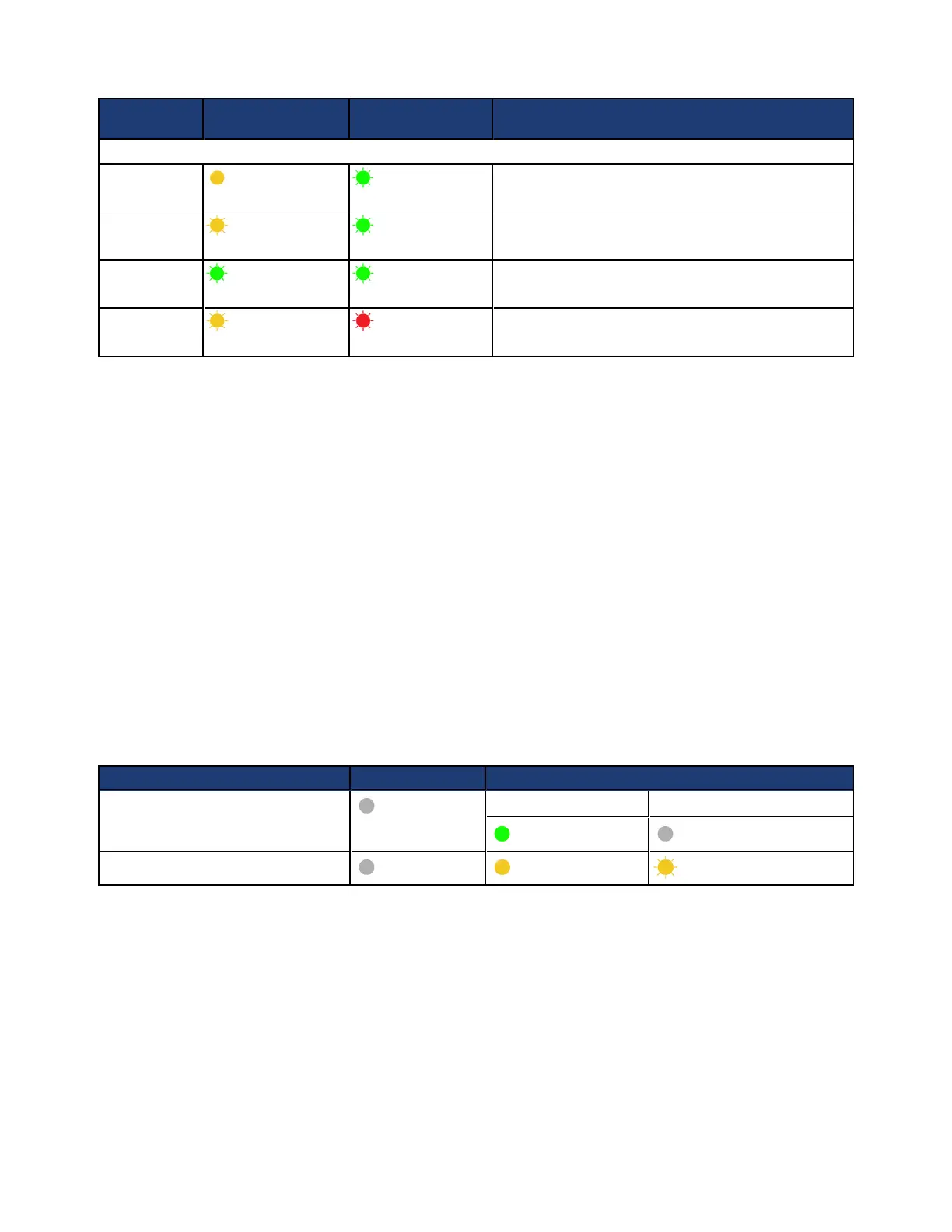
LED 1 LED 2 Status Description
State save
Steady yellow Flash green
Accelerator card NVRAM state save is in progress.
State restore
Flash yellow Flash green
Accelerator card NVRAM state restore is in progress.
Upgrade
Flash green Flash green
Accelerator card FPGA/firmware upgrade is in
progress.
Host Ctrl
Flash yellow
(alternate)
Flash red
(alternate)
Accelerator card not in service. See your service
provider for a replacement.
If an Accelerator card fails, contact your service representative to have it replaced.
Viewing Accelerator Card Status in the vSphere Client
After installing and deploying the system, you can use the vSphere Client to view the status of an
Accelerator card to ensure that the card is operational.
To view Accelerator card status:
1. In your vSphere Client, expand the datacenter that contains the CN-Series system.
2. Select the CN-Series system.
3. Select the SimpliVity tab.
Accelerator Card is Not Detected
If an OmniCube is unable to detect or communicate with an Accelerator card after powering on the
OmniCube or performing a system software upgrade, you will see the following error conditions:
LED Number Initial State Error state (Host Ctrl)
1 (top in system enclosure)
Off
After power on After software upgrade
Steady green Off
2 (bottom in system enclosure)
Off Steady yellow Flash yellow
The problem might have been caused by a firmware load error on the Accelerator card. You can try to
correct this problem by shutting down and restarting the OmniCube, which prompts the Accelerator card to
revert to its backup firmware.
Related Topics
Reverting an Accelerator Card to its Backup Firmware on page 45
44



 To Next Page