CN-Series Hardware Installation and Maintenance Guide Direct-Connected Storage Network Configuration
• Separate the SimpliVity Storage, Management, and Federation networks by using VLANs on each
switch.
Related Topics
Obtaining Hardware That is Not Supplied on page 20
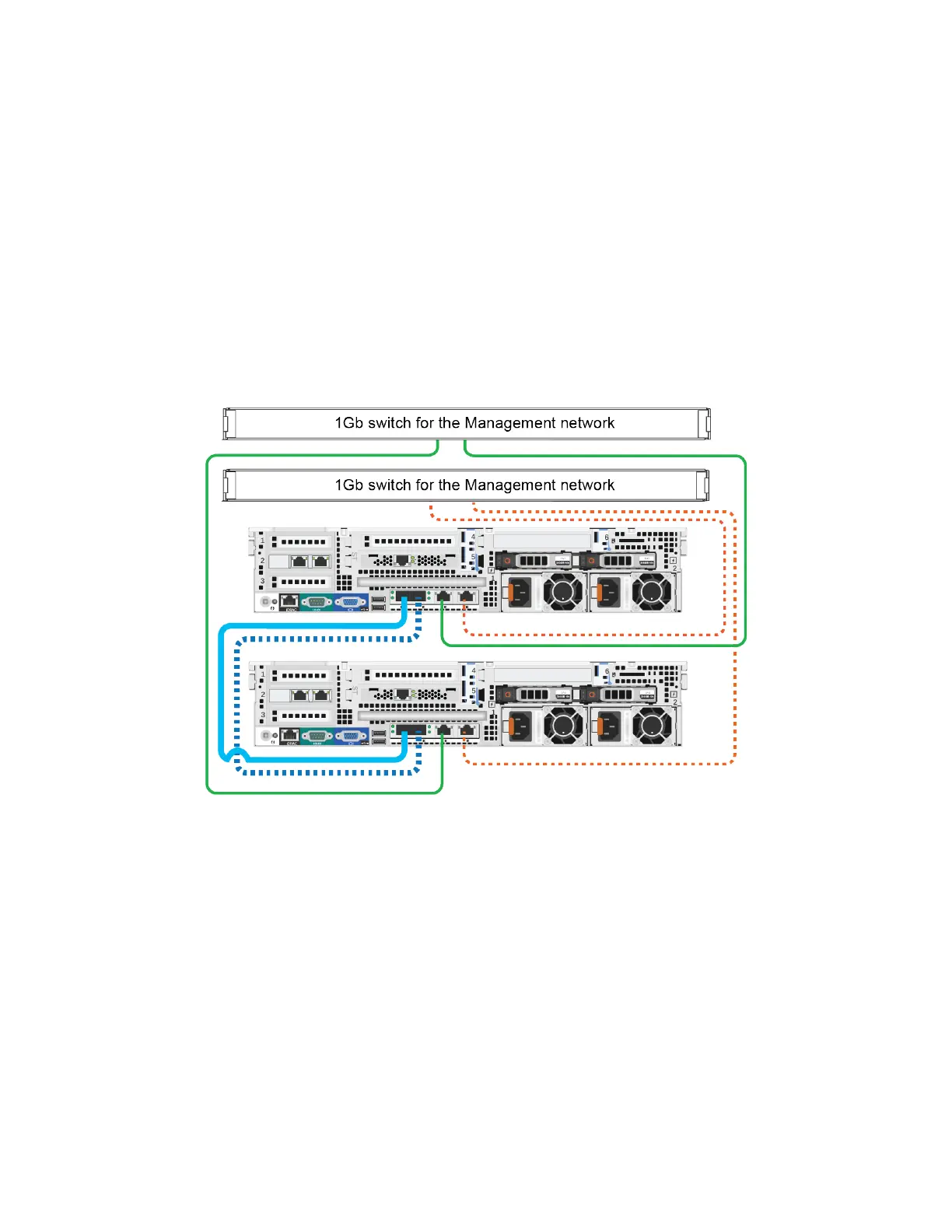
Direct-Connected Storage Network Configuration
The following image shows a minimum two-OmniCube network configuration that uses redundant, direct
10GbE connections for the Storage and Federation networks and redundant 1GbE connections to 1GbE
switches for the Management network.
Notes: This network configuration requires additional cables not supplied in the shipping carton.
Guidelines for this network configuration:
• You cannot use direct connections for the Storage network if you have three or more systems in a
Federation datacenter.
• Use two SFP+ Direct Attach cables (or Fiber Optic cables) to directly connect the 10GbE network
interfaces on each system.
• For each system, you use two network cables to connect the 1GbE network interfaces to different
1GbE switches.
• Port 1 on system A must connect to port 1 on system B and port 2 on system A must connect to port 2
on system B.
Related Topics
Obtaining Hardware That is Not Supplied on page 20
58



 To Next Page