4 - Basic Troubleshooting
You can use the diagnostic indicators and LEDs to identify problems with the CN-Series system hardware.
For assistance with resolving hardware problems, such as a component failing, contact your service
provider.
Federation events and alarms appear in the vSphere Client. When you configure the CN-Series system as an
OmniCube in a Federation, you can also view the health status of CN-Series system components by
selecting an OmniCube in the vSphere inventory and clicking the SimpliVity tab.
About Diagnostic Indicators
The left side of the CN-Series system front panel displays diagnostic indicators that glow when the system is
functioning properly and when a hardware-related error occurs. The indicators can help you correct
problems before they affect service levels.
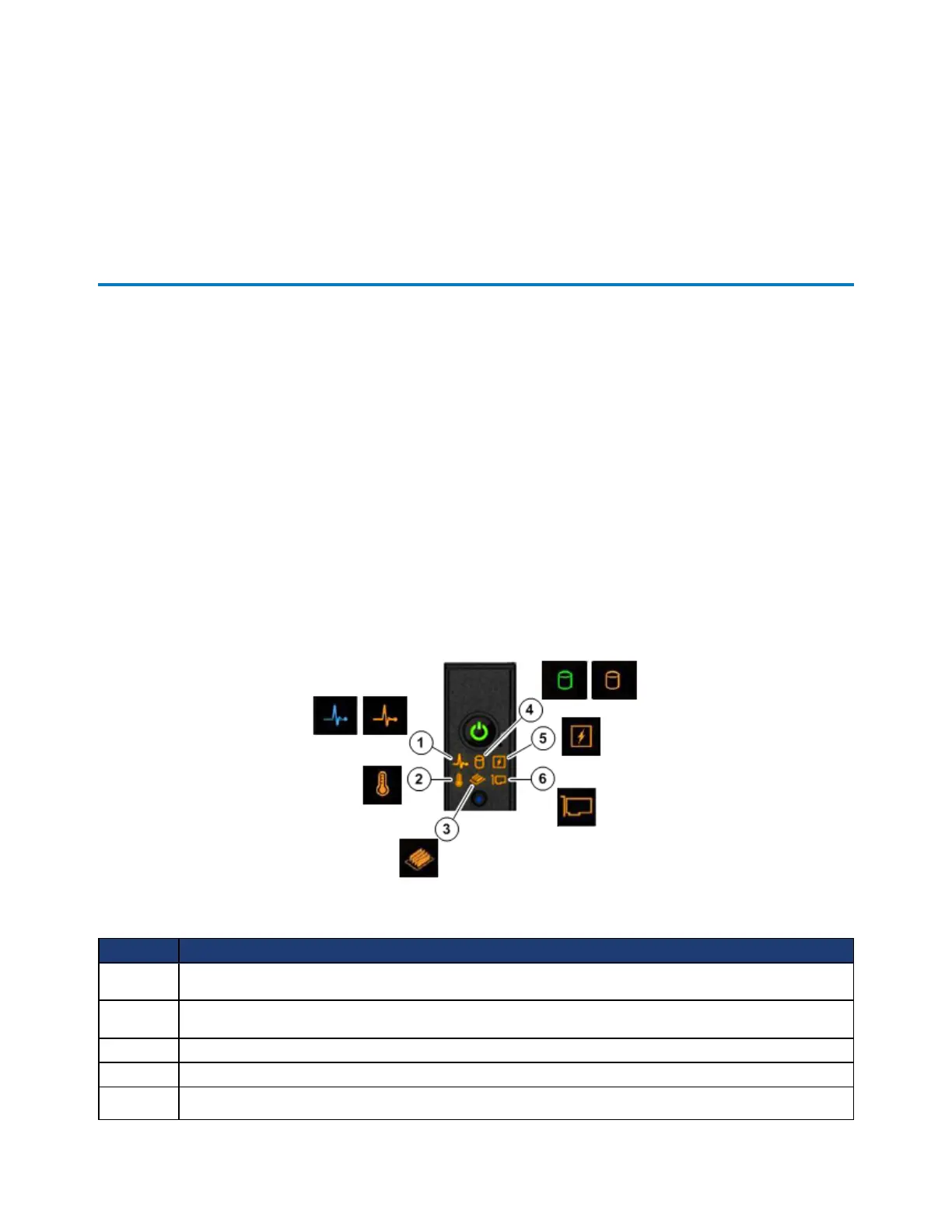
The following image shows the diagnostic indicators on the front panel and the colors they glow depending
on the condition.
Callout Description
1
Health indicator. If no errors exist, the indicator is steady blue. The health indicator flashes amber
during startup or if a system component, such as a fan or disk, fails.
2
Temperature indicator. The indicator flashes amber if the system experiences a thermal error. For
example, a temperature is out of range or fan fails.
3
Memory indicator. The indicator flashes amber if a memory error occurs.
4
Drive indicator. The indicator flashes amber if a drive fails. Green indicates normal operation.
5
Electrical indicator. The indicator flashes amber if the system experiences an electrical error. For
The following table describes the diagnostic indicators shown in the image above.
39



 To Next Page