.Attaching
lhe
feed
cóver
CF)
.
lhe
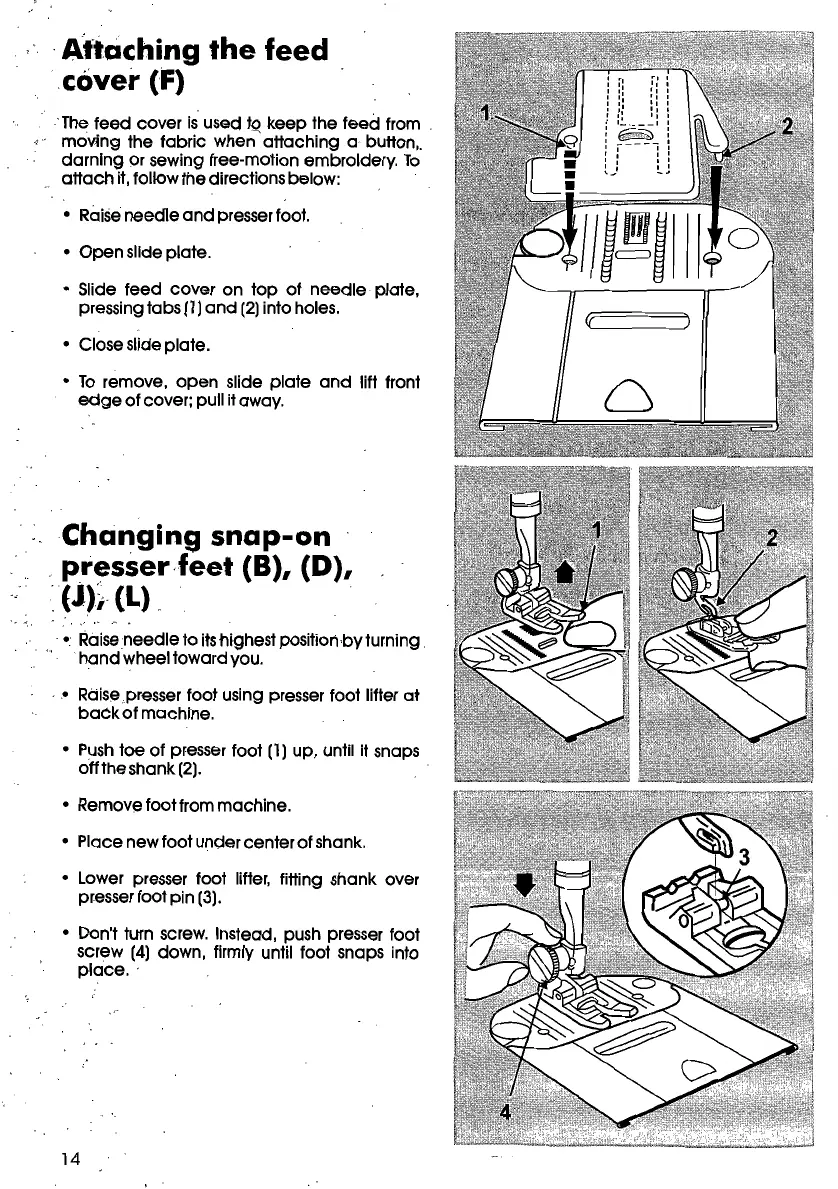
feed cover
ts
used tQkeep the teed from .
•s" movlng the tobrlc when attaching a button,
darnlng or sewing free-motion embroldery.
lo
attach
it,follow the directions below:
o Raiseneedle
and
presserfoot.
o Qpen slide plate.
o 5lide feed cover on
top
of needle plote,
pressingtabs (1)
and
(2)into holes.
o Close slide plate.
o
lo
remove,
open
slide plate
and
/ift front
edge
of cover; pull it away.
Changing
snap-on
presser·feet
(8),
(D),
:(j)~
(L) .
o.
Raise
needle
to itshighest posltlonbvturning .
hand
wheef towardvou.
• 0 Rdisepresser foot using presserfoot Iifter at
back
ot machine.
o
Push
toe of presser foot (1) up, until it snaps
offtheshank (2).
o Remove footfrom machine.
o Place new foot undercenterof shank.
o Lower presser foot Iifter, fitting shank over
presserfoot pln (3).
o Don't turn screw. Instead, push presser foot
screw (4) down, flrmly until foot snaps into
place
..
14









 To Next Page