Sirona Dental Systems GmbH 14 SIVISION 3
Operating Instructions C4
+
14.10 Switching between VIDEO mode and PC mode
59 06 313 D 3382
D 3382.201.01.13.02
97
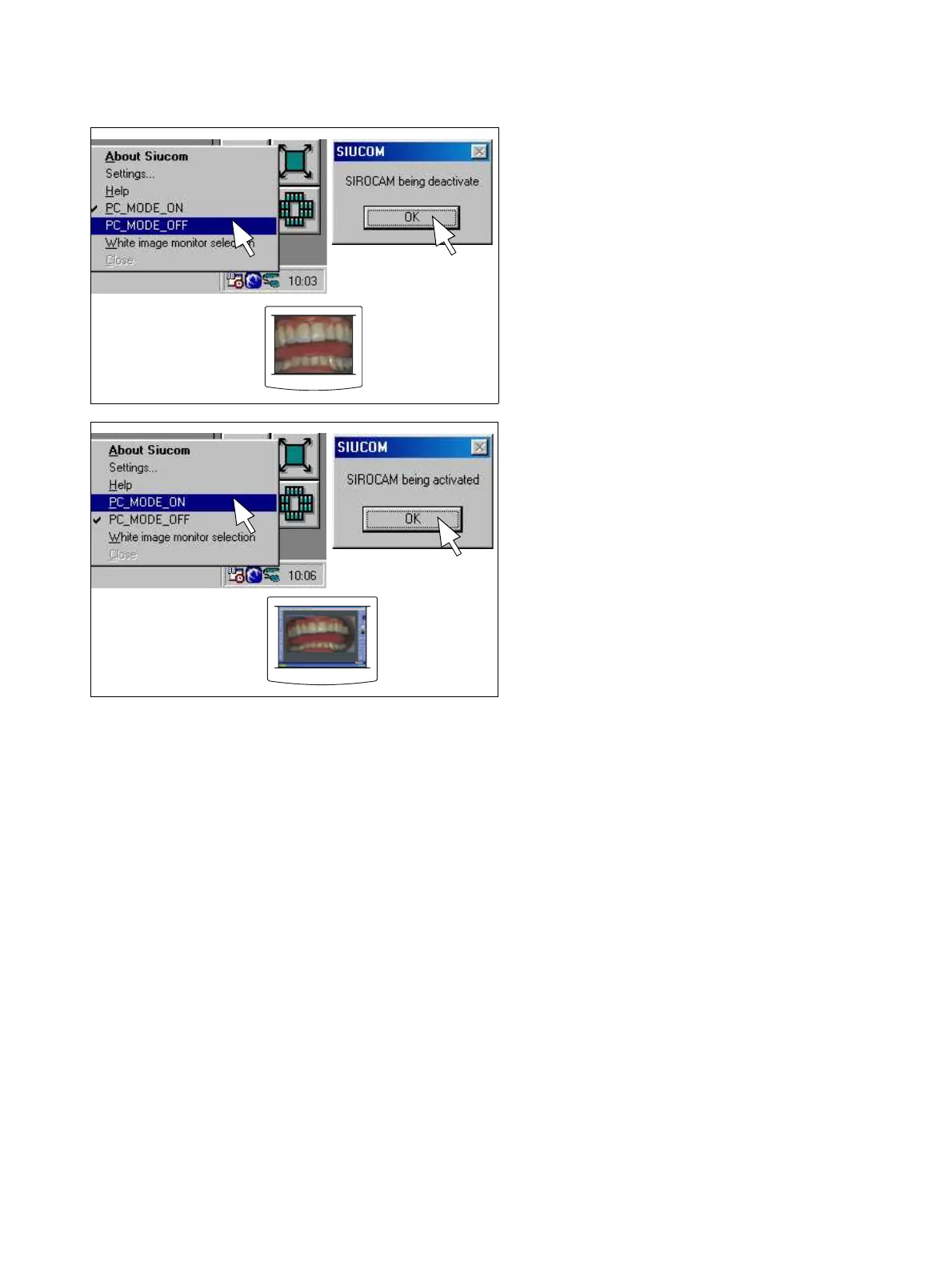
Switching to video mode
Right-click the Siucom icon in the Systray (usually in the
lower right corner of the screen).
In the Siucom popup menu which then opens, click
“PC_MODE_OFF”. Confirm by clicking OK in the
„SIROCAM being deactivate“ message box.
These settings will remain saved even after you switch
off the PC.
The SIVISION monitor must also be set to video mode
(S Video Port; see monitor operating instructions).
Switching to PC mode
Right-click the Siucom icon in the Systray (usually in the
lower right corner of the screen).
In the Siucom popup menu which then opens, click
“PC_MODE_ON”. Confirm by clicking OK in the „SIRO-
CAM being activated“ message box.
These settings will remain saved even after you switch
off the PC.
The SIVISION monitor must also be set to PC mode
(Analog Port; see monitor operating instructions).
After switching the treatment center or the PC off and on
again, it may be necessary to reset the monitor to PC
mode.



 To Next Page