HRX-OM-W002-A
Chapter 2 Name and Function of Parts
2.4 Operation display panel HRR Series
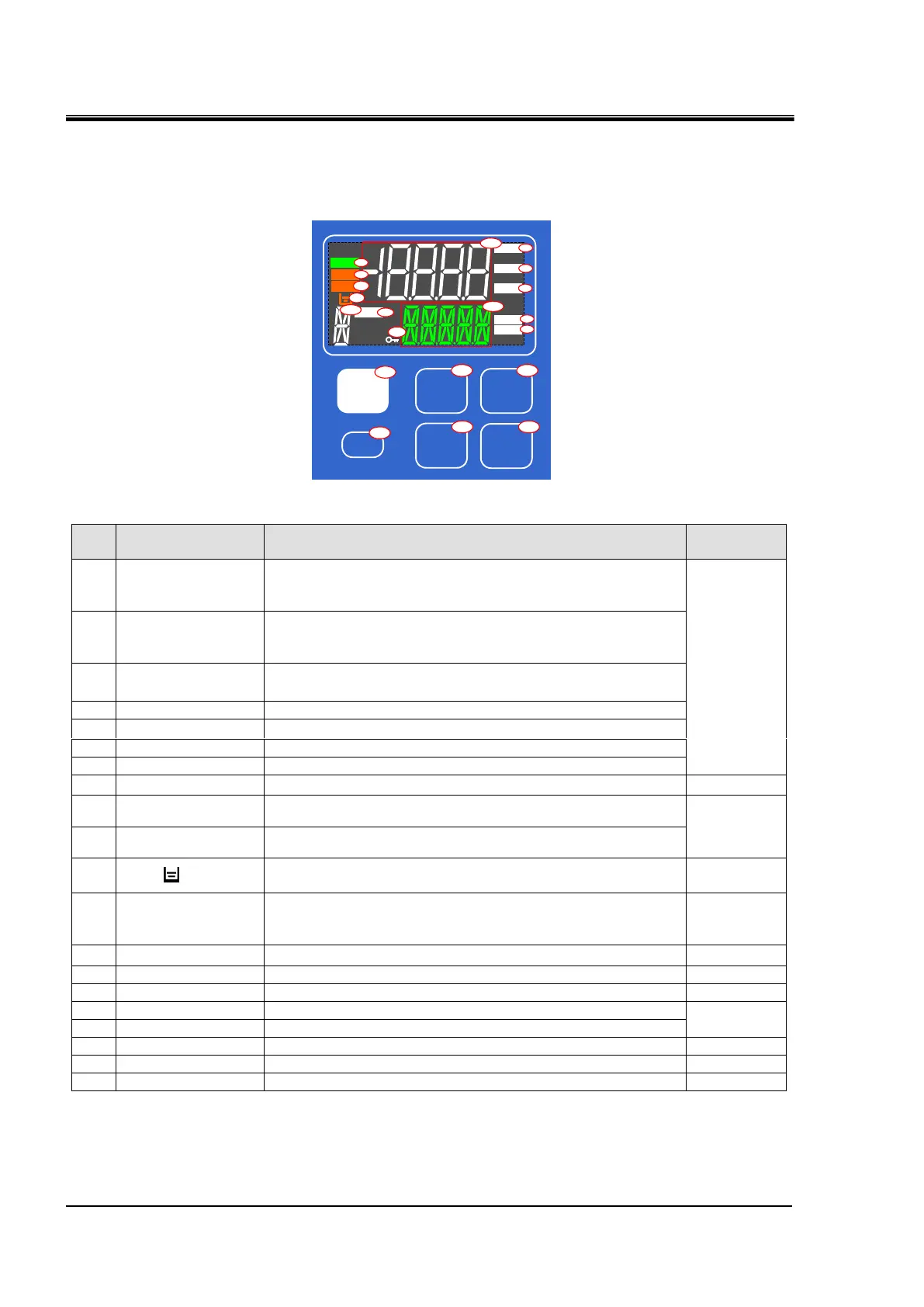
2.4 Operation display panel
The operation panel on the front of the product controls the basic operation of
the product
図 2-5 操作表示パネル
Table 2-4 Operation display panel
Digital display
(7 segment,
5 digits)
Displays the temperature,pressure and flow rate of the circulating fluid
and the set values of other menus.
Digital display
(11 segment,
5 digits)
Displays the discharge temperature of the circulating fluid and the set
values of other menus.
Lights up when temperature is displayed on the digital display.
Lights up when pressure is displayed on the digital display part.
Lights up when flow rate is displayed on the digital display part.
Lights up when time is displayed on the digital display section.
Lights up when seconds are displayed on the digital display section.
Lights up when the product is started and in operation.
Lights up when a fault occurs.
(This product will stop.)
Lights up when a warning occurs.
(This product will continue operation.)
Lights up when 「AL.01 Tank level drop failure」 or
「AL.02 Tank level drop」alarm is generated.
Digital display
(11 segment,
1 digits)
「X」 is displayed when notice for maintenance is generated.
Lights up during remote operation by communication function.
Lights up when key lock setting is active.
Press and hold for 1 second to start or stop.
Switching of each menu and cancellation of setting values.
Switch to setting mode and set values.
Move item upward or increase the set value.
Move item downward or decrease the set value.
▲
▼
ENT
MENU
RUN/
STOP
RESET
℃
MPa
LPM
SEC
ALM
WRN
RUN
RMT
H
15
20
16
17
18
19
12
14
2
1
6
7
5
4
3
13
8
9
10
11


 To Next Page
 Loading...