BTP-M300 Service Manual
- 36 -
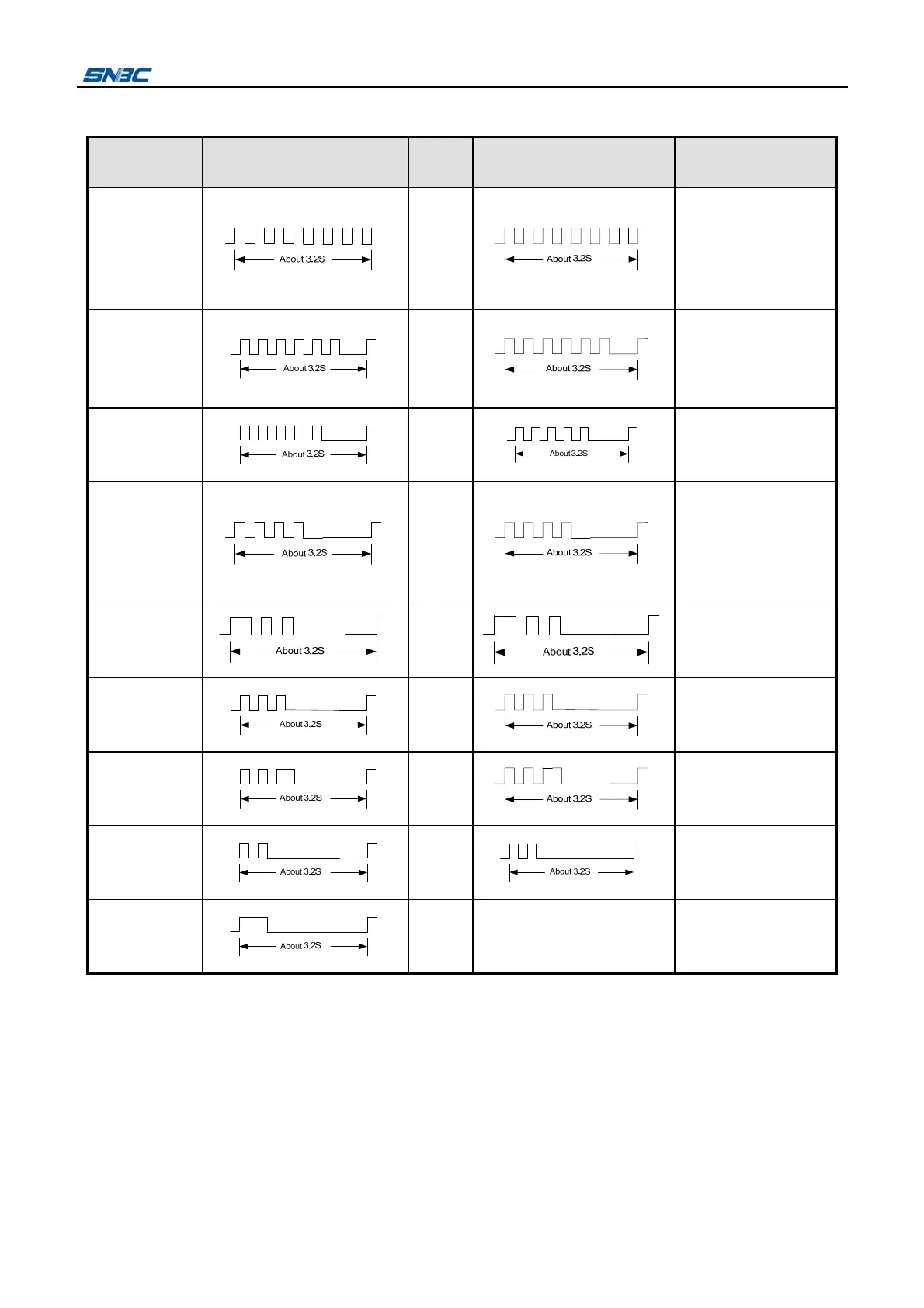
6 Error Types and Processing
Errors ERROR LED
PAPER
LED
Buzzer Recovery
HP Error Off
Press the FEED
Button for a long time,
or send command DLE
ENQ 2, or re-start the
printer.
Print head is
overheated
Off
Automatically come
back to normal status
after print head cooling
down
Voltage is
abnormal
Off
Turn on the printer
power again.
Cutter error Off
Press the FEED
Button for a long time,
or send
command DLE ENQ 2,
or re-start the printer.
Rear cover
open
(unrecoverable)
Off
Send command DLE
ENQ 2 after closing
rear cover
Rear cover
open
(recoverable)
Off
Close rear cover
Front cover
open
Off
Close front cover
Paper end
On
Automatically come
back to normal status
after loading paper.
Paper near
end
On Replace roll paper
Notes:
The priority sequence of errors output from high level to low level is as below:
HP Error > Print head is overheated > Voltage is abnormal > Cutter error > Rear cover open >
Front cover open > Paper end > Paper near end;
The processing method of rear cover open error can be set by command GS ( E.
When the cutter error occurs due to the paper jam, please turn off the printer, and turn on the printer
after clearing paper jam.



 To Next Page