BTP-M300 Service Manual
- 13 -
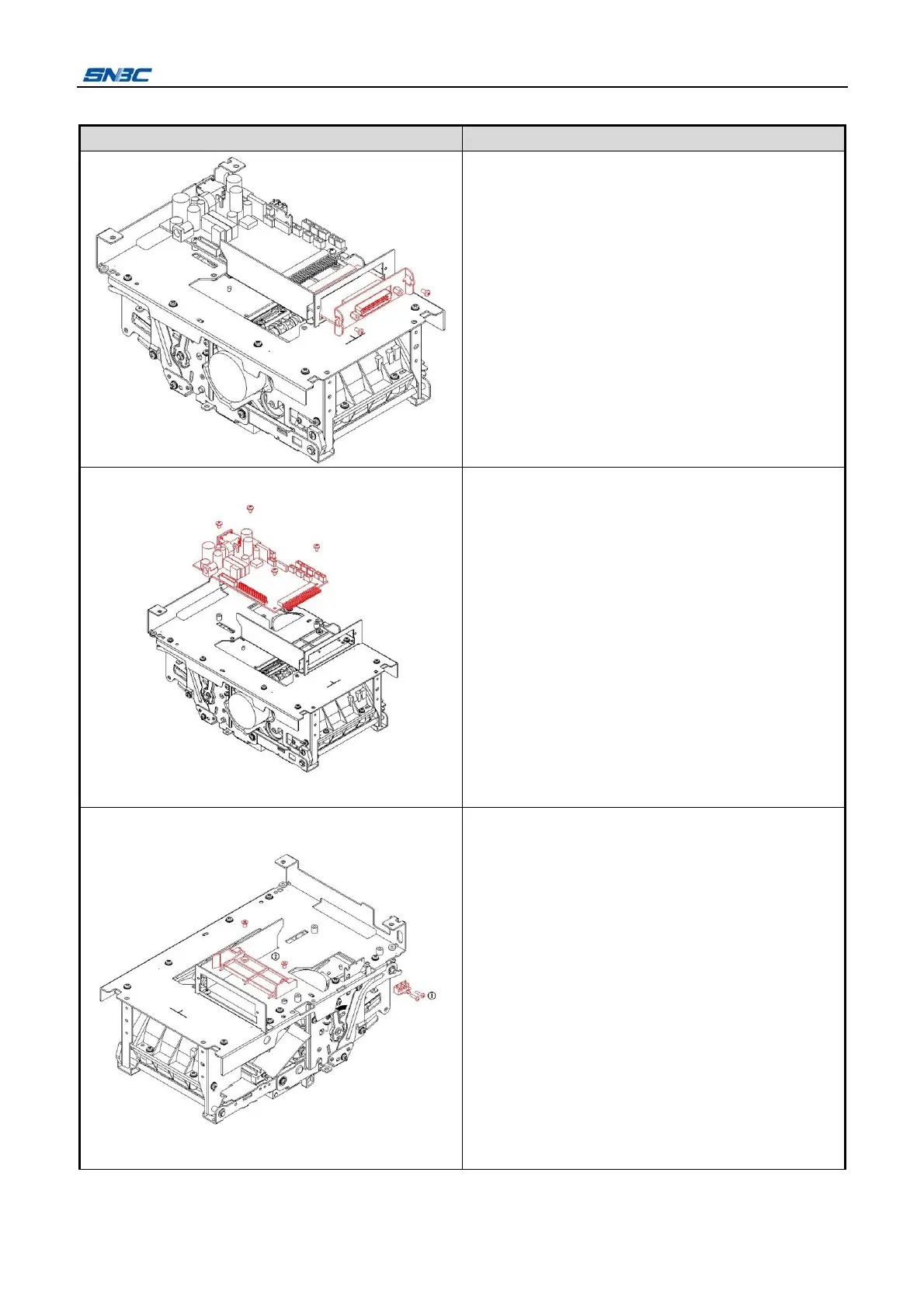
4.2.2 Disassemble the main control board cover
Picture
Instructions
Remove the two screws (M2.5x5) shown in the
figure with cross screwdriver, and take off the
optional communication interface module.
Notes:
Please use moderate force to plug/unplug the
communication interface in horizontal
direction to avoid damaging the pins.
1) Unplug all the wires in the main control board
with a moderate force;
2) Remove the four screws (M3x5) with the
screw driver and take off the main control
board.
Notes:
Please keep the main control board safely to
avoid scratching and short circuit;
Please do not pull the connection wire to avoid
damage to the wire when plug and unplug the
connection wire.
1) Remove the two screws (M2x8) shown in the
figure at with cross screwdriver and take off ①
the micro switch;
2) Remove the two sunk screws (M3x5) shown in
the figure at with cross screw driver and ②
take off the guide plate;
3) Take off the power switch in the arrow
direction shown in the figure



 To Next Page