snom technology AG • 79
[ SNOM 320 USER MANUAL V1.00 ]
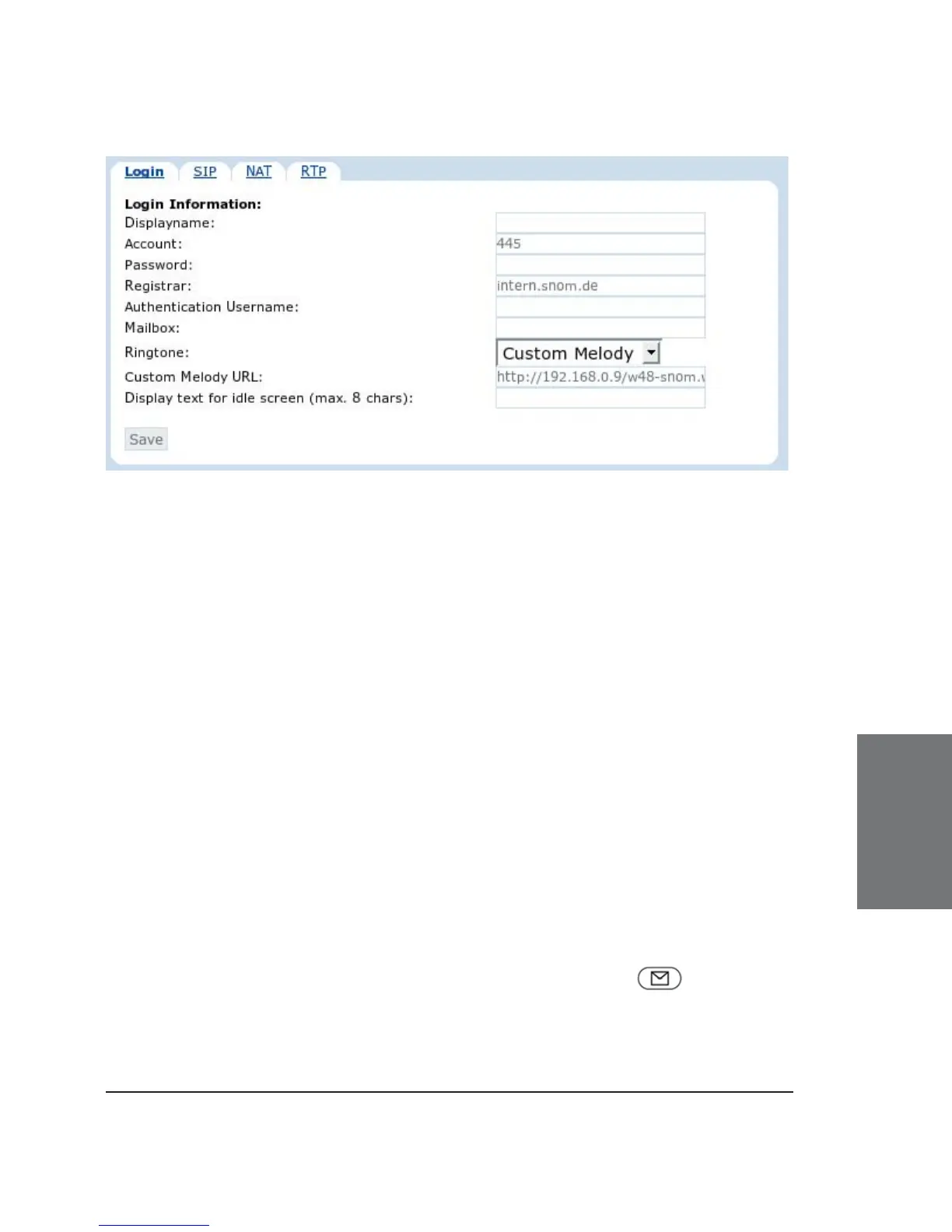
Login Information
Displayname: Set the name you would like to associate with
each line, e.g. “John Smith”. This information is also sent out to any party
you are calling.
Account: This is the account with which you register to a registrar/
proxy. It could be alphanumeric, e.g. “js”, or based on digit like “445” in
the screenshot above.
Password: This is the password to be used for challenge
responses. In order to protect them from unauthorized use, passwords
are not displayed in their true form, but as a series of asterisks (**..).
Registrar: Specify the IP or DNS address of the registrar/proxy
where you want to register this account. After a successful registration,
the registrar knows how to reach this specifi c line and can route requests
(e.g., incoming calls) from other registered parties to this phone.
Authentication Username: Registrar environments may need
different user names for registration and authentication.
Mailbox: If you have set up a mailbox, specify the account name
for that mailbox here to associate it with this particular SIP line. This is
important for contacting your mailbox - by pressing the key - when
there are no new messages indicated or when the MWI message does not
include the proper mailbox SIP URI.
6





 To Next Page