39
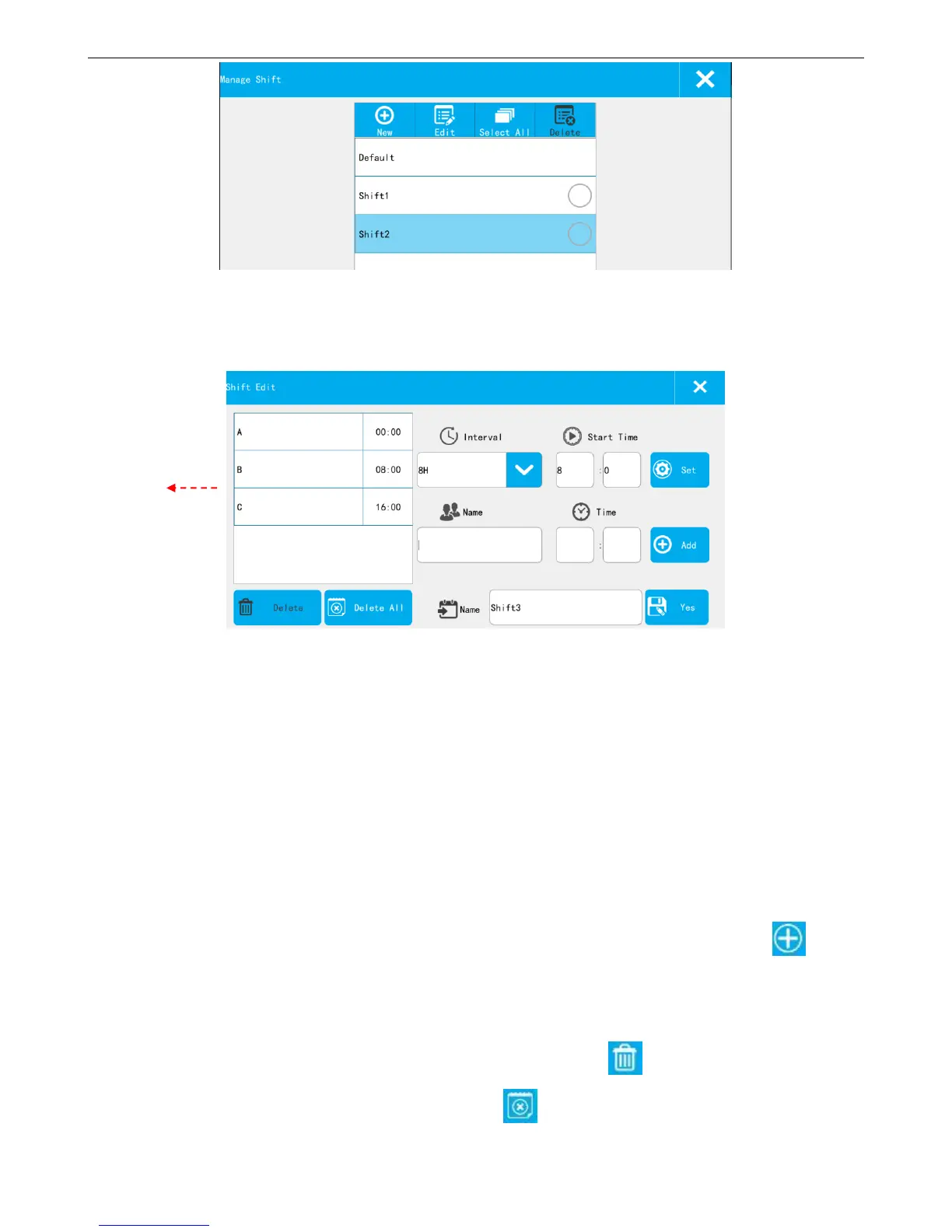
Shift List: Show the default and new built shift.
New: Building new shift
【Interval】: According to the selected time interval, 24 hours a day is divided into the corresponding number of
shifts. For example, the time interval is set to 4H, the system automatically generates 6 shifts (default A-F), and shows
in the left list.
【Start Time】: Time of first shift. For example, set the interval to 4H, the starting time is set to 8:00, then the
first shift A start time is 8:00, shift B start time is 12:00, shift C start time is 16:00, and so on.
【Set】: Select the time interval and the start time, click the button【Set】, will generate the default shifts
automatically, and shows in the left list.
【add】:If need to add another shift, you can input the 【shift name】 and the 【time】, click 【Add】,
the new shift will be added to the list on the left side.
【shift content list】: Show the current team all content; Maximum user can add 48 shifts.
【delete】: If need to delete any shift, select that one in the list, click 【Delete】
【delete all】:If need to delete all exist shifts, click 【Delete All】



 To Next Page