4
DVR4400 DVD+VCR
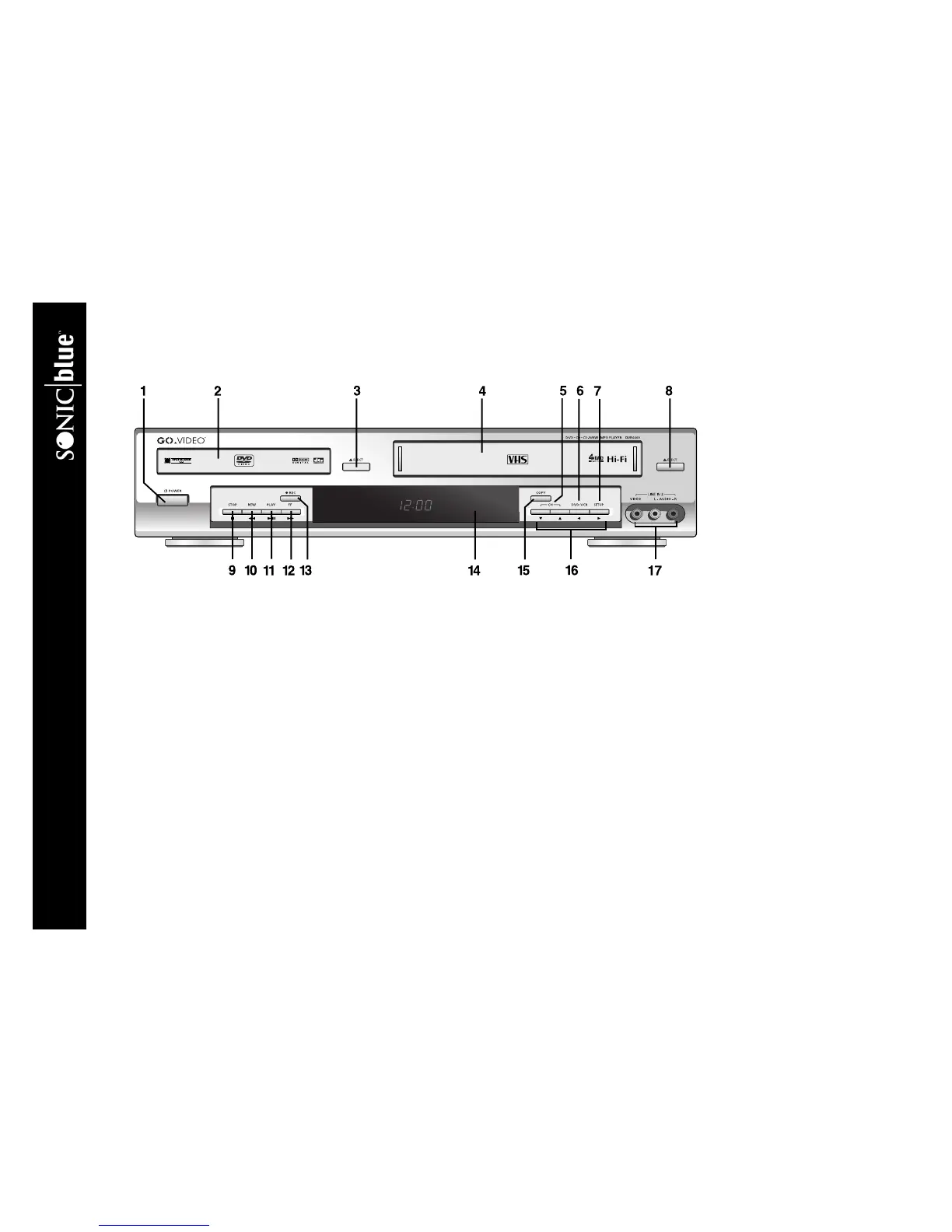
:: Front Panel Overview
Front Panel Features
1POWER Press to power the DVD+VCR on or off.
2DVD DECK Deck used for playback of DVD, CD, VCD/SVCD and CD-R/RW discs.
3EJECT (DVD) Press to open and close the DVD deck.
4 VCR DECK Deck used for playback of VHS tapes.
5CH Y/B Press to select the next or previous channel.
6DVD-VCR Press to toggle control between the DVD deck and the VCR deck.
7SETUP Press to display the DVD+VCR menu system and confirm menu settings.
8 EJECT (VCR) Press to eject the tape from the VCR deck.
9STOP J Press to stop playback.
10 REW AA In DVD mode, press to skip to the previous track. In VCR mode, press to rewind the tape. Press and hold to scan
backward during playback.
11 PLAY/PAUSE "|| Press once to start playback. Press again to pause playback. Press again to resume playback.
12 FF "" In DVD mode, press to skip to the next track. In VCR mode, press to fast-forward the tape. Press and hold to scan for-
ward during playback.
13 REC F Press once to start recording in the VCR deck. Press repeatedly to add recording time in 30-minute increments.
14 FRONT PANEL DISPLAY Displays feedback on DVD+VCR operation.



 To Next Page