6
DVR4400 DVD+VCR
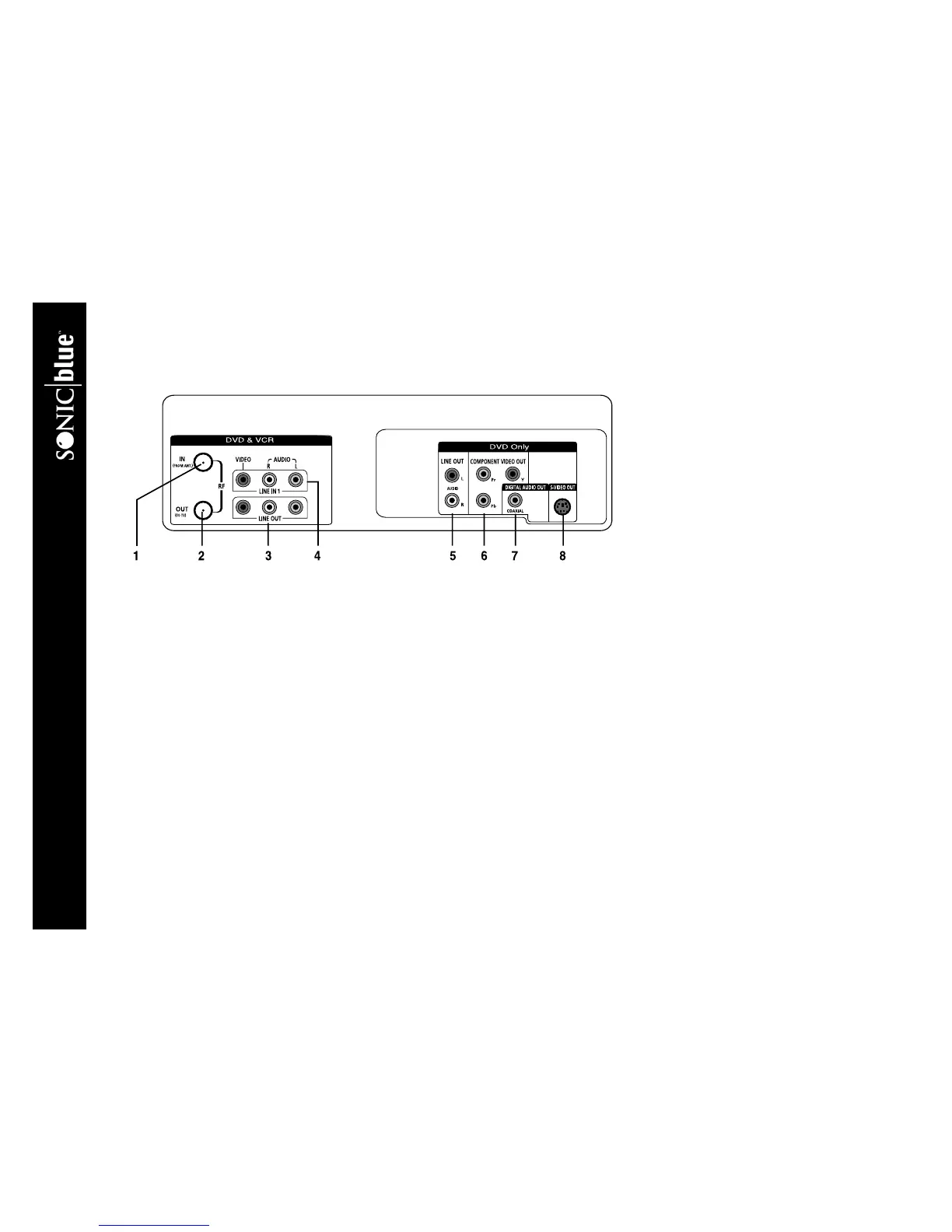
:: Rear Panel Overview
1IN (FROM ANT.) Connect to your antenna, cable TV, or cable box with a coaxial cable.
2OUT (TO TV) Connect to your television with a coaxial cable.
3 LINE OUT (DVD & VCR) Connect to the audio/video inputs of your television or stereo receiver using standard audio/
video cables.
4 LINE IN 1 Connect to the audio/video outputs of an external device, such as a video game or additional VCR. Referred to as
Line 1 in the menu system.
5 LINE OUT (DVD Only) Connect to the audio inputs of your television or stereo receiver using standard audio cables.
These audio outputs are for use with the S-Video or Component Video outputs only.
6 COMPONENT VIDEO OUT Connect to a television or display device equipped with Component video inputs (Y, Pb, Pr).
For the audio signal, use either Line Out or Digital Audio Out. For DVD playback only.
7 DIGITAL AUDIO OUT (COAXIAL) Connect to an audio/video receiver equipped with a coaxial input (for DVD play-
back only).
8S-VIDEO OUT Connect to a television or display device equipped with an S-Video input. For the audio signal, use either
Line Out or Digital Audio Out. For DVD playback only.



 To Next Page