8
DVR4400 DVD+VCR
:: Advanced Connections
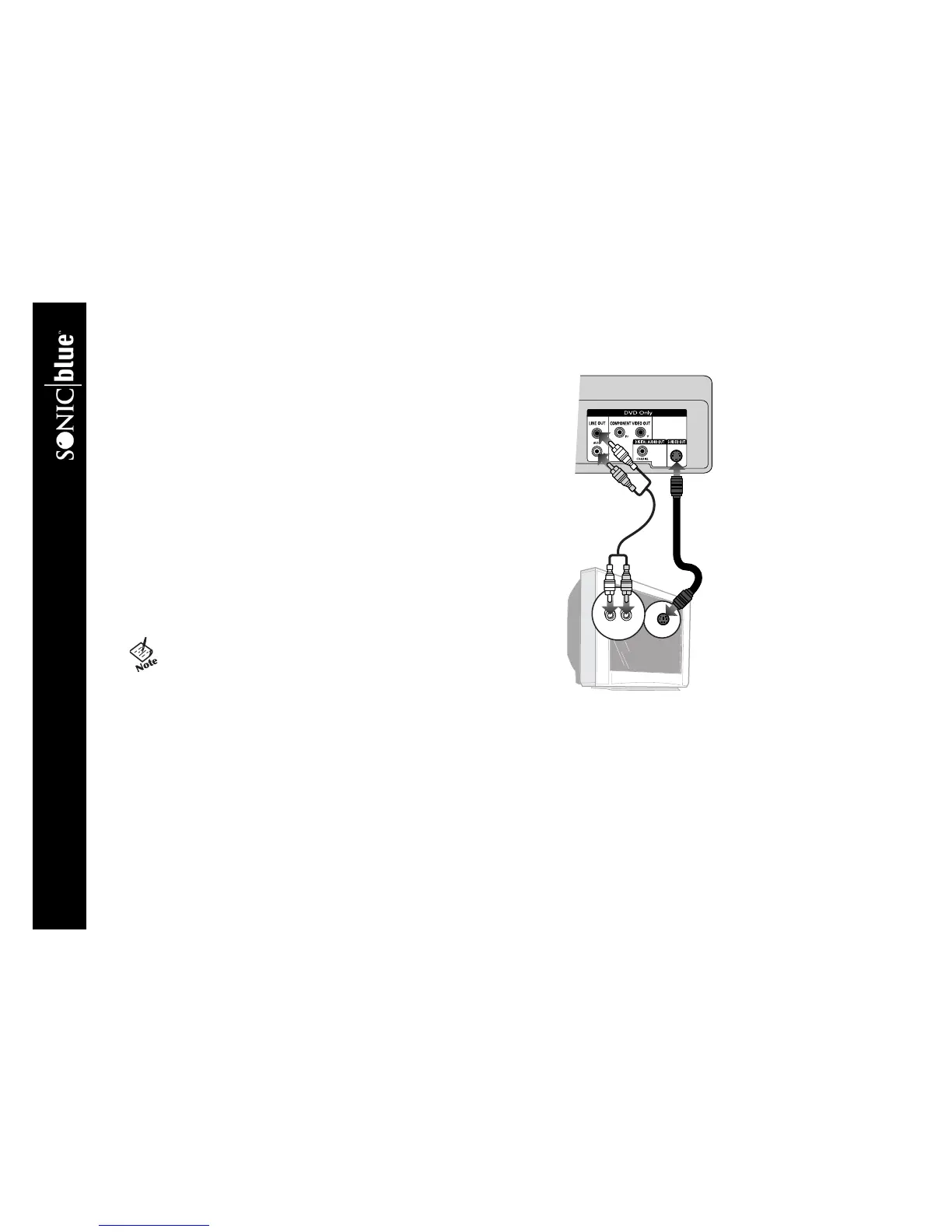
S-Video Connections
Use for improved picture quality when watching DVD movies. Before you
begin, please note the following:
• Your television must be equipped with an S-Video input.
• You can only watch the DVD player through the S-Video output. The VCR,
tuner and menu system are only available through the RF Out or Line Out
connection, see page 7.
1 Connect S-Video to TV Connect an S-Video cable from the S-VIDEO
OUT jack on the back panel of the DVD+VCR to the S-Video input on your
television.
2 Connect Stereo or Digital Audio to TV Connect stereo audio
cables from the Line Out jacks on the back panel of the DVD+VCR to the
line in jacks on your television or stereo receiver, OR connect the coaxial
digital audio output to your audio/video receiver; see page 11.
3 Enable S-Video in the DVD+VCR Menu System See Alt Video
Out on page 26 (required).
• Remember: You can only watch the DVD player through the S-
Video output.You must use the basic RF or Line Out connection
to watch VHS movies or to view DVD+VCR setup menus, see
page 7.
Television
DVD+VCR



 To Next Page