AUDIO OUTPUTS
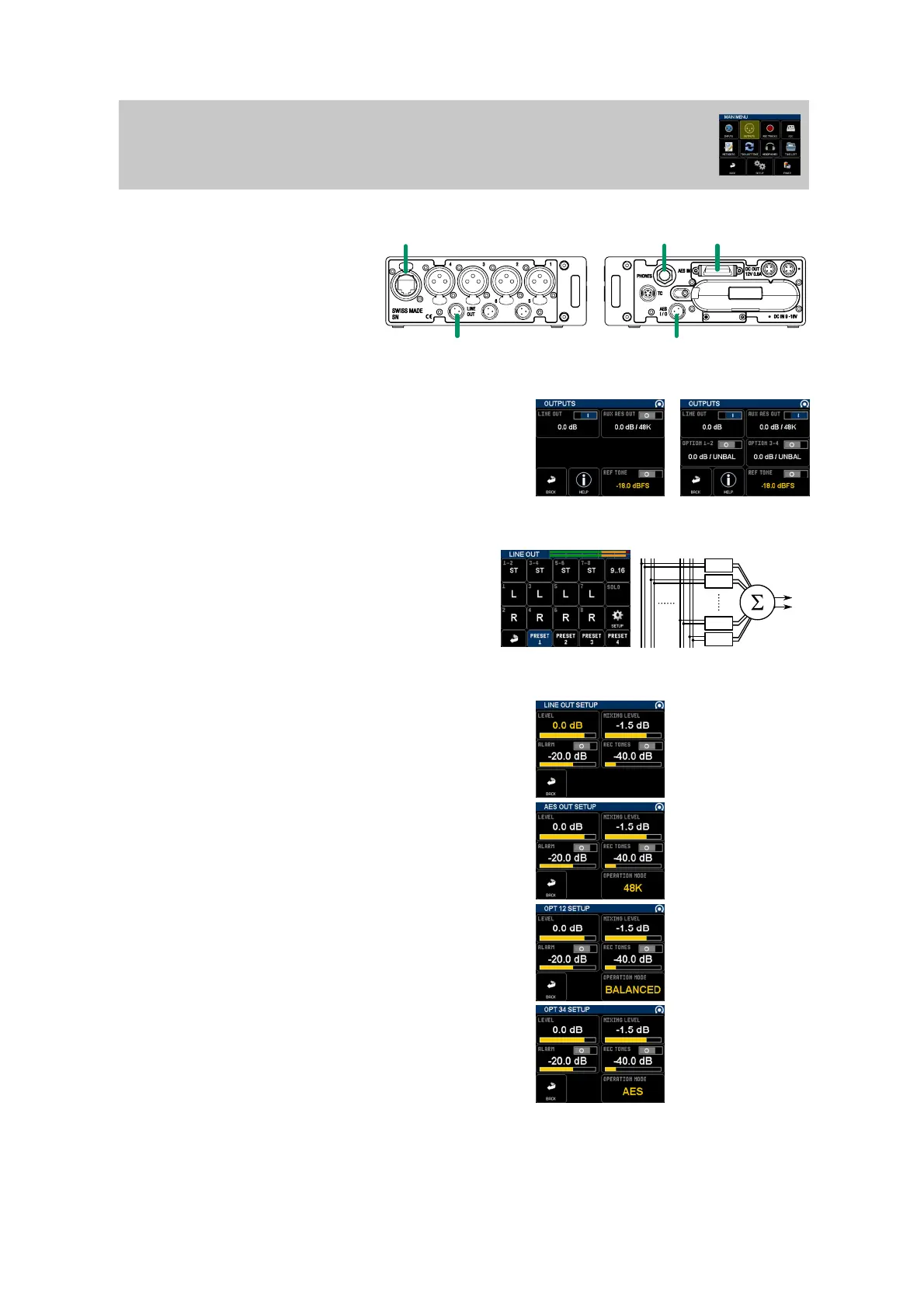
MAIN MENU / OUTPUTS
LINE OUT
OPTION CARD
AUX AES OUT
HEADPHONES
PHYSICAL
HEADPHONES: 2 channel 1/4'' jack and accessory
LINE OUT: 2 channels unbalanced line output (TA3)
AUX AES OUT: 2 channels digital AES (TA3)
OPTION CARD: 2 channels balanced or 4 channels
unbalanced or 4 channels AES (XLR5)
OUTPUTS MENU
All outputs are listed in that menu.
To enable/disable an output, keep the button pressed until power icon change.
Push the button to enter routing setup.
When Reference tone generator is enabled, a 1kHz sinus wave is injected in
all tracks and outputs. This means that output routing is disabled, but output
level is still working.
OUTPUT ROUTING SETUP MENU
The routing selection is identical to headphones monitoring, see
headphones monitoring for detailed instructions.
Solo button enable a solo of the selected track to the output channels
(and not in the headphones).
Presets are independant from all other outputs or headphones.
Press setup to enter OUTPUT SETUP menu.
OUTPUT SETUP MENU
Level: output level [dB]
Mixing Level: attenuation to be applied to each track when summing (mixing)
multiple tracks. 0dB: no attenation, -1.5db (default): sources have no phase
coincidence, -3dB: recommanded for phase coincident sources, -6dB: only used
if the sources may be absolutely in phase.
ALARM, REC TONES: level and enable status
AUX AES OUT SPECIFIC
OPERATION MODE: 48K, 96K, 192K. That output sampling frequency
follows recorder sampling: if sampling is set to 44.1, 88.2 or 176.4k,
output frequencies become 44.1, 88.2 or 176.4k.
OPTION 1-2 SPECIFIC
OPERATION MODE: BALANCED, UNBAL, AES
OPTION 3-4 SPECIFIC
OPERATION MODE: UNBAL, AES
Not available when option 1-2 is enabled and configurated as BALANCED.
4 CHANNELS OUTPUT
OPTION CARD INSTALLED
12 34 13
14
15
16
LEFT
RIGHT
STEREO
STEREO
M/S
MONO


 To Next Page
 Loading...