AUDIO INPUTS
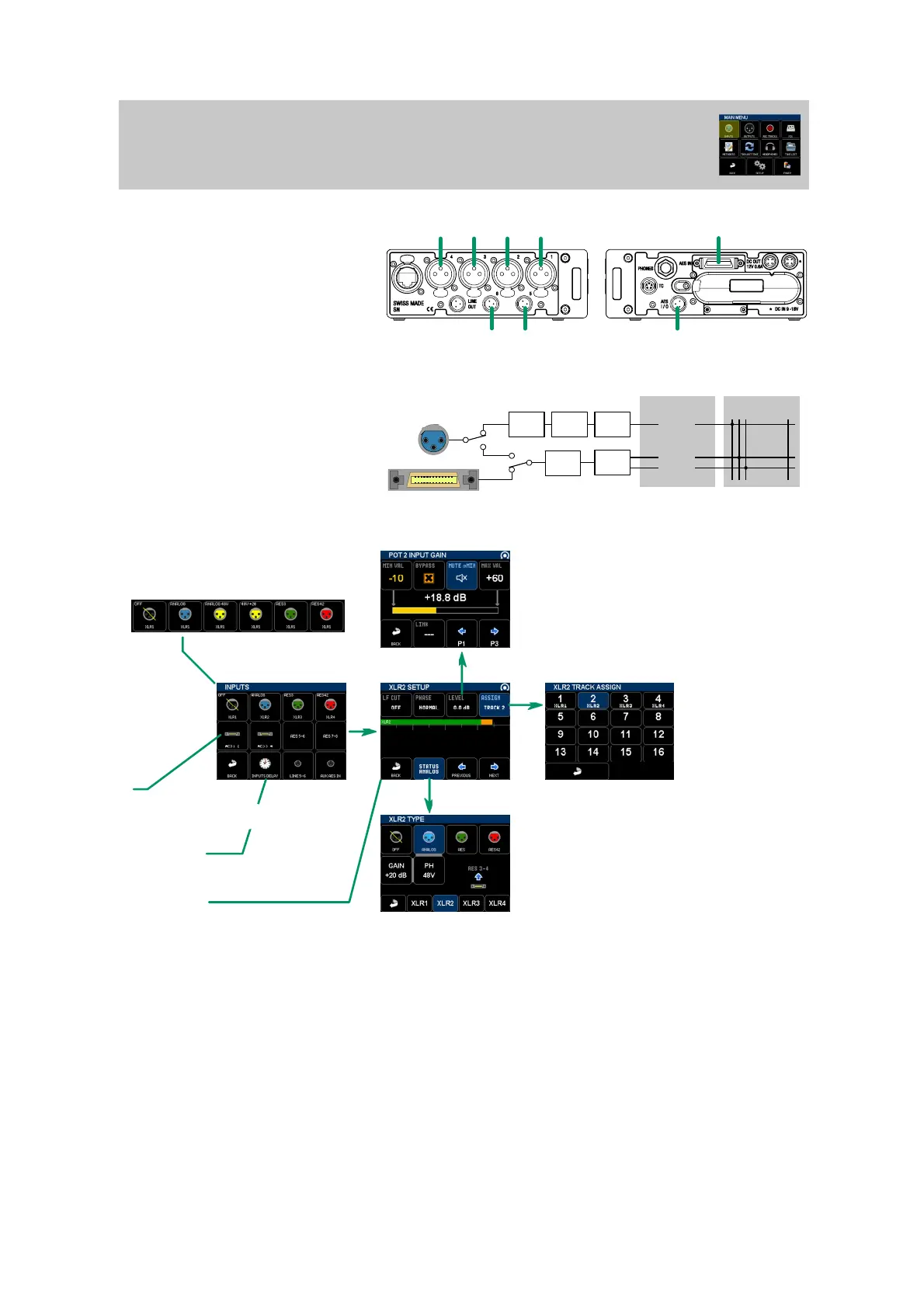
MAIN MENU / INPUTS
LINE 5
LINE 6
XLR1 XLR2
XLR3
XLR4
AES 1-8
AUX AES IN
ADC XLR1
ASRC
AES1
AES2
48V +20dB
CHANNELS TRACKS
1 2 3 ..... 16
PHYSICAL
XLR1-4: balanced mic/line or AES/AES42
(max 192k)
LINE 5-6 (TA3): balanced line level inputs
AUX AES IN (TA3): digital AES (max 96k)
AES1-8 (3M accessory): 4x AES3 (8 channels,
max 192k)
LOGICAL
All inputs must be assigned to tracks in order to
be recorded.
XLR inputs share digital receiver and
asynchronous sample rate converters with
accessory AES inputs.
Diagram thereagainst shows XLR1 and AES12
ressource sharing.
INPUTS MENU
Touch any button to access input configuration
XLR inputs configuration is shown using colors:
POT INPUT GAIN MENU
XLR inputs only - POT as input gains only
MIN/MAX values define pot gain range
When BYPASS is set, input level is fixed to 0dB
When MUTE @MIN is set, input is mute when pot is closed
LINK allow an input level to be linked to another pot
INPUT TRACK ASSIGN
Buttons 1 to 16 represent
tracks. Assignation is
active when button is
blue. Multiple assignation
is possible.
XLR INPUT TYPE - XLR inputs only
Configure XLR input type
For US version: GAIN has 3 positions:
0, +20 and +40 dB
INPUT MENU
Headphones monitor a solo on that input
in this menu
An input have one or two channels. Each
channel have the following parameters:
- LF CUT (OFF, 60 Hz, 120 Hz)
- Phase reversal
- Level
- Track assignation
AES
INPUT DELAY
Each input can be delayed from 0 to 60ms,
step 0.1 ms.
AES INPUTS
3M multipin connector icon is displayed
only when input is not used by XLR input
AMBISONIC MIC
The Ambisonic decoder is described in another specific chapter, see Ambisonic Mic documentation.
AES3/AES42
AES3


 To Next Page
 Loading...