Working Instruction Repair Instruction Mechanical/,
Mechanical
1212-7760 State: Preliminary 8.1
Company Internal
© Sony Ericsson Mobile Communications AB
38(66)
3.21 Shield Can Lid BB 1 & Conductive Gaskets
REMOVAL
Follow the 2.1.1 – 2.1.7 Disassembly instructions!
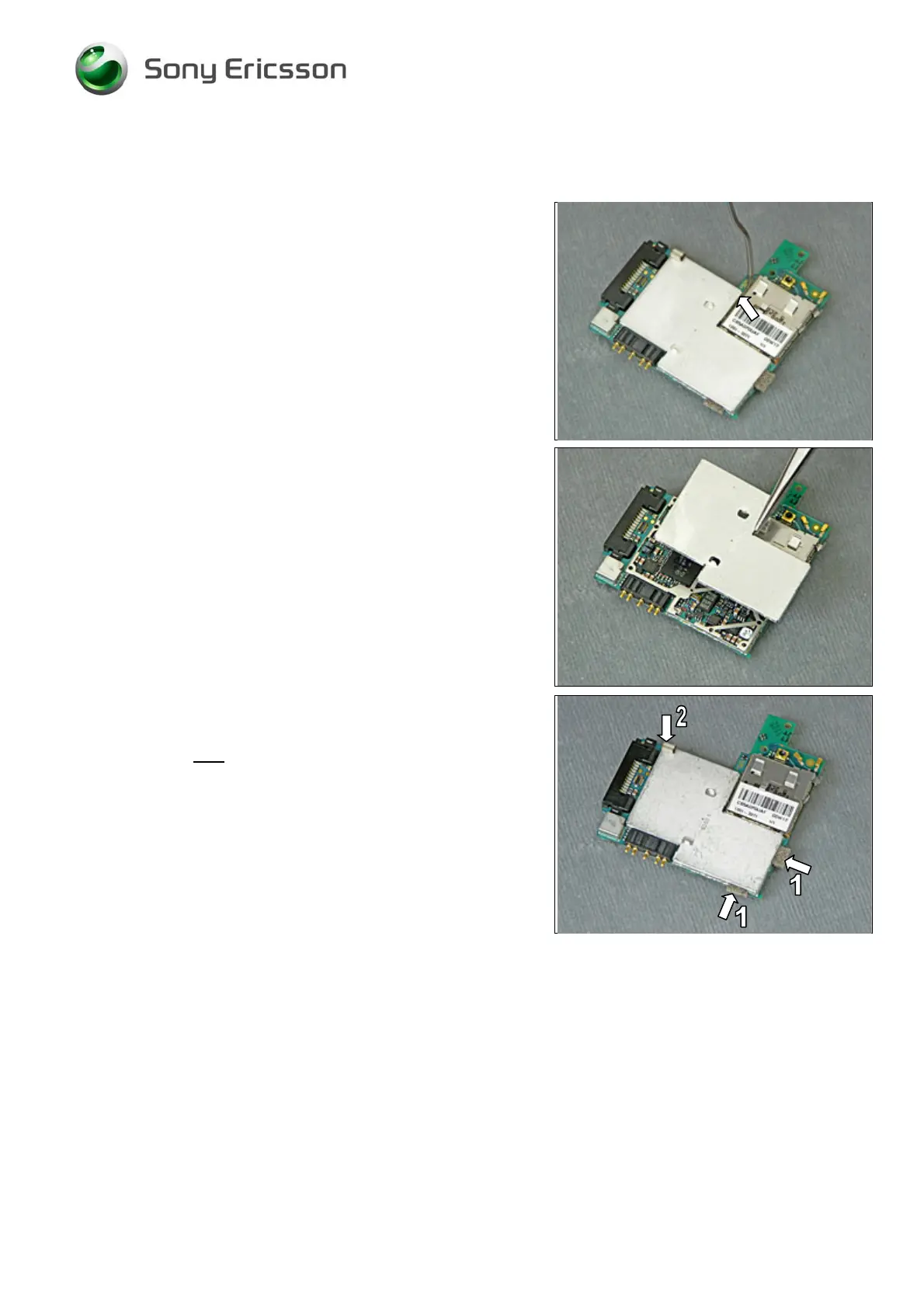
Use the Dentist Hook to release the Shield Can Lid BB
1from the Shield Can Fence and then remove it.
T
HE SHIELD CAN LID BB 1MUST BE SCRAPPED, CANNOT BE
REUSED!
INSTALLATION
Position the new Shield Can Lid BB 1over the Shield Can
Fence and press gently with your fingers until it is properly
attached on all sides.
Two kinds of new conductive gaskets have to be attached
to the Shield Can Lid BB 1as shown in this picture:
two ‘Conductive Gaskets’ at locations 1
one ‘Conductive Gasket, Grey’ at location 2
Follow the 4.1.6 – 4.1.12 Reassembly instructions!













 To Next Page