18 Getting to Know Your Phone M600i
This is the Internet version of the user guide. © Print only for private use.
C. The current input field. Tap the arrows or
rotate the Jog Dial to change the input
field.
D. Character sets.
abc - standard characters,
àëó - international characters, 123 -
numeric characters and currencies.
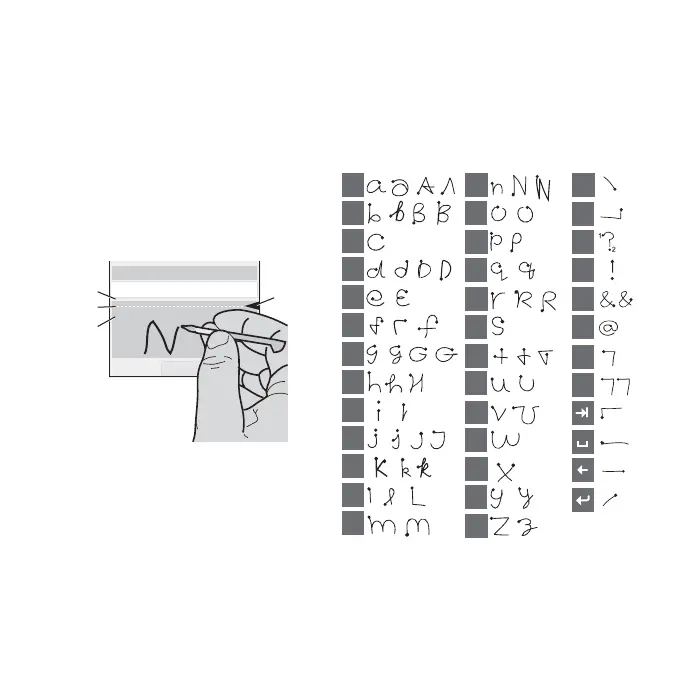
Handwriting recognition
Handwriting recognition translates stylus
gestures into letters, numbers, or other
characters, then displays them as text.
Handwriting recognition is only activated in
places where you can enter text.
A. Write numbers and symbols above the
arrow.
B. Write uppercase letters in line with the
arrow.
C. Write lowercase letters below the arrow.
D. Arrow that divides the text mode screen
into upper and lower areas.
To select icons or buttons, tap and hold them
using the stylus.
Note: Most letters can be written using
various stroke styles. See the tables below. The
position on the screen determines the case, not
the writing style.
Letters
Write lowercase letters below the arrow and
uppercase letters in line with the arrow.
Note: Start each stroke at the dotted end.
To
Dan
Done
A
C
B
D
a
b
c
d
e
f
g
h
k
l
m
n
o
p
q
r
s
t
u
v
y
z
w
x
1
2
i
j
1
1
1
1
1
1
2
1
2
2
2
2
2
2
,
.
?
!
&
@
"
'









 To Next Page