M600i Getting to Know Your Phone 9
This is the Internet version of the user guide. © Print only for private use.
Finding Applications
Activity menu
The Activity menu displays whenever you
turn on your phone. It is the starting point for
performing a variety of tasks. The use of this
menu depends on your mobile network
operator and is described in the Quick Guide.
Standby view
The Activity menu screen also serves as the
phone's Standby view. The remainder of the
User's Guide will refer to the Activity menu as
the Standby view. The Standby view displays
when no application has been launched. Use
shortcuts to launch your most frequently used
applications. You can also select the
shortcut to take you to all the applications
in the Main menu.
Status bar
The status bar contains icons that indicate the
status of your current settings and activities.
See Status Bar Icons on page 11.
Select the status bar menu to access
additional settings.
Main menu
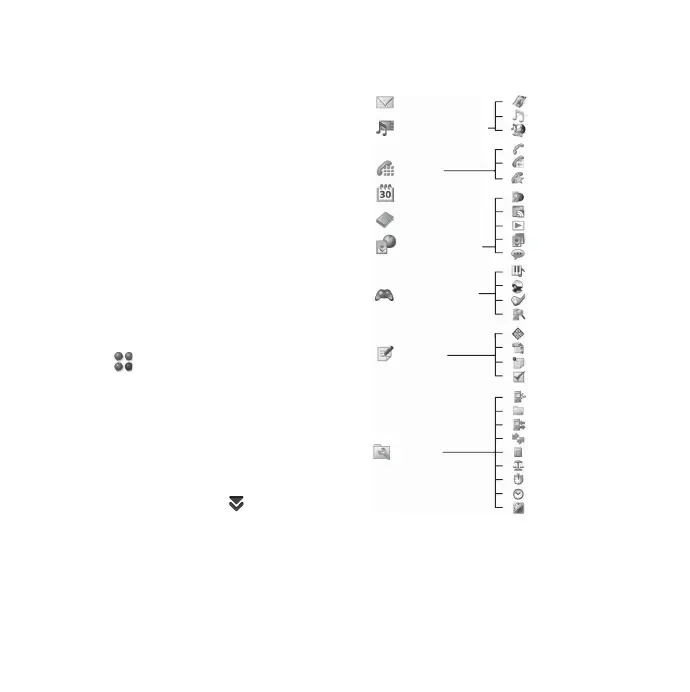
In the Main menu, applications are categorized
within folders, as shown below:
Calendar
Contacts
Messaging
Media player
Phone
Multimedia
Entertain-
ment
Office
Tools
TM
TM
Music
Video
Online
Phone
Call log
Speed contacts
Web
RSS feeds
PlayNow
Picture gallery
Sound recorder
Quickoffice
Pdf+
Notes
Tas k s
Control panel
File manager
Connections mgr
Remote sync
Calculator
Converter
Stopwatch
Time
Timer
Demo
Vijay Singh Pro Golf 2
QuadraPop
MusicDJ











 To Next Page