36 Web M600i
This is the Internet version of the user guide. © Print only for private use.
Navigation is quick and simple:
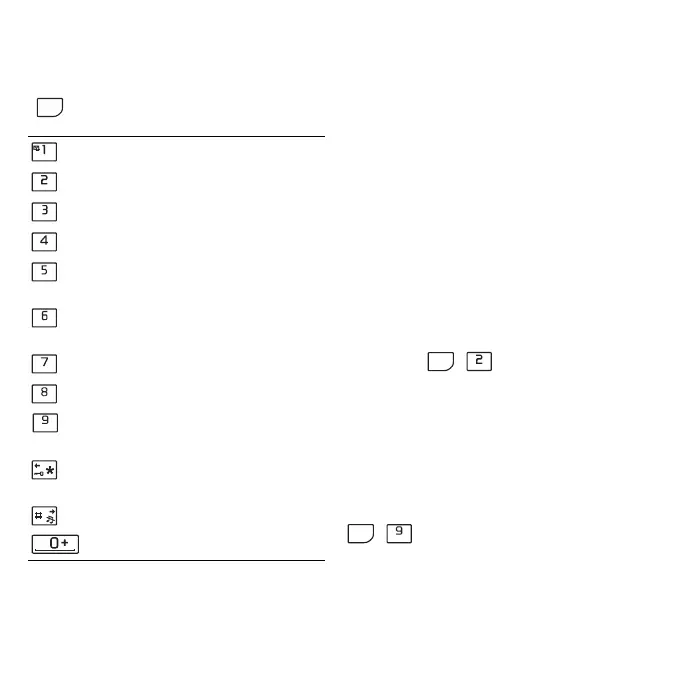
• For menu shortcuts and navigation options
press
• Go to a link or bookmark.
• Tap and hold a link to open an options
menu based on the type of link.
– If the link is an RSS feed (see RSS
Feeds on page 38) RSS feeds
opens
allowing you to subscribe to the feed.
• Use the Jog Dial to scroll up or down a
page. Links will highlight as you scroll.
• When you log in to a Web site and see the
username and password fields highlighted
with yellow boxes, you can select
the
option, Log in, to use the username and
password you saved earlier.
• When not in text mode, you can shift a
page up and down or left and right using
the stylus.
• To change the zoom level, select
More >
Zoom
, rotate the Jog Dial, then select
Save.
Working with bookmarks
To open your bookmarks list, select More >
Bookmarks
( ). Select an entry in
the list to open it.
When you highlight a bookmark, you can use
the options on the
More menu in Bookmarks to
delete, edit, or set it to always open in a new
page.
To add a bookmark for the current page, select
More > Current page > Add to bookmarks
( )
Working with text
To select text on a page, choose More >
Settings
, then mark Select text mode. Select
and then one of the following keys
to:
Open a Web page.
Open your bookmarks list.
Close the current page.
Go to the home page.
Switch between loading and not
loading images.
Switch between normal and
Full
screen
display.
Go to the next page.
Open the
Configuration menu.
Add a bookmark for the current
page.
Find (on the Internet or current
page).
Go to the top or bottom of the page.
Stop or Reload the current page.
ALT
ER
TY
UI
DF
GH
JK
XC
VB
N M
ALT
TY
ALT
N M









 To Next Page