48 MusicDJ™ M600i
This is the Internet version of the user guide. © Print only for private use.
All recordings you make with the Sound
recorder are also available in
Media player
under
Music > My recordings.
Tip You can use recordings as ringtones.
Preferences
Select More > Preferences. Choose where to
save your recordings.
Memory Stick™
preferred
saves recordings to the Memory
Stick™, if one is inserted. Otherwise,
recordings will be stored in your phone's
memory.
MusicDJ™
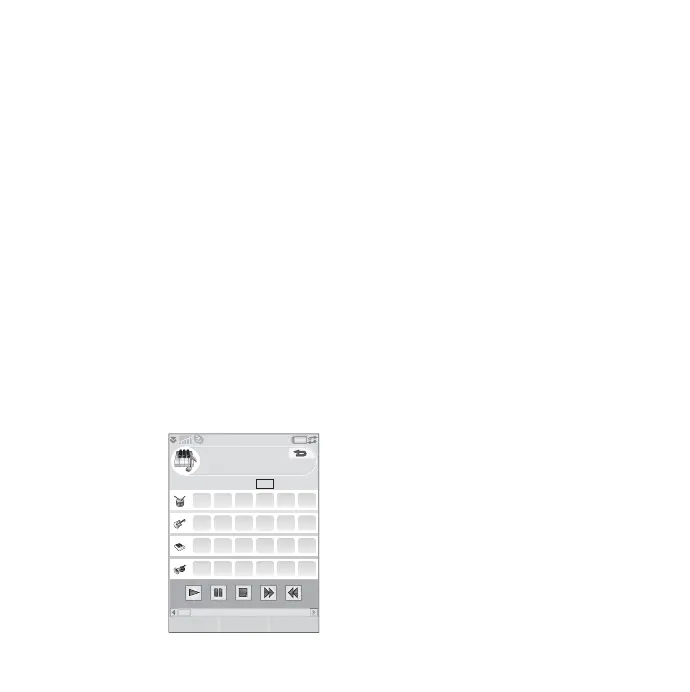
With MusicDJ™, you can compose melodies
to use as ringtones.
A melody consists
of four tracks:
Drums, Bass,
Chords, and
Accents. Compose
the melody by
adding prearranged
sound samples to
the tracks. Each
sample is one bar
long. The samples are grouped into Intro,
Verse, Chorus, and Break.
To compose a melody
1. Select
Entertainment > MusicDJ™.
2. Select
More > Set tempo and adjust the
tempo of the melody in beats per minute
(BPM).
3. Tap a bar in one of the tracks, then select a
sample to insert. You can also copy and
paste samples between bars.
Use the transport bar to play, pause, stop, fast
forward, or rewind. When composing, you can
also move between bars by rotating the Jog
Dial or selecting
More > Go to, then entering
the numbers of the desired track and bar.
From the More menu, you can also save, open,
and send melodies. When saving a melody,
you can also choose to use it as a ringtone.
5 5 13 13 13 13
123456
14 14
1 14141414
91010
MusicDJ
InsertOpen More
TM









 To Next Page