1
2
\
cae
I
c:::::a
c::::::.
~
-
~\Mi
+
c::::::.
I J
V
I
'II
I
R
r
8
7 6 5 4 3
12
US
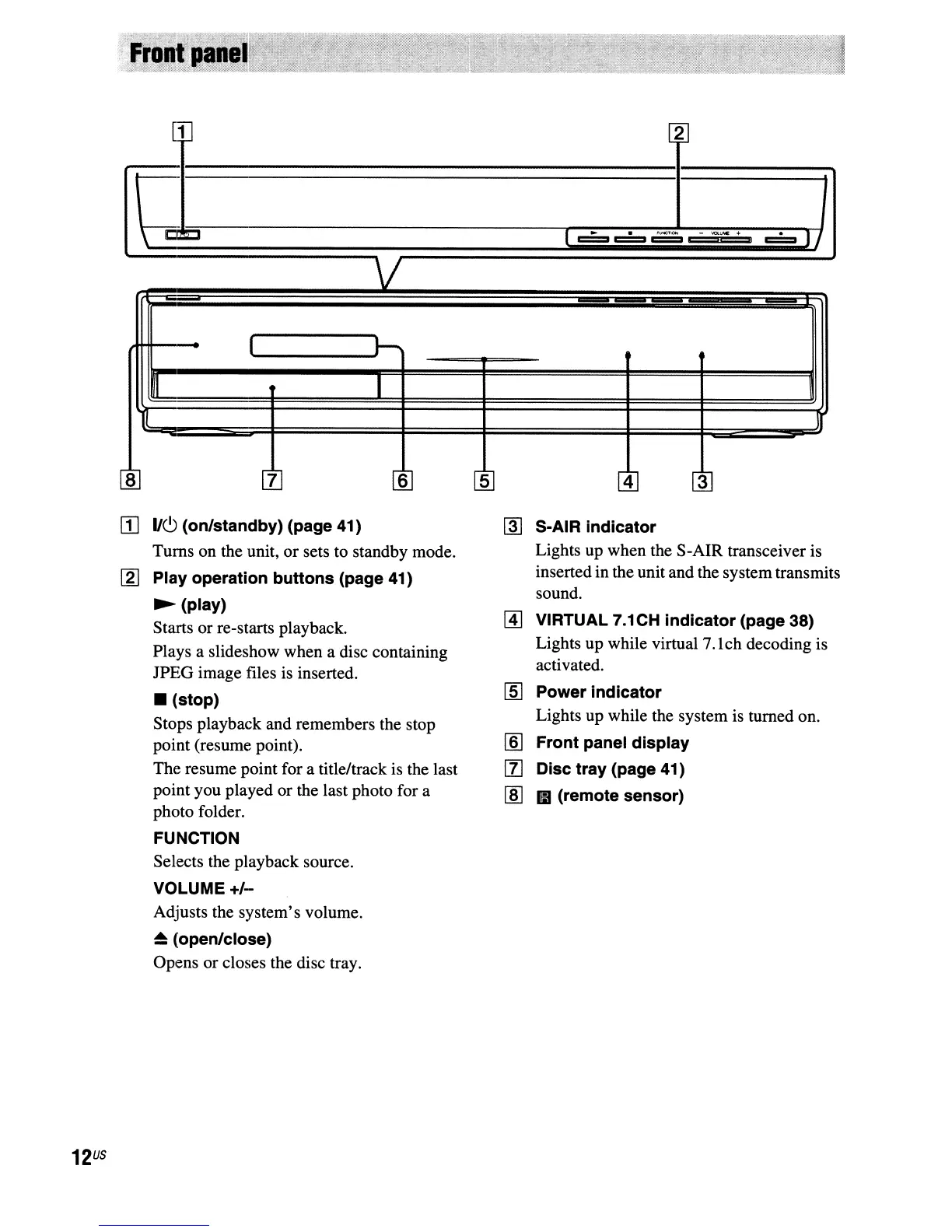
II]
lie!)
(on/standby) (page 41)
Turns on the unit,
or
sets
to
standby mode.
[g] Play operation buttons (page 41)
~
(play)
Starts or re-starts playback.
Plays a slideshow when a disc containing
JPEG image files is inserted.
• (stop)
Stops playback and remembers the stop
point (resume point).
The resume point for a title/track is the last
point you played or the last photo for a
photo folder.
FUNCTION
Selects the playback source.
VOLUME
+/-
Adjusts the system's volume.
~
(open/close)
Opens or closes the disc tray.
~
S-AIR indicator
Lights up when the S-AIR transceiver is
inserted in the unit and the system transmits
sound.
[A]
VIRTUAL 7.1CH indicator (page 38)
Lights up while virtual 7.1ch decoding is
activated.
[§] Power indicator
Lights up while the system is turned on.
[§] Front panel display
[l] Disc tray (page 41)
lID
II
(remote sensor)



 To Next Page