About
the
indications
in
the
front
panel
display
13
[]
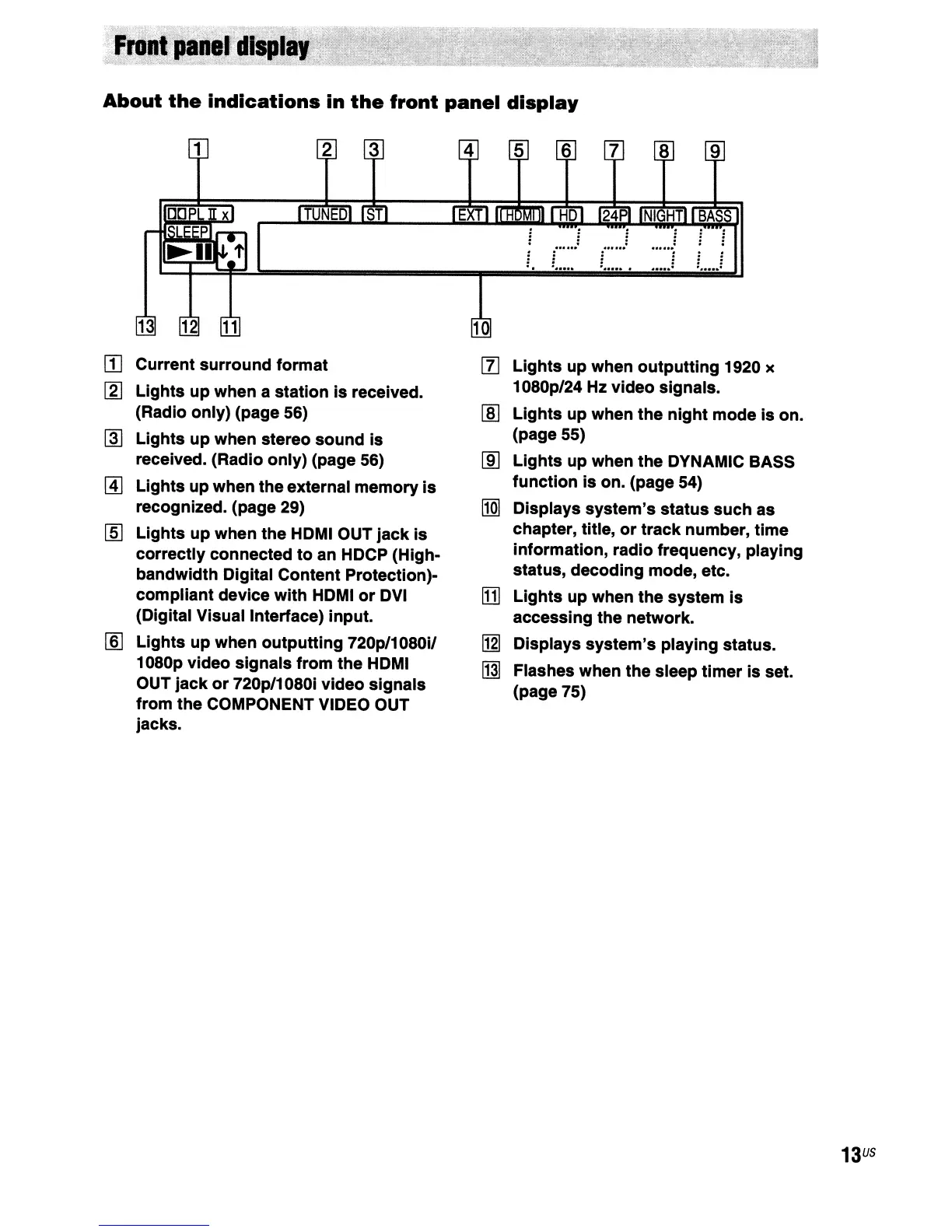
Current surround format
[1]
Lights
up when
outputting
1920 x
[1]
Lights
up
when a station
is
received.
1080p/24 Hz video signals.
(Radio only) (page 56)
[ID
Lights
up when the
night
mode
is
on.
[ID
Lights
up
when stereo sound
is
(page 55)
received. (Radio only) (page 56)
lID
Lights up when the DYNAMIC BASS
[!]
Lights up when the external memory
is
function
is
on. (page 54)
recognized. (page 29)
~
Displays system's status
such
as
[§]
Lights
up
when the HDMI OUT
jack
is
chapter, title,
or
track number, time
correctly connected
to
an HDCP (High-
information, radio frequency, playing
bandwidth Digital Content Protection)-
status, decoding mode, etc.
compliant device
with
HDMI
or
DVI
[j]
Lights up when the system
is
(Digital Visual Interface) input.
accessing the network.
[ID
Lights up when outputting 720p/1080i/
[j1]
Displays system's playing status.
1080p video signals from the
HDMI
~
Flashes when the sleep
timer
is
set.
OUT
jack
or
720p/1080i video signals
(page 75)
from the COMPONENT VIDEO OUT
jacks.
13
US



 To Next Page