SON~
11111111111111111111111111111111
m~ml~111
• 4 1 5 1 0 7 0 1 1 • (1)
4-151-070-11(1)
S-AIR
r~e~tion
is~oor
Check the following.
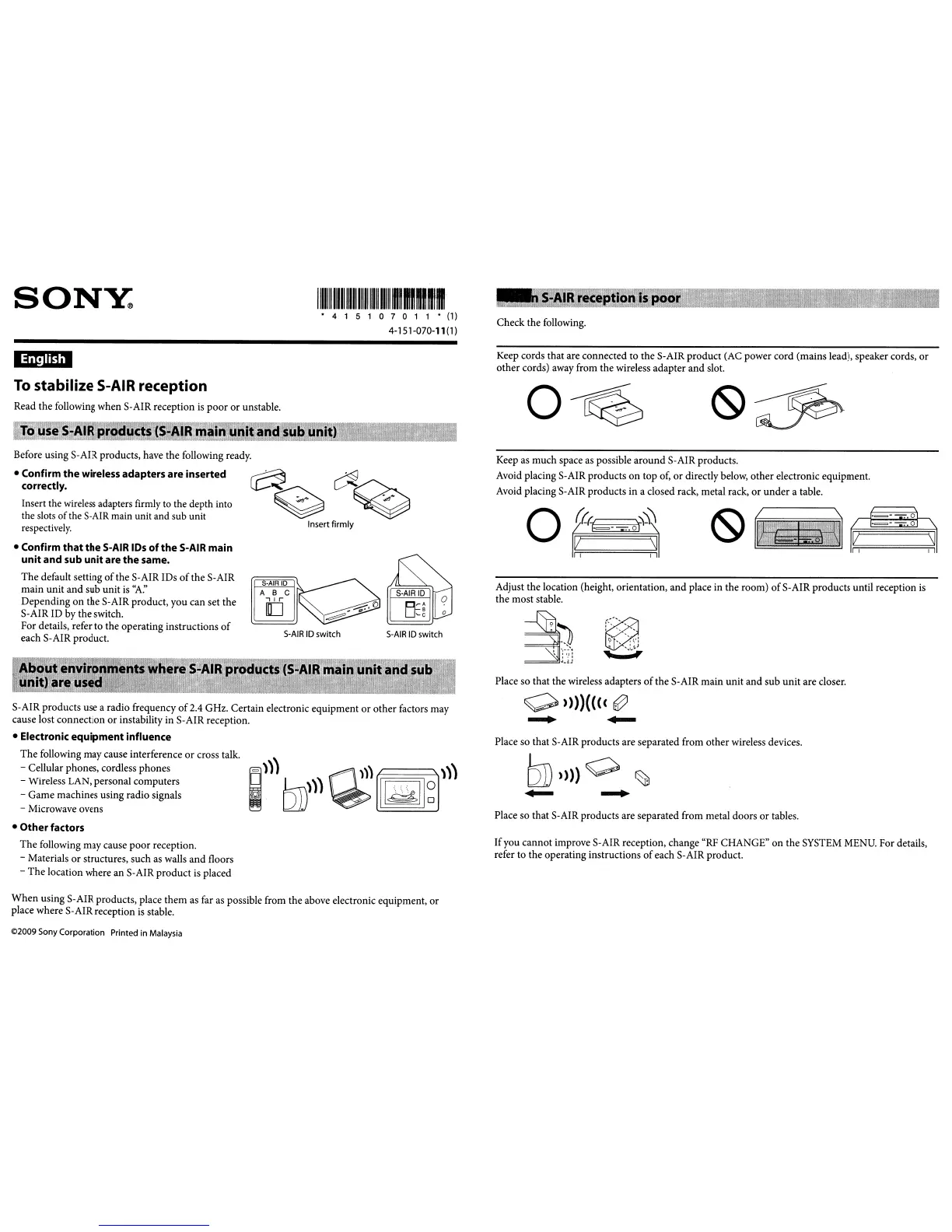
Keep cords that are connected to the S-AIR product (AC power cord (mains lead), speaker cords,
or
other cords) away from the wireless adapter and slot.
To
stabilize S-AIR reception
Read the following when S-AIR reception
is
poor
or
unstable.
To
use
S-AIR
products
(S-AIR
main unit
and
sub
unit)
o~
o
t={t1=-
=-=.'='oi'=~
I~
~I
3
;~
LV
,
,,-
_
...
~
...
"I'
,
.,
.J.l.!
Keep as much space
as
possible around S-AIR products.
Avoid placing S-AIR products
on
top of,
or
directly below, other electronic equipment.
Avoid placing S-AIR products in a closed rack, metal rack,
or
under
a table.
Place so that S-AIR products are separated from other wireless devices.
Adjust the location (height, orientation,
and
place in the room)
of
S-
AIR products until reception
is
the most stable.
Place so that the wireless adapters
of
the S-AIR main unit
and
sub unit are closer.
Place so that S-AIR products are separated from metal doors or tables.
Ifyou cannot improve S-AIR reception, change "RF CHANGE"
on
the SYSTEM MENU. For details,
refer to the operating instructions
of
each S-AIR product.
S-AIR
ID
switch
S-AJR
ID switch
S-AIR
10
ABC
"r
[]
~~~
Insert
firmly
Before using S-AIR products, have the following ready.
• Confirm
the
wireless adapters are inserted
correctly.
Insert the wireless adapters firmly to the depth into
the slots
of
the
S-AIR
main unit and sub unit
respectively.
• Confirm
that
the
S-AIR IDs
of
the
S-AIR main
unit
and sub unit are
the
same.
The default setting
of
the
S-
AIR IDs
of
the
S-
AIR
main unit
and
sub unit
is
''A:'
Depending
on
the S-AIR product, you can set the
S-AIR ID by the switch.
For details, refer to the operating instructions
of
each S-AIR product.
About environments where
S-AIR
products
(S-AIR
main unit
and
sub
unit) are
used'"
-
•
Other
factors
The following may cause
poor
reception.
- Materials
or
structures, such
as
walls
and
floors
-
The
location where an S-AIR product
is
placed
S-AIR products use a radio frequency
of
2.4 GHz. Certain electronic equipment
or
other factors may
cause lost connection
or
instability in S-AIR reception.
• Electronic equipment influence
The following may cause interference
or
cross talk.
- Cellular phones, cordless phones
- Wireless LAN, personal computers
- Game machines using radio signals
- Microwave ovens
When
using S-AIR products, place them
as
far
as
possible from the above electronic equipment,
or
place where S-AIR reception
is
stable.
©2009 Sony Corporation Printed in Malaysia



 To Next Page