19
Press
1'/'"
to select [Start].
To cancel, select [Cancel].
1m
• Quick Start mode will increase electricity
consumption
in
the standby mode.
17
Press G or-+.
The Setup Display for [Auto Calibration]
appears.
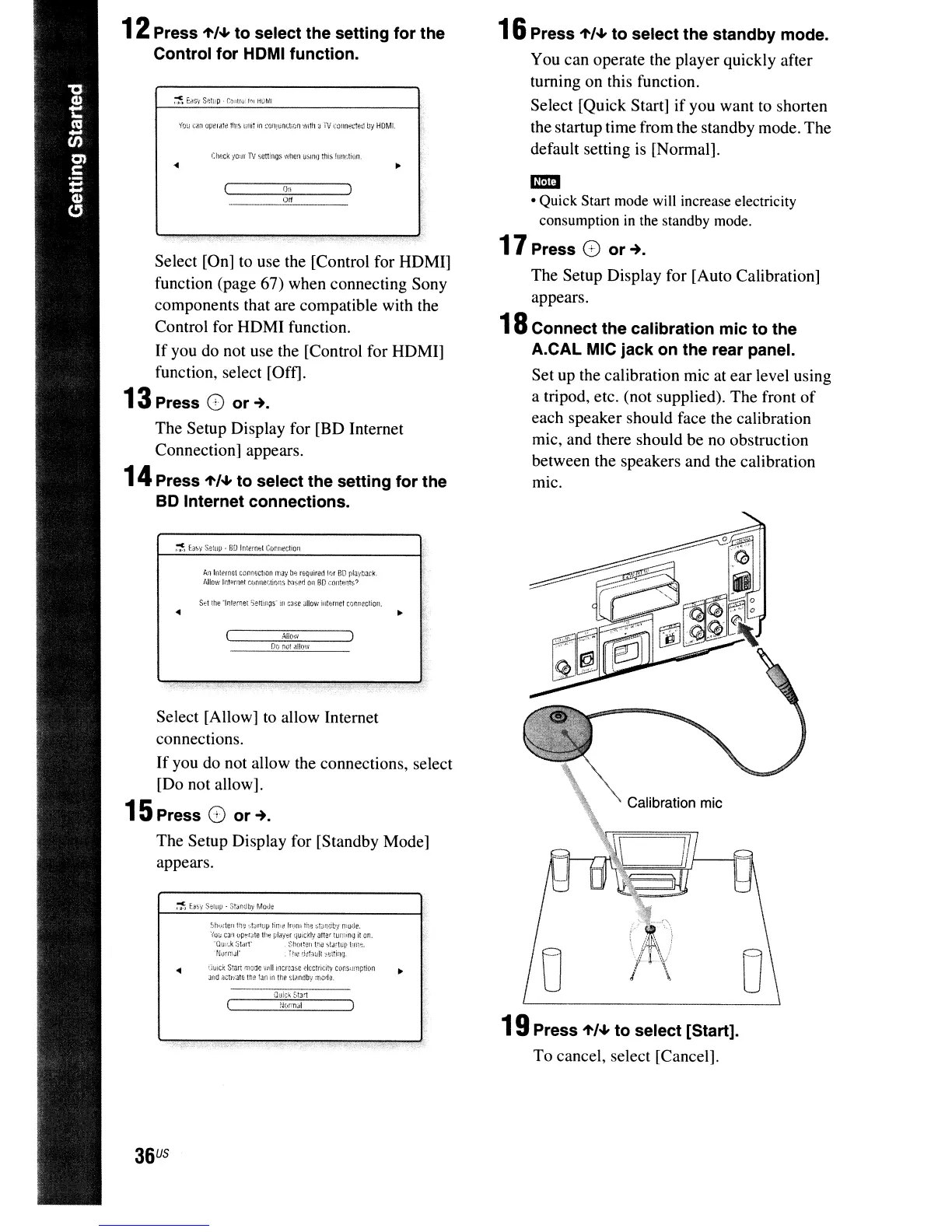
18
Connect the calibration mic to the
A.CAL MIC jack on the rear panel.
Set up the calibration mic at ear level using
a tripod, etc. (not supplied). The front
of
each speaker should face the calibration
mic, and there should be no obstruction
between the speakers and the calibration
mlC.
16
Press
1'/'"
to select the standby mode.
You can operate the player quickly after
turning on this function.
Select [Quick Start] if you want to shorten
the startup time from the standby mode. The
default setting
is
[Normal].
:
",'
"
Shl)llenlhe
~;t~rtt'lJ
tili:;!
IflJRl
the
:;t~!1db:t
n;oue.
'(0:;
C<I:l
up,:,rJle
lh:
ptayo;r
tiUltkly
arter
tun~:ng
il
cn.
-Qu;f.k
Sti:1I1'
Sh(IIHln elil iotJ,Wp
I:r:;~.
Nl,lflilJr
H1ed:!taull;,,::!iwJ.
QliIC~
S!lln
f'Poae
'0,11
locr~3SC
elcctlK,it\,
cOf:s"mption
...
Jl"ld
aCtl'iale
tne
~Jflln
the
~I.mdb'i
rTIGtl:J.
St:t the
"1r,lw;et
5eftI1?S·
,II
case
allow
illtHnet
cor:r:eclion
.
36
US
~>
f.a~y
Setup·
SD
lntefn+:l
CvmlecllOll
Select [Allow] to allow Internet
connections.
If
you do not allow the connections, select
[Do not allow].
15
Press
()
or-+.
The Setup Display for [Standby Mode]
appears.
off
I)n
OD
no!
allo·
...
Check
yO'lf
1V
'icnings
when
UioHlQ
this
Junction.
..
A.!llnternH
Cilp.r;ectlOn
rna,'
b".:
requirad
Ir;f
so
play:;acic
Allow
InIHrnel
r.!Jnne::liofiS
l'ilseo
Oil
SO
COlltF.!1tS?
Select [On] to use the [Control for HDMI]
function (page 67) when connecting Sony
components that are compatible with the
Control for HDMI function.
If
you do not use the [Control for HDMI]
function, select [Off].
13
Press
()
or-+.
The Setup Display for [BD Internet
Connection] appears.
14
Press
1'/'"
to select the setting for the
SO Internet connections.
12
Press
1'/'"
to select the setting for the
Control for HOMI function.



 To Next Page