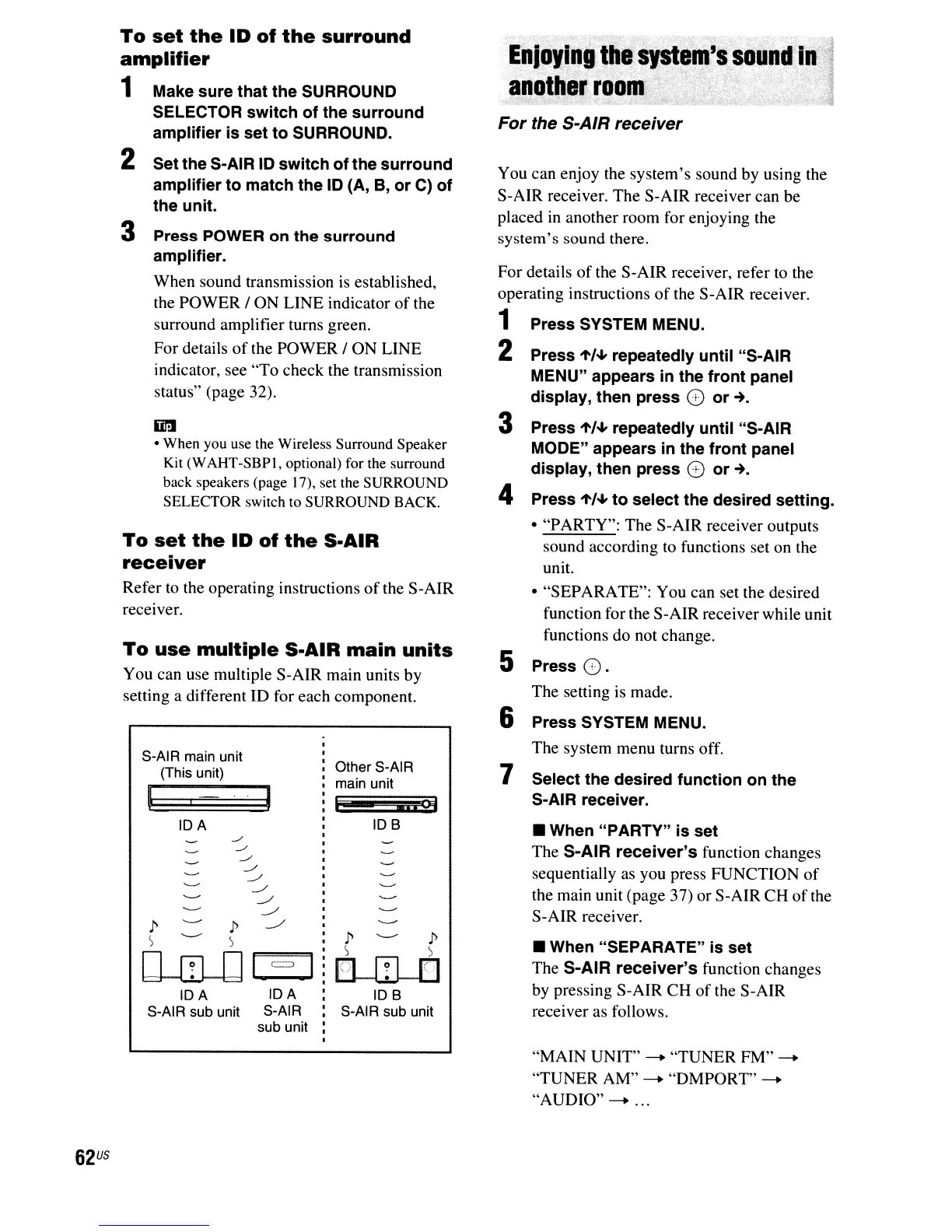
To
use
multiple
S-AIR
main
units
You can use multiple S-AIR main units by
setting a different ID for each component.
To
set
the
ID
of
the
S·AIR
receiver
Refer
to
the operating instructions
of
the S-AIR
receiver.
rni!Jr~J~.e
~n(~Jjl"~f~1
anotller,
room.
.
,,-
."
"
...
--
,:.',~'
-
..
'.-
.
:::~;
.
-'-.
_
.....
,.;".
=t;
..
1
•
When
"SEPARATE"
is
set
The S-AIR
receiver's
function changes
by pressing S-AIR CH
of
the S-AIR
receiver
as
follows.
For
the S-AIR receiver
You can enjoy the system's sound by using the
S-AIR receiver. The S-AIR receiver can be
placed
in
another room for enjoying the
system's sound there.
For details
of
the S-AIR receiver, refer to the
operating instructions of the S-AIR receiver.
1
Press
SYSTEM
MENU.
2
Press
"'/."
repeatedly
until "S-AIR
MENU"
appears
in
the
front
panel
display,
then
press
0 or-+.
3
Press
"'/."
repeatedly
until "S-AIR
MODE"
appears
in
the
front
panel
display,
then
press
0 or-+.
4
Press
"'/."
to
select
the
desired
setting.
• "PARTY": The S-AIR receiver outputs
sound according
to
functions set on the
unit.
• "SEPARATE": You can set the desired
function for the S-AIR receiver while unit
functions do not change.
5
Press
O.
The setting
is
made.
6
Press
SYSTEM
MENU.
The system menu turns off.
7
Select
the
desired
function
on
the
S-AIR receiver.
•
When
"PARTY"
is
set
The S-AIR
receiver's
function changes
sequentially
as
you press FUNCTION
of
the main unit (page 37) or S-AIR CH ofthe
S-AIR receiver.
1" 1"
) s
lnIr;lrn
tJ--w--tJ
lOB
S-AI R sub unit
Other S-AIR
main unit
,
.11
C)j
lOB
IDA
IDA IDA
S-AIR sub unit S-AIR
sub unit
S-AIR main unit
(This unit)
1" 1"
S S
C1JILJJ
1,---'-=
,
Dr:I
• When you use the Wireless Surround Speaker
Kit (WAHT-SBPI, optional) for the surround
back speakers (page 17), set the SURROUND
SELECTOR switch to SURROUND BACK.
To
set
the
ID
of
the
surround
amplifier
1 Make
sure
that
the
SURROUND
SELECTOR
switch
of
the
surround
amplifier
is
set
to
SURROUND.
2
Set
the
S-AIR 10
switch
of
the
surround
amplifier
to
match
the
10
(A, B,
or
C)
of
the
unit.
3
Press
POWER
on
the
surround
amplifier.
When sound transmission
is
established,
the POWER
I ON LINE indicator of the
surround amplifier turns green.
For details
of
the POWER I ON LINE
indicator, see "To check the transmission
status" (page 32).
"MAIN UNIT" - "TUNER FM" -
"TUNER AM"
-+
"DMPORT"
-+
"AUDIO"
-+
'"
62
US



 To Next Page