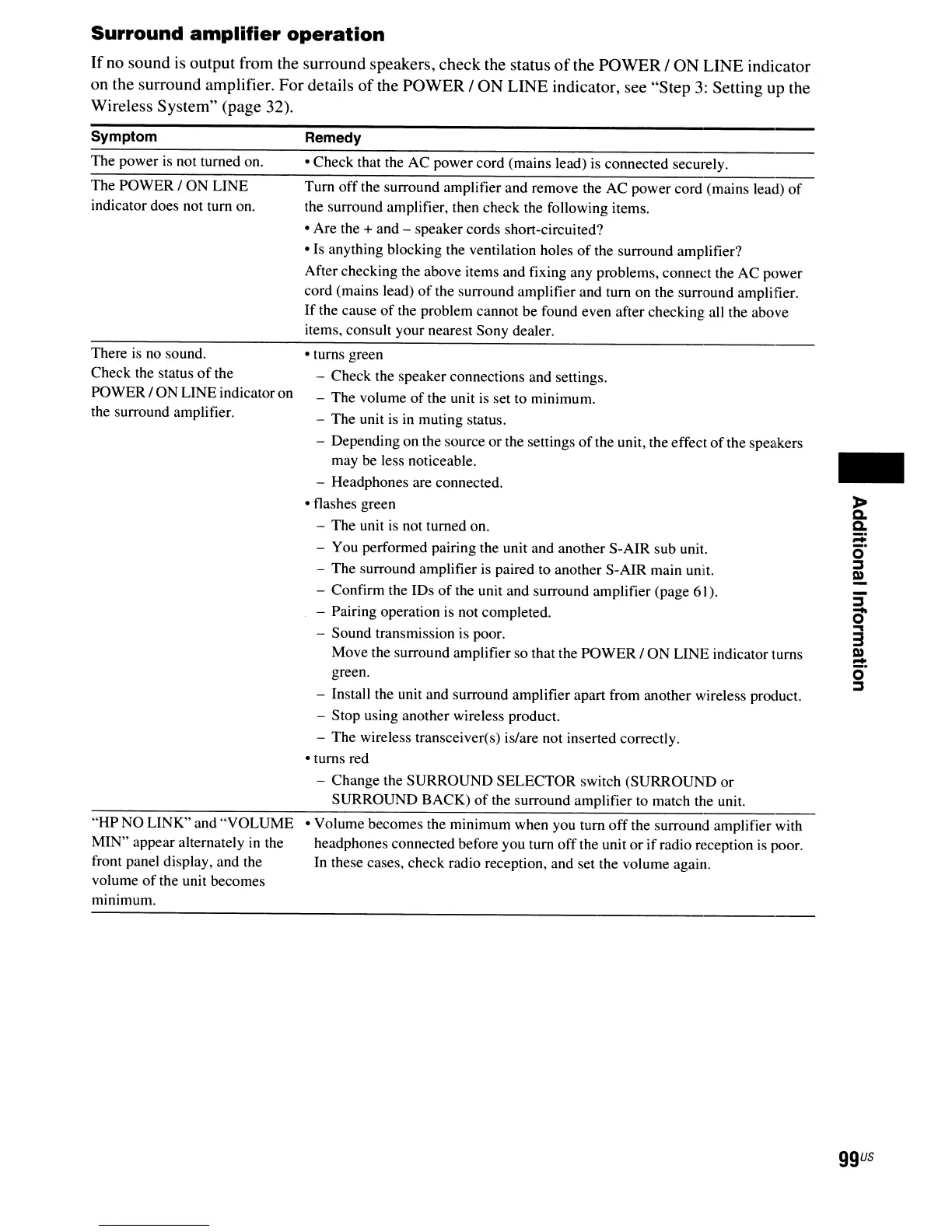
Surround
amplifier
operation
If no sound is output from the surround speakers, check the status
of
the POWER/ ON LINE indicator
on the surround amplifier. For details
of
the POWER / ON LINE indicator, see "Step
3:
Setting up the
Wireless System" (page 32).
Symptom
The power
is
not turned on.
The POWER / ON LINE
indicator does not turn on.
There
is
no sound.
Check the status
of
the
POWER / ON LINE indicatoron
the surround amplifier.
"HP NO LINK" and "VOLUME
MIN" appear alternately
in
the
front panel display, and the
volume
of
the unit becomes
minimum.
Remedy
• Check that the AC power cord (mains lead)
is
connected securely.
Tum
off
the surround amplifier and remove the AC power cord (mains lead)
of
the surround amplifier, then check the following items.
• Are the + and - speaker cords short-circuited?
• Is anything blocking the ventilation holes
of
the surround amplifier?
After checking the above items and fixing any problems, connect the AC power
cord (mains lead)
of
the surround amplifier and turn on the surround amplifier.
If
the cause
of
the problem cannot be found even after checking all the above
items, consult your nearest Sony dealer.
• turns green
- Check the speaker connections and settings.
- The volume
of
the unit
is
set to minimum.
- The unit is
in
muting status.
- Dependi
ng
on the source or the settings
of
the unit, the effect
of
the speakers
may be less noticeable.
- Headphones are connected.
• flashes green
- The unit
is
not turned on.
- You performed pairing the unit and another S-AIR sub unit.
- The surround amplifier is paired to another S-AIR main unit.
- Confirm the IDs
of
the unit and surround amplifier (page 61).
- Pairing operation is not completed.
- Sound transmission is poor.
Move the surround amplifier so that the POWER/ ON LINE indicator turns
green.
- Install the unit and surround amplifier apart from another wireless product.
- Stop using another wireless product.
- The wireless transceiver(s) is/are not inserted correctly.
• turns red
- Change the SURROUND SELECTOR switch (SURROUND or
SURROUND BACK)
of
the surround amplifier to match the unit.
• Volume becomes the minimum when you turn
off
the surround amplifier with
headphones connected before you turn
off
the unit
or
if
radio reception
is
poor.
In these cases, check radio reception, and set the volume again.
-
-
:::s
0'
....
3
Q)
-
o'
:::s
ggus



 To Next Page